1.7 Treasury Settlement Monitor
This topic provides systematic instruction to treasury settlement blotter.
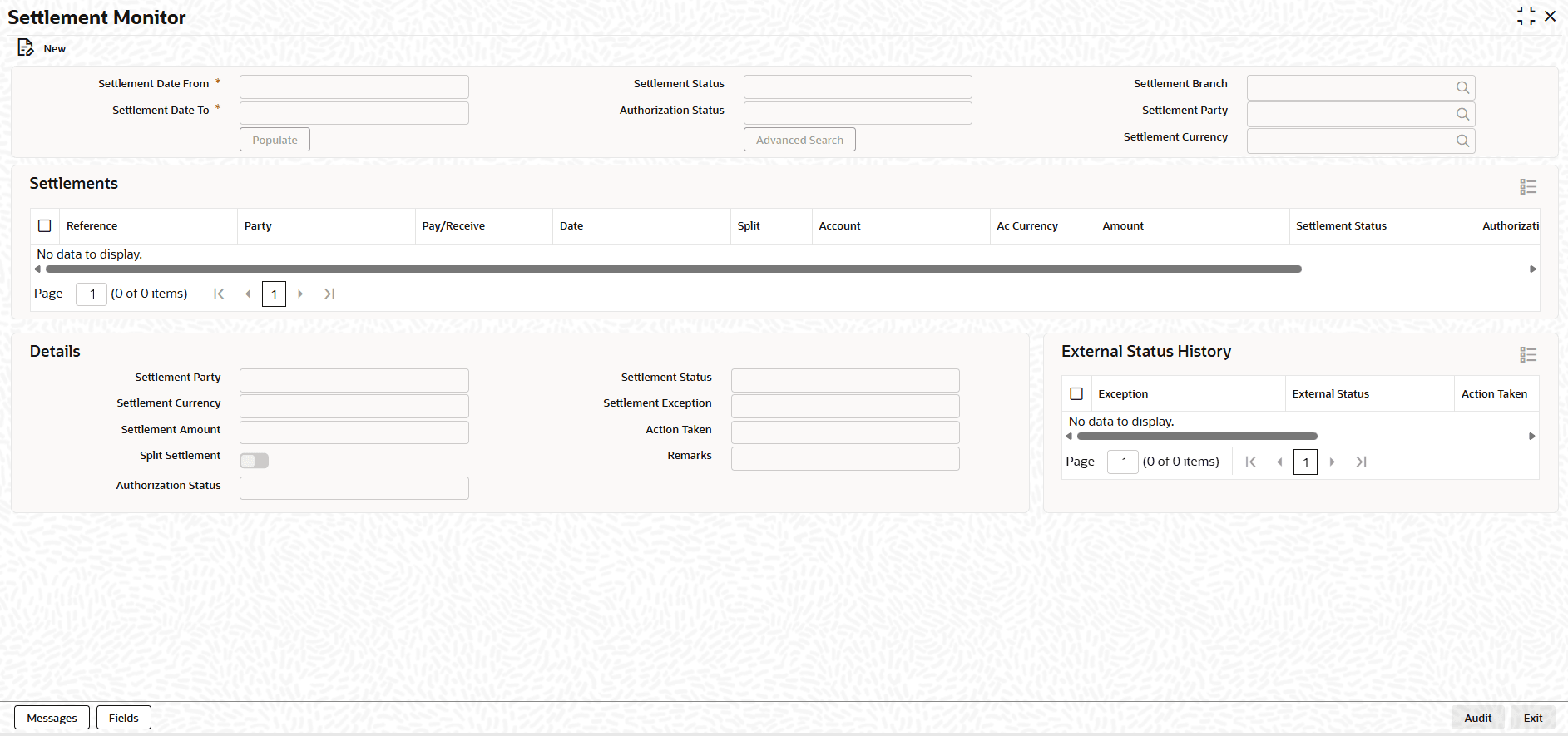
External Status of the settlement initiated can be tracked using Treasury Settlement Monitor operation.
All the modifications to the fields would be logged for audit trail purposes.
Auto authorization could be enabled for this function.
- On the Home screen, type NTDSNMTR
in the text box, and click Next.The Settlement Monitor screen displays.
- On the Treasury Settlement Monitor screen, Click New.
- On the Treasury Settlement Monitor, Specify the details
as required.
Table 1-7 Treasury Settlement Monitor - Field Description
Field Description Settlement Date From Select the minimum settlement date of the settlements to be monitored. Settlement Date To Select the maximum settlement date of the settlements to be monitored. Settlement Status Select the status of the settlements to be monitored. Authorization Status Select the authorization status of the settlements to be monitored. Settlement Branch Select the maximum due date of the cashflows to be settled. Settlement Party Select the counterparty of the settlements to be monitored. Settlement Currency Select the currency of the settlements to be monitored. Settlement This section lists of all the settlements, with the settlement date between the from and to dates selected, that have to be monitored. Reference Displays the unique user reference that identifies this settlement. Party Displays the settlement party of this settlement. Pay/Receive Displays the direction of this settlement. Date Displays the due date of this cashflow. Split Displays whether this is a split settlement. Account Displays the settlement account used for this settlement. Ac Currency Displays the currency of the settlement account used for this settlement. Amount Displays the Amount settled in settlement currency of this settlement. Settlement Status Displays the Current Status of the settlement in the external system. Authorization Displays the Authorization status of the settlement. Message Displays the Message generation status of the settlement. Details This section displays the details of the selected settlement. Settlement Party Displays the counterparty of the selected settlement. Settlement Currency Displays the currency of the selected settlement. Settlement Amount Displays the amount settled in settlement currency of this settlement. Split Settlement Displays whether this is a split settlement. Authorization Status Displays the Authorization status of the settlement. Settlement Status Select the current Status of the settlement in the external system. Settlement Exception Select the exception that resulted in the current status of the settlement in the external system. Action Taken Select the action taken to correct the Settlement Exception. Remarks Enter notes about the external status of the settlement, intended for bank’s internal reference. External Status History Displays the history of the external status movements for the selected settlement. Settlement Status Displays the status of the settlement in the external system. Settlement Exception Displays the exception that resulted in the status of the settlement in the external system. Action Taken Displays the action taken to correct the Settlement Exception. Remarks Displays the notes about the external status of the settlement.
Parent topic: Overview