1.2.8 Instrument Conversion Monitor

This topic provides systematic instructions to instrument conversion monitor.

This screen is introduced to track the Conversion Status , Converted Nominal & Custodian wise Conversions.

Conversion Status: This chart visualizes the conversion status across three types of events: Merger, Others, and Split. Each bar represents the number of conversion cases, further broken down into different status categories: Pending, In Progress, Completed, and Unknown.

Converted Nominal: This pie chart illustrates the Converted Nominal values (in millions LCY) for three categories: Split, Merger, and Others.

Custodian-Wise Conversions: This bar chart displays the custodian-wise conversion amounts (in millions), categorized by conversion status: Pending, In Progress, Completed, and Unknown.

  1. On the Home screen, type TIDCNVBT in the text box, and click Next.
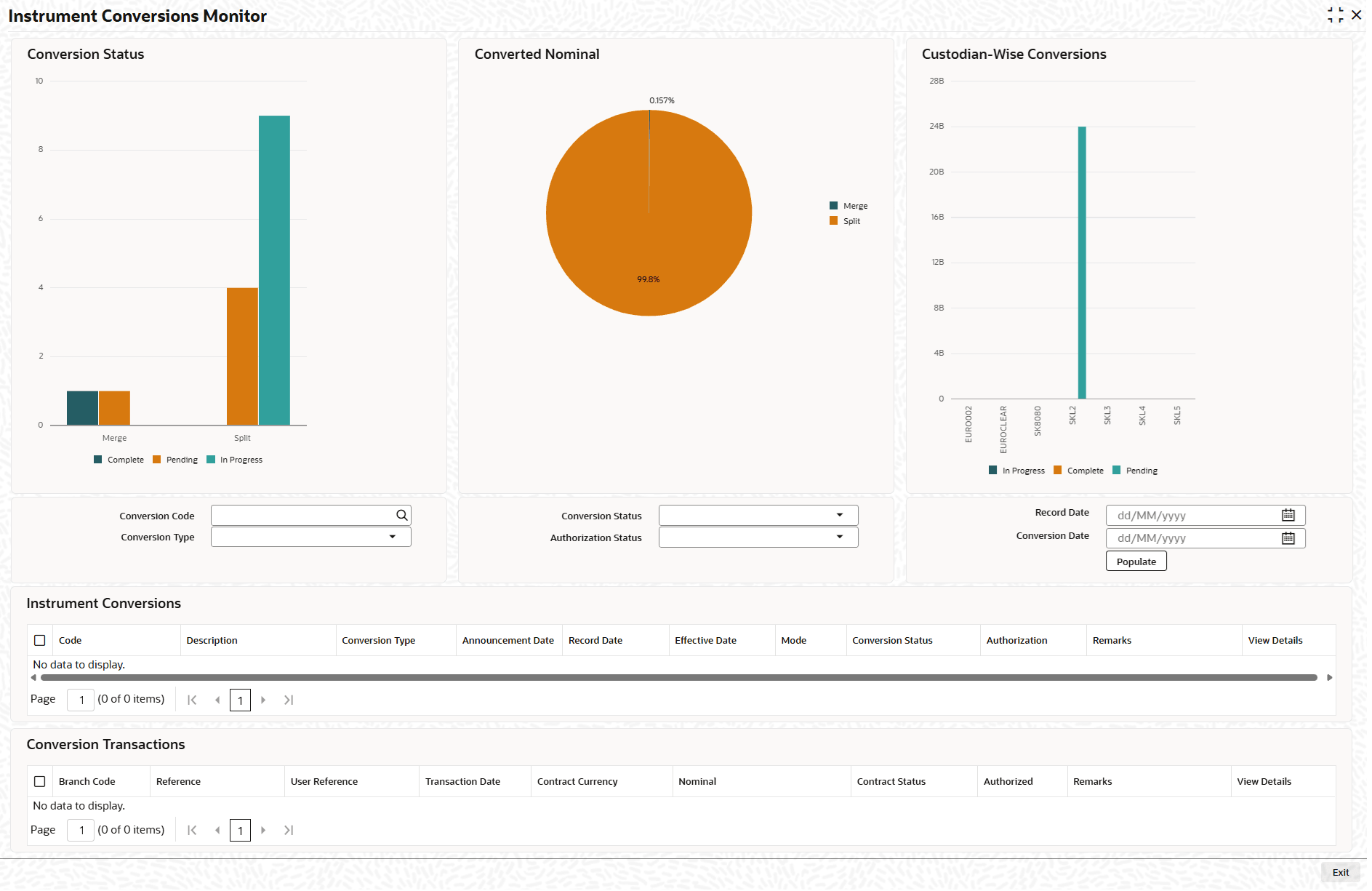
    The Instrument Conversion Monitor screen displays.

  2. On the Instrument Conversion Monitor screen, Click New.
  3. On the Instrument Conversion Monitor, Specify the details as required.

    Table 1-15 Instrument Conversion Monitor - Field Description

    Field Description
    Conversion Code Enter the unique Id of the security conversion.
    Conversion Type Select the conversion type from drop-down list. The available options are:
    • Merge
    • Split
    • Others
    Conversion Status Select the conversion status from the drop-down list. The available options are:
    • Pending
    • In Progress
    • Complete
    Authorization Status Select the authorization status from the drop-down list. The available options are:
    • Authorized
    • Un Authorized
    Record Date Select the date on which the conversion deal is saved.
    Conversion Date Enter the effective date of securities conversion.
    Code Displays the code for conversion.
    Description Displays the description of the conversion.
    Conversion Type Displays the conversion type it indicates if the maintenance is for security split or merger.
    Announcement Date Displays the date on which securities conversion is announced.
    Record Date Displays the date on which the conversion deal is saved.
    Effective Date Displays the effective date.
    Conversion Status Displays the status of the conversion.
    Authorization Displays the status of the authorization.
    View Details Click on the hyper link to see additional details of the Instrument Conversion Monitor.
    Branch Code Displays the branch code.
    User Reference Displays the user reference.
    Transaction Date Displays the transaction date.
    Contact Currency Displays the currency of contact.
    Nominal Displays the nominal of the conversion.
    Contract Status Displays the status of the contract.
    Authorized Displays the status of authorization.
    View Details Click on the hyper link to see additional details of the Instrument Conversion Monitor.