1.2.3 Instrument Conversion Deal Input
This topic provides systematic instructions to instrument conversion deal input.
This screen is designed to facilitate the recording and management of corporate actions involving the conversion of securities, such as splits, mergers. By capturing this information, the system can accurately process securities conversion transactions, and update source and target positions.
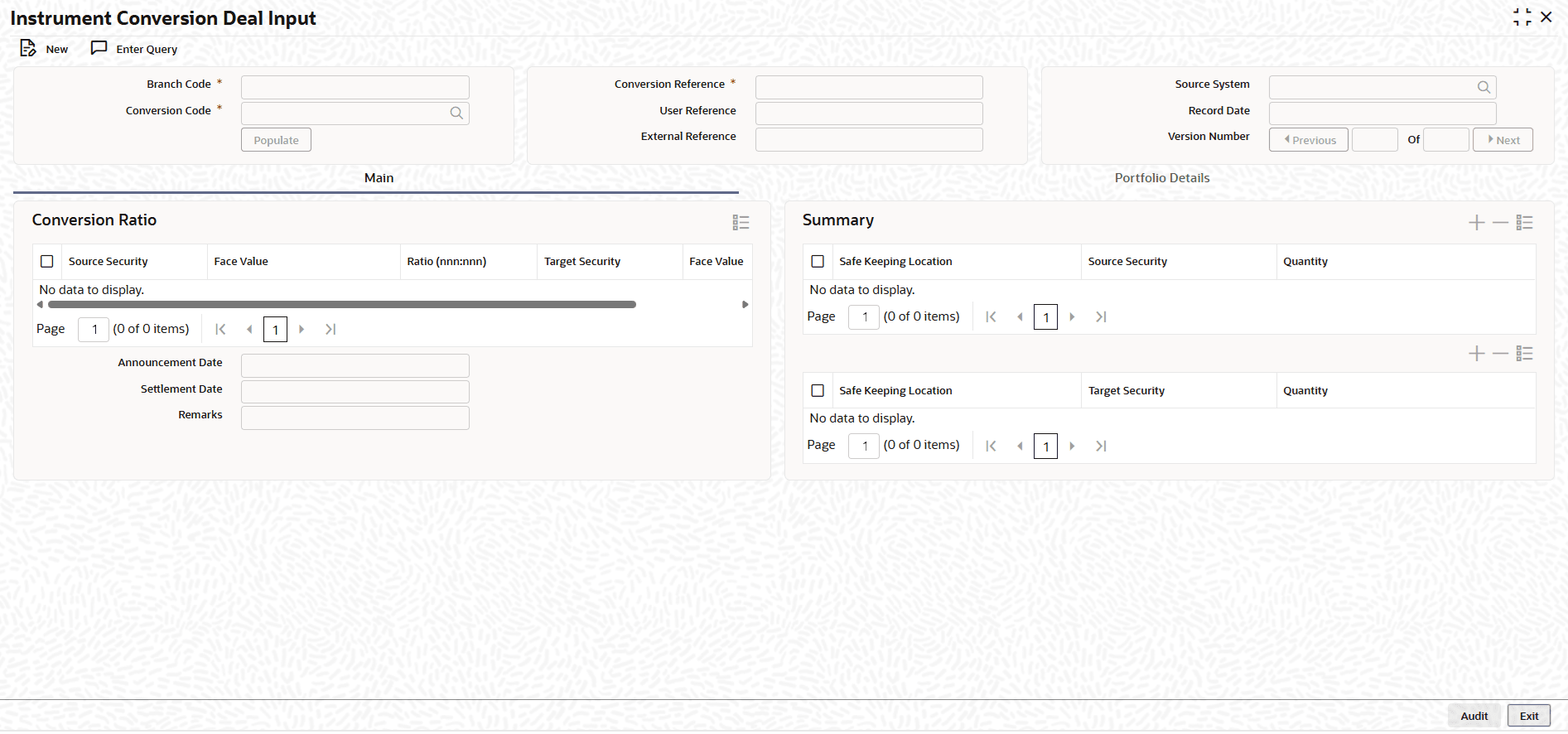
In this screen user selects the active conversion code, which was already maintained. Upon selecting, the details for the conversion maintenance default. This screen also lists the existing position balances of the source security. When the calculate button is clicked the target side position updates, and other details like new quantity, nominal, face value, and price are displayed.
- On the Home screen, type TIDCNVTR
in the text box, and click Next.The Instrument Conversion Deal Input screen displays.
Figure 1-14 Instrument Conversion Deal Input
- On the Instrument Conversion Deal Input screen, Click New.
- On the Instrument Conversion Deal Input, specify the
details as required.
Table 1-13 Instrument Conversion Deal Input - Field Description
Field Description Branch Code Enter the conversion transaction branch code. Conversion Code Enter the conversion code maintained at TIDCNVMT. Conversion Reference Enter the unique identifier assigned to the conversion. User Reference Enter the reference provided by the user for the conversion. External Reference Enter the unique identifier provided by an external system or source for the conversion transaction. Source System Enter the source system from which the conversion is initiated. Record Date Select the date on which the conversion deal is saved. Source Security Displays the source security. Face Value Displays the face value of source security. Ratio (nnn:nnn) Displays the split \ merger ration. Target Security Displays the target security. Face Value Displays the face value of target security. Announcement Date Displays the date on which securities conversion is announced. Settlement Date Displays the conversion effective date. Safe Keeping Location Displays the location where the source security is maintained for safekeeping. Source Security Displays the original security involved in the conversion transaction. Quantity Displays the number of units involved in the conversion transaction. Safe Keeping Location Displays the location where the target security is maintained for safekeeping. Target Security Displays the security that results from the conversion transaction. Quantity Displays the number of units involved in the conversion transaction. - On the Instrument Conversion Deal Input, click Portfolio Details
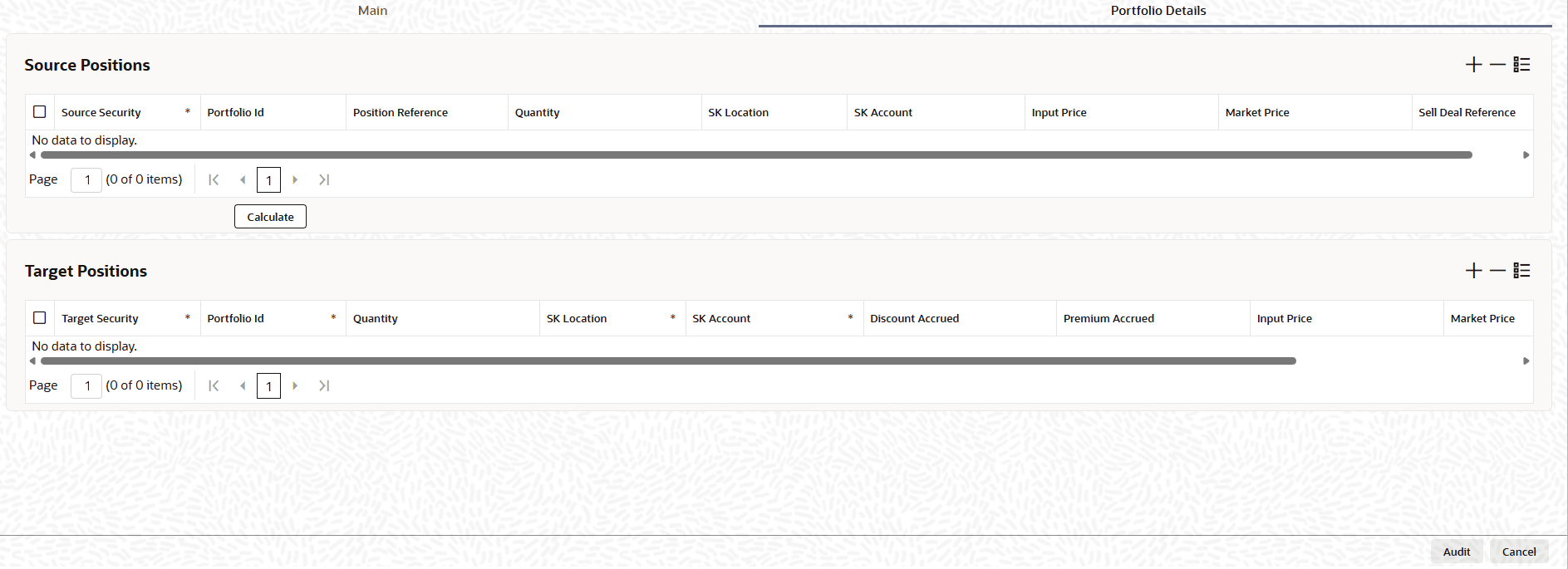
- On the Portfolio Details tab, specify the details as
required.
Table 1-14 Portfolio Details - Field Description
Field Description Source Security Displays the original security involved in the conversion transaction. Portfolio Id Displays the source portfolio associated with the conversion transaction. Position Reference Displays the specific position involved in the conversion transaction. Quantity Displays the number of units involved in the conversion transaction. SK Location Displays the safekeeping location where the source security is maintained. SK Account Displays the safekeeping account where the security is maintained. Input Price Displays the price entered for the source security during the conversion transaction. Market Price Displays the current price of the security in the market at the time of the conversion transaction. Sell Deal Reference Displays the reference number of the source sell deal linked to the conversion transaction. Target Security Displays the security that results from the conversion transaction. Portfolio Id Displays the target portfolio associated with the conversion transaction. Quantity Displays the number of units involved in the conversion transaction. SK Location Displays the safekeeping location where the target security is maintained. SK Account Displays the safekeeping account where the security is maintained. Discount Accrued Displays the amount of discount accumulated up to the date of the conversion transaction. Premium Accrued Displays the amount of premium accumulated up to the date of the conversion transaction. Input Price Displays the price entered for the target security during the conversion transaction. Market Price Displays the current price of the security in the market at the time of the conversion transaction. Buy Deal Reference Displays the reference number of the target buy deal linked to the conversion transaction.
- Conversion Transaction Creation
This topic provides the systematic instructions to create the conversion transaction. - Authorize Conversion Transaction
This topic describes about the authorize the conversion transaction. - Key User Actions
This topic describes about the key for actions for TIDCNVTR.