12 Set Language for Specific Text in PDF
Specifying the language for text within a PDF will improves accessibility, especially when the document contains many languages. Setting language attributes improves the experience for users relying on screen readers, allowing them to interpret content accurately. When the reader encounters a change in language for a given text element, the spoken tone and inflection should change to make the content more recognizable to the user.
No noticeable difference should occur in the actual printed document (PDF), but some of the intermediate files utilized by the system will reflect the new language attribute.
Inlined text records in NA file will have one additional element for accessibility language ID. Although the new attribute will only appear when the section has been changed to include it, any regression of legacy transactions will contain the placeholder for this attribute.
TP417BX1;8334;3806;19134;3866;912;0;0;0;0;0;0;0;0;;1;0;\OOEDGEKLC...TP417BX1;8334;3806;19134;3866;912;0;0;0;0;0;0;0;0;;1;0;;\OOEDGEKLC... Accessibility attribute records (A,xA26) in sections (.FAP files) for text labels, variable fields, text areas, etc. will have one additional element for an accessibility language ID.
For example,
- A,TA26,0,13,"fr"
- A,FA26,0,0,"en-US"
- A,MA26,0,0,"es"
Baseline regressions may need to be updated to reflect the additional attribute position.
Accessibility attribute records in XML output for text labels, variable fields, text areas, etc. will have a LANGID element for an accessibility language ID.

Setting the Language ID in the Accessibility fields in Studio
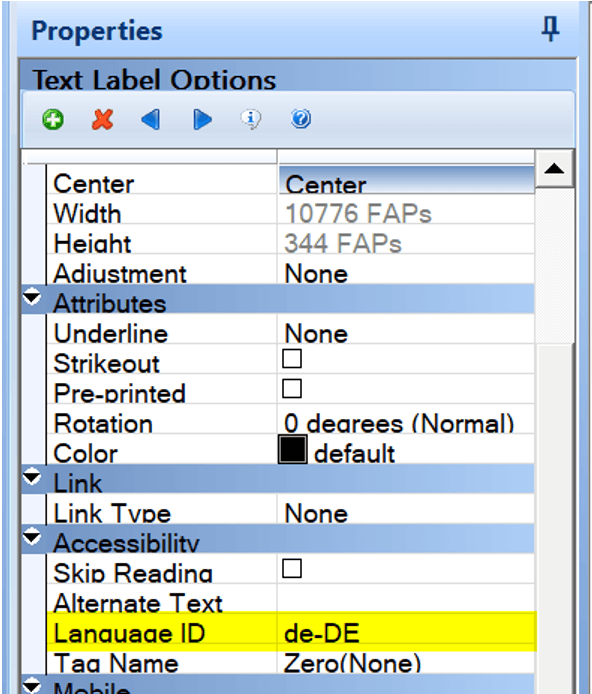
In the example above, the text label that contains German text is set with a Language ID of de-DE, representing German as spoken in Germany. The de represents the ISO 629 language code for German and the DE represents the ISO-3166 Country Code for Germany.
It is not required to use the country code, user can
use only de as the ISO 629 language code for the German
language.
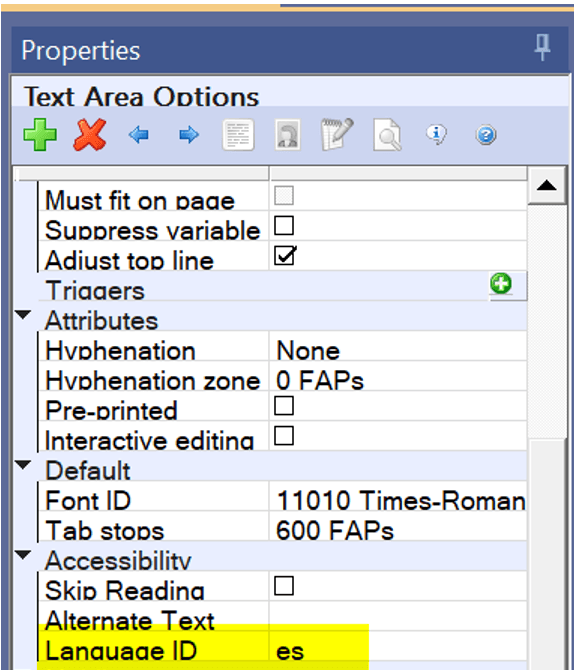
For example, If the user has a text area that uses a different language than the rest of the document. User can specify the language for the entire text area in the text area properties.
User can also specify a language for specific text within a text area. When
editing the text area, user can select the text and then right click on the mouse to
open the menu and select Edit / Output Attributes.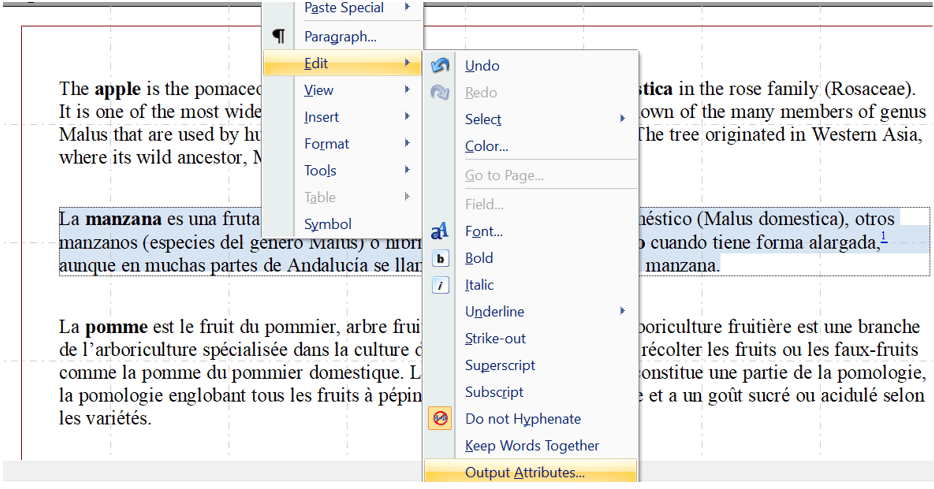
In the below example, we are setting the highlighted text to use a Language ID of es (Spanish).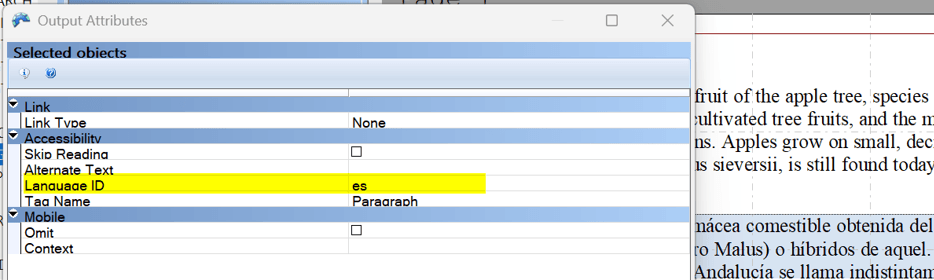
2-character ISO 639 language codes are commonly represented using lowercase letters and ISO-3166 country codes are commonly represented using uppercase letters.
User can find a list of ISO-639 Language Codes and ISO-3166 Country Codes at https://docs.oracle.com/cd/E13214_01/wli/docs92/xref/xqisocodes.html.
Setting the Language ID Through DAL
The SetLangID (DAL) function is used to specify a language ID on a text label or variable field.
SetLangID(ObjectName,Section,Form,Key2,ObjectType, LangID)| Parameter | Description |
|---|---|
| ObjectName | Enter the name of the text label or field to set with an ADA tag enumeration. If all naming parameters are omitted, this parameter defaults to the current field. The system updates the first object found that matches your entry for this parameter. |
| Section | Optional. Enter the name of the section. |
| Form | Optional. Enter the name of the form. |
| Key2 | Optional. Enter the name of the Key2 group. |
| ObjectType | Enter the type of object, such as "FIELD" or "TEXT".
Note: The default is "FIELD" |
| LangID | The Language ID to use for the specified text label or variable |
Note:
- The object referenced by SetLangID must have an explicit name.
- Language IDs are only used when producing accessible PDF output
- There is no validation of the Language ID to ensure it is a valid ISO code.
| Parameter | Description |
|---|---|
| SetLangID ("MyField", , , , ,"fr") | Search for the field named MyField on the current form section and if found, set the associated Language ID to fr (French language). Note that the neglecting of the section, form, and key2 names means that the search is limited to the currently active section. Neglecting of the ObjectType parameter means that FIELD is assumed.
|
| SetLangID ("MyLabel", "*", "*", "*", "TEXT", "es") | Search for the first occurrence of a text label with the name MyLabel found within the entire transaction and set the Language ID to es (Spanish language). Note the the asterisk parameters (“*") means to include all within the search. Using asterisk for section, form, and key2 indicates to search the entire transaction.
|
| SetLangID ("AField", "ASection", "AForm", "AKey2", "FIELD", "de") | Indicates to locate a given field on a specific section, form, and key2 grouping within the entire transaction and set the Language ID to de (German language).
|
Updated Form and Section Accessibility Reports
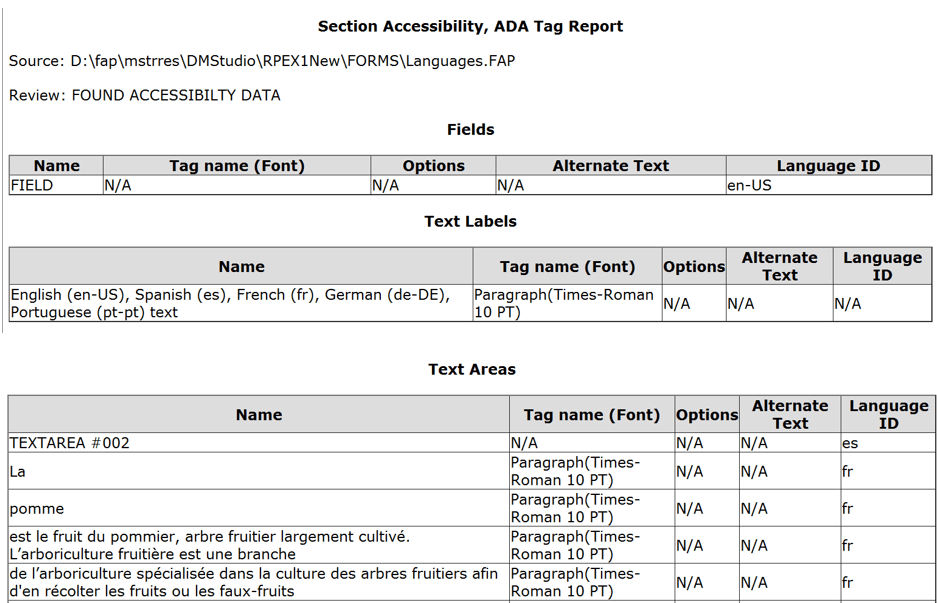
Form and Section Accessibility Reports have been updated to include the Language ID.
The Accessibility Report will display the Language ID for variable fields, text labels, and text areas (including specific text within a text area).