6.3.1 Origination Lease Rental Processing Workflow
This topic provides information on the workflow involved in processing lease rentals during the origination stage, including rental calculation, schedule generation, validation, and setup of payment details.
The process flow to create a renting contract in the system differs a little for Existing and New type of customers and is explained in below sections separately.
Existing Customer
Figure 6-4 Origination Renting Flow (Existing Customer)
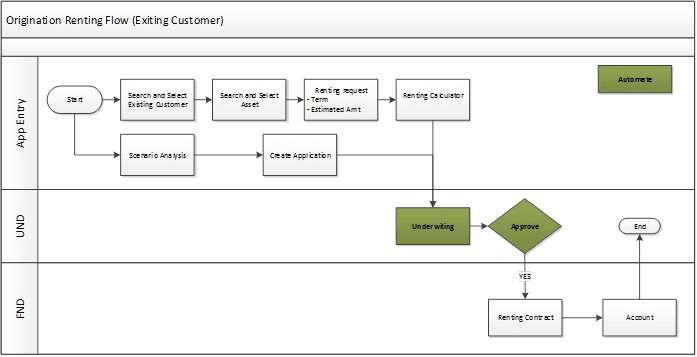
Like any other application funding in Origination module, the lease renting contract is also moved through Application Entry, Underwriting and Funding process. But the Underwriting stage is automated and applications can be funded directly.
User can either start with Application Entry screen for creating renting contract or Scenario Analysis to simulate the same before creating.
In the Application Entry screen, user can search and select the existing customer details and the asset to be used for rental. Specify the required Term and Estimated amount for rental. Use the Renting Calculator to derive the rental amount based on the above details.
The status of such application will be in APPROVED - BLANK. The same can be accessed in funding screen and funded.
New Customer
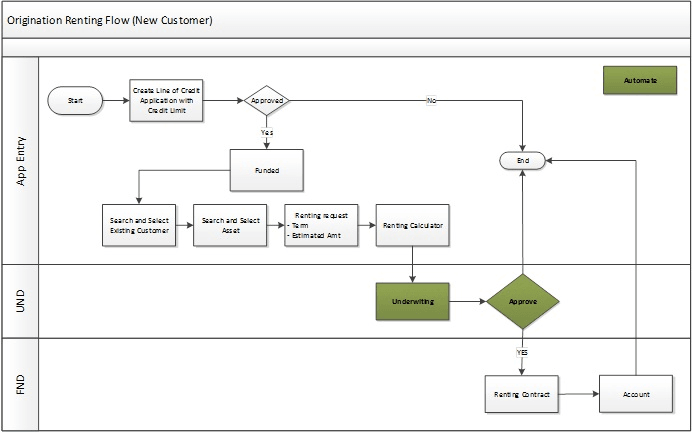
For a new applicant, the details are to be registered as a customer in the system. To do so, the applicant details are to be defined and funded against a contract.
While funding Loan and Lease contracts, the applicant information can also be processed along with other details. But for Line of Credit, user need to first create a line of credit application, assign a credit limit and fund the application. This process can also help to evaluate credit worthiness and also validate customer details against the KYC.
The same is indicated in the below image. The rest of renting contract processing is similar to existing customer workflow.
Figure 6-5 Origination Renting Flow (New Customer)
Parent topic: Rental Agreement