7.11 Bureau Tab
This topic provides information on the Bureau. It enables users to view and manage bureau‑related data such as credit reports, scores, and customer history retrieved from external credit bureaus.
The Bureau tab displays the credit report (if pulled) for an applicant. If there is a need for another pull for any applicant, it can be done here manually using the New Request section.
- Application Indicates Potential Fraud
- Bureau Indicates Social Security Number Variance
- Duplicate Application Exists
- Bureau Indicates a Possible Current Delinquency
- Bureau Indicates Bankruptcy
- Bureau Indicates Consumer Statement
- Bureau Indicates a Possible Repossession
- Bureau Reports OFAC hit
- Bureau Reports Applicant as Deceased
- Potential Delinquencies for Auto Loans in Past 12 Months
- Customer Rate (APR) Exceeds the State Usury Rate
- Open Consumer Credit Counseling
The reasons will also be displayed in the Summary tab in Bureau details under Exceptions/Comments section.
- On the Origination, click Origination. Under Origination, click Underwriting.
- Under Underwriting, click Underwriting
tab. Under Underwriting tab, click
Bureau.
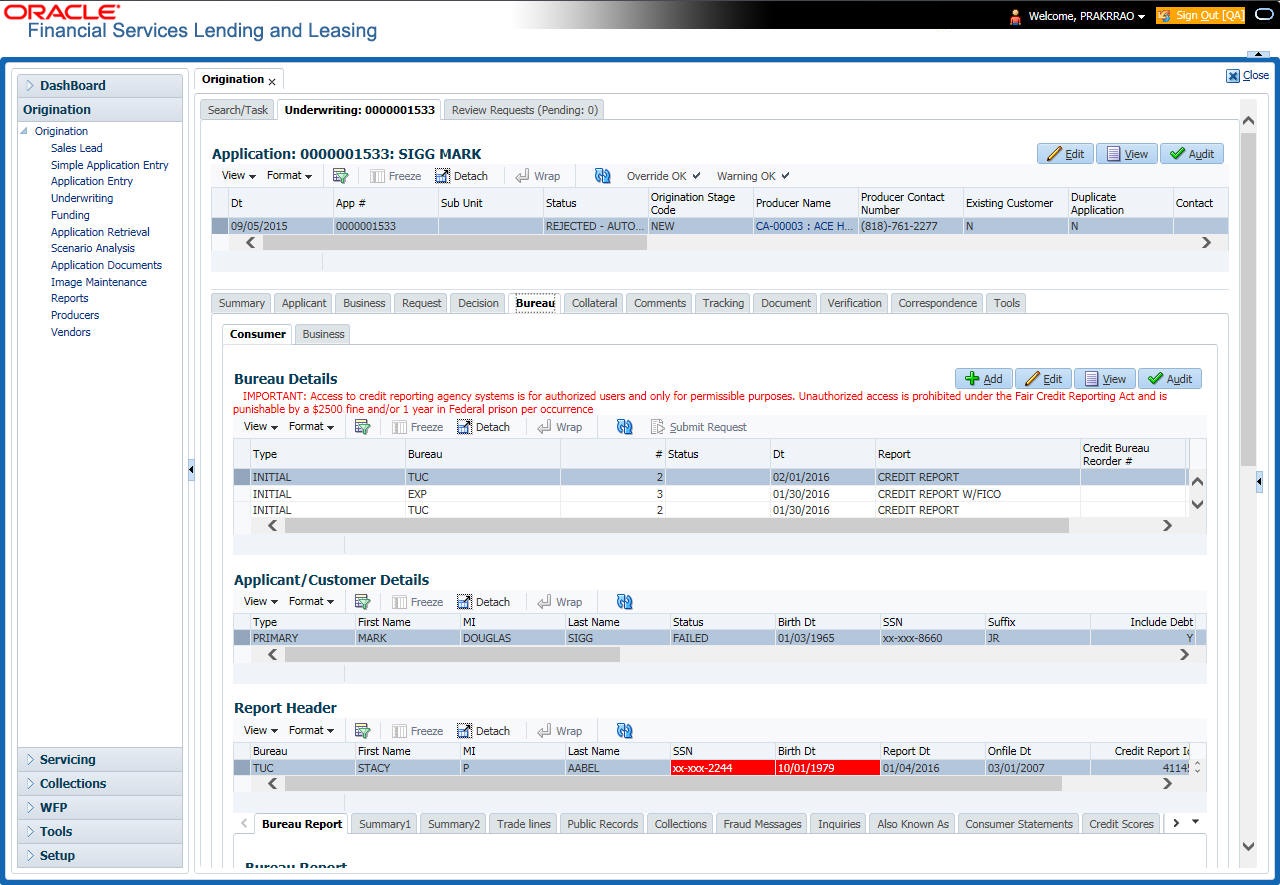
The Bureau screen displays.
- In the Bureau Details section, view the following information:
Table 7-39 Bureau Details
Field Description Type Displays the credit bureau request type. Bureau Displays the credit bureau. # Displays the credit bureau request number. Status Displays the status of credit bureau request. Dt Displays the credit bureau request date. Report Displays the credit bureau report type. Credit Bureau Reorder# Displays the credit bureau reorder number. App Ind If selected, indicates that a bureau was pulled for an application. To add the bureau details refer the Requesting a Credit Bureau Report Manually.
- In the Applicant/Customer Detail section, view the following
information:
Table 7-40 Applicant/Customer Detail
Field Description Type View the relation type. First Name Specify the first name. MI Specify the middle name. Last Name Specify the last name. Status View the credit bureau request status. Birth Dt Specify the date of birth. SSN Specify the social security number.
Note: If the organizational parameter UIX_HIDE_RESTRICTED_- DATA is set to Y, this appears as a masked number; for example, XXX-XX-1234.
Suffix Select the generation. Include Debt Select to include credit bureau information in the Liabilities section of the Summary sub screen. Populate Debt Select to load debt information from the credit bureau in the Liabilities section of the Summary sub screen. Address Type Select the address type. Country Select the country. Address # Specify the building number. City Specify the city. State Select the state code. Street Pre Select the street pre type. Street Name Specify the street name. Street Type Select the street type. Street Post Select the street post type. Apt # Specify the apartment number. Address Line 2 Specify the address line 2. Zip Select the zip code.
For non US country, user have to enter zip code.
Zip Extn Specify the zip extension. Phone Specify the phone number. - In the Report Header section, view the following information:
Table 7-41 Report Header
Field Description Bureau Displays the bureau. First Name Displays the first name. MI Displays the middle initial. Last Name Displays the last name. SSN Displays the social security number.
Note: If the organizational parameter UIX_HIDE_RESTRICTED_DATA is set to Y, this appears as a masked number; for example, XXX-XX-1234.
Birth Dt Displays the birth date. Note: The SSN and Birth Dt fields in Report Header section are displayed in red, if there is a mismatch in the respective data present in the above Applicant/Customer Details section.
Report Dt Displays the report date. Onfile Dt Displays the on file date. Credit Report Id Displays the credit report id. Best Match Displays the best match. - Click Bureau Report. For more information refer the Printing the Credit Bureau Data as a Text/PDF Report.
The system parcels out the details from the credit bureau report in the Bureau screen’s sub tabs:
- Summary 1
- Summary 2
- Tradelines
- Public Records
- Collections
- Fraud Messages
- Inquiries
- Also Known As
- Consumer Statements
- Credit Scores
- Click Summary 1 sub tab.
- User can view the following information:
Table 7-42 Summary 1
Field Description Trades Records of extended installment payments, mortgage and revolving credit, as detailed in the credit bureau report. Bankruptcy The total number of times the applicant has applied for Chapter 7, Chapter 11 and Chapter 13 bankruptcies, recently and throughout life. Past Due The total number of times the applicant has been past due on payments by 30, 60, or 90 days in the last year, two years, and throughout life. Public Records Number of legal actions, including liens, public records, and judgments over the course of the applicant’s life, as well as any that are currently open. Collection Trades referred to an outside vendor for collection. Credit Scores View the FICO and bankruptcy scores. Statistical Trade Ages Ages of the oldest and newest trades, as well as the average age of the open and total trades. Derogatory Trades Tradelines that an action other than being late was reported; this includes collections, repossessions, charge offs, and bankruptcies. - Click Summary 2 sub tab.
- User can view the following information:
Table 7-43 Summary 2
Field Description Trades Records of extended credit for auto, bank, credit card, retail, Loan finance, and sales finance Loan, as detailed in the credit bureau report. Inquiries Requests for a credit report regarding Loan in the Trades section over the last six months, as well as total requests over 6, 12, and 24-month periods, as well as the newest and oldest request. Balance The total balance of retail and bank trades, as well as the high balance of each. Open Derogatory The following information for all of the customer’s open trade lines: the shortest and longest period of time (in months) since the customer’s most recent minor derogatory (30-60 days late), major derogatory (90- 180 days late), and derogatory (bankruptcy, repossession, or charge off). Derogatory The following information for all of the customer’s total trade lines (open and closed): the shortest and longest period of time (in months) since the customer’s most recent minor derogatory (30-60 days late), major derogatory (90-180 days late), and derogatory (bankruptcy, repossession, or charge off). - Click Tradelines sub tab to view information about trade lines, such as the creditor’s name, trade’s status, type and code and balance information.
- View the following details:
Table 7-44 Tradelines
Field Description Creditors Name Displays the creditors name. Status Displays the status of the tradeline. Type Displays the type of tradeline, such as bank, first mortgage, travel card, and so on. Type Code Displays the code for the type of tradeline. Past Due Amt Displays the past due amount. Balance Displays the balance of the tradeline. Balance Dt Displays the balance date. Open Dt Displays the date the tradeline was opened. History Dt Displays the trade line’s history date. History Data Displays the trade line’s history data. 30 Displays the number of times the tradeline was 30 days past due. 60 Displays the number of times the tradeline was 60 days past due. 90 Displays the number of times the tradeline was 90 days past due. Creditors Subscriber # Displays the creditor’s subscriber number. Mop Displays the method of payment. Account # Displays the account number. Credit Limit Displays the credit limit. Term Pmt Amt Displays the term payment amount. High Balance Displays the high balance of the tradeline. Reported Dt Displays the reported date. Duplicate If selected, the tradeline is a duplicate. Special Exclusion If selected, the tradeline is a special exclusion. - Click the Public Records sub tab to view information about public records, including each one’s type, status, and amount, as well as the date the record was filed and resolved.
- View the following details:
Table 7-45 Public Records
Field Description Record Type Displays the record type. Status Displays the status. Amount Displays the amount. Filed Dt Displays the filed date. Satisfied Dt Displays the satisfied date. - Click the Fraud Messages sub screen to view information about fraudulent attempts to use the applicant’s credit.
- Click the Inquiries sub screen to view all the credit reports for the applicant in reverse chronological order.
- View the following details:
Table 7-46 Inquiries
Field Description Inquirer Name Displays the inquirer’s name. Inquirer Subscriber # Displays the inquirer’s subscriber number. Inquirer Industry Code Displays the inquirer’s industry code. Inquiry Dt Displays the inquiry date. Rate Shopping If selected, the inquiry concerned rate shopping. Duplicate If selected, if the inquiry was a duplicate. - Click the Also Known As sub screen to view other names used by the applicant.
- Click the Consumer Statements sub screen to view statements that the applicant has issued to the credit bureau.
- Click the Credit Scores sub screen to view the score model, the score factor, and the score returned from the credit bureau report.
This section consists of the following topics:
- Printing the Credit Bureau Data as a Text/PDF Report
This topic provides information on printing credit bureau data as a text or pdf report. It enables users to generate a formatted report of bureau details, including credit scores and history, for documentation, review, or sharing purposes. - Requesting a Credit Bureau Report Manually
This topic provides information on manually requesting a credit bureau report.
Parent topic: Underwriting