7.6 Business Tab
This topic provides information on the business, including key details, operations, and associated contacts.
- Address
- Telecoms
- Financials
- Liabilities
- Partners
- Affiliates
- Other details
If there are no business information associated with the application, the Business Applicant tab is unavailable.
- If SME business information is included on the application, select SMALL BUSINESS in the Class field on the Applications section and click Save.
- On the Origination, click
Origination. Under Origination,
click Underwriting. Under
Underwriting, click Business.
Under Business, click Business
tab.
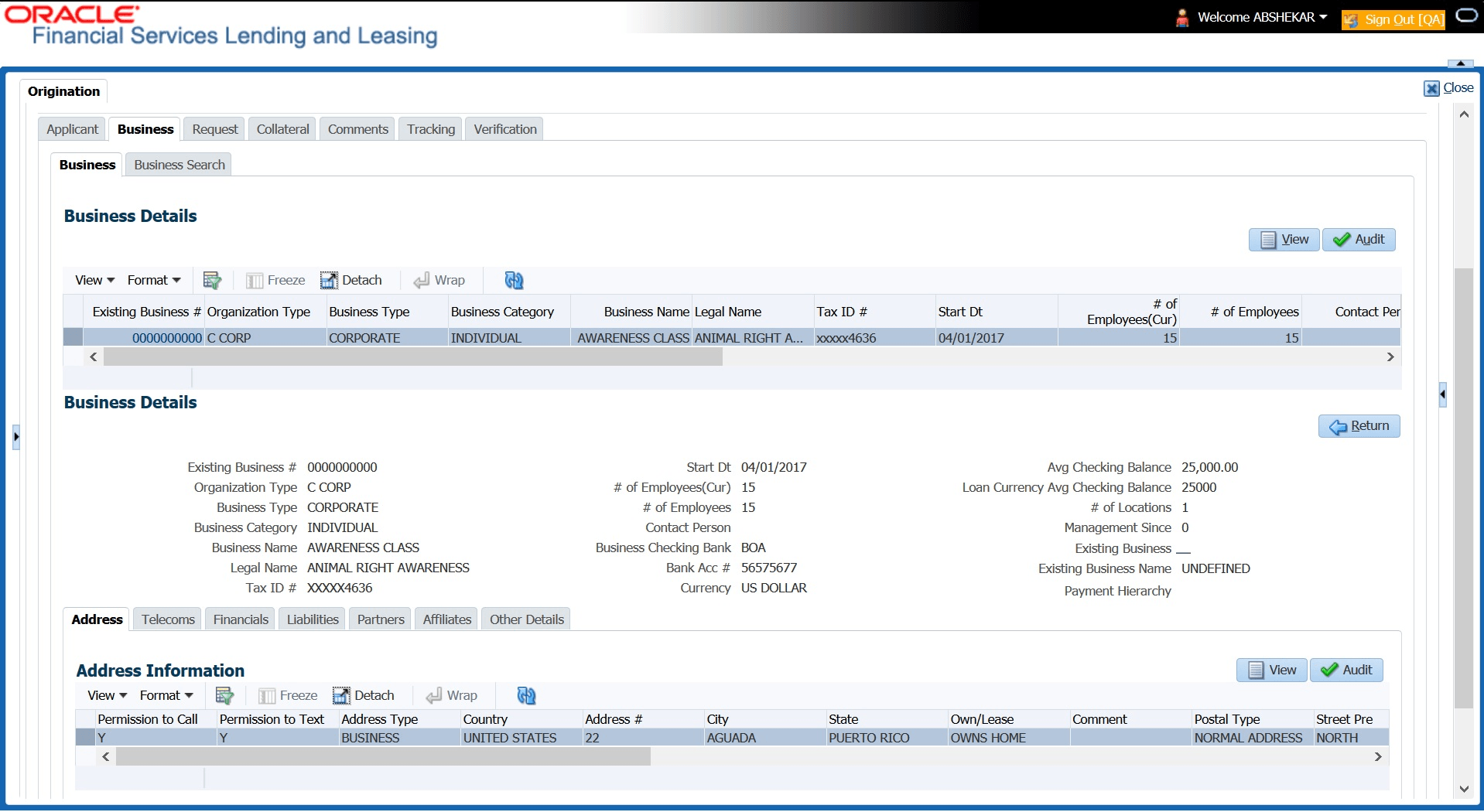
The Business screen displays.
- Perform any of the Basic Operations mentioned in Preface.
A brief description of the fields is given below:
Table 7-15 Business
Field Description Organization Type Select the organization type. Business Type Select the type of the business. Business Name Specify the name of the business. Legal Name Specify the legal name of the business. Tax ID Specify the tax identification. Start Date Specify the business start date. # of Employees (Cur) Specify the current number of employees at the business. # of Employees Specify the number of employees at the business after financing. Contact Person Specify the contact person at the business. Business Checking Bank Specify the bank name of the business’s checking account. Bank Acc # Specify the bank account number. Avg Checking Balance Specify the average checking balance. # of Locations Specify the number of locations of the business. Management Since Specify the year the current management was established. Existing Business Check this box if it is an existing Business. Existing Business Name Specify the name of Business entity. If this is not an existing Business, the field is displayed as UNDEFINED. Payment Hierarchy Select the required Hierarchy Definition to be used for payment appropriation from the drop-down list. The list is populated with all the pre-defined and enabled hierarchy definitions maintained on the Setup under Setup, click Administration under Administration, click Users under Users, click Payment Hierarchy screen.
The Hierarchy Definition selected here is propagated to Servicing, click Customer/Business details. If an existing hierarchy is modified and the Update Customer/Business info option is enabled, then the Payment Hierarchy in Servicing, click Customer/Business details are also updated.
- Perform any of the Basic Actions mentioned in Preface.
This section consists of the following topics:
- Address Sub Tab
This topic provides information on the Address section. It enables users to capture, view, and manage address details within the request. - Telecoms Sub Tab
This topic provides information on the telecoms. It enables users to capture, view, and manage telecoms details within the request. - Financials Sub Tab
This topic provides information on the financials. It enables users to view, capture, and manage financial details within the request. - Liabilities Sub Tab
This topic provides information on the liabilities. It enables users to capture, view, and manage liability details within the request. - Partners Sub Tab
This topic provides information on the partners. - Affiliates Sub Tab
This topic provides information on affiliates. - Other Details Sub Tab
This topic provides information on other details. - Tracking Attributes Sub Tab
This topic provides information on tracking attributes. It enables users to define, monitor, and manage key attributes that support tracking and reporting within the request.
Parent topic: Underwriting