Lease - End of Term Options
This topic provides the release highlights for Lease - End of Term Options.
Introduced the following List of new Placeholders:
Table 2-2 Placeholders
| Residual Value (Book Value) | Account Table → ACC_RESIDUAL_VAL_CUR |
| Residual Value (Market Value) | Collateral Tab → Valuations Tab → Retail Amt (Current indicator = Y) |
| Depreciation (Market Value) | Refer ACCOUNT_BALANCES_AMORTIZE → ABA_BAL minus ABA_BAL_EARNED |
Changes to Lease Payoff Quote Transaction:
- This payoff quote transaction is enhanced to support generating
payoff quote for other lease end of term options considering the collateral
residual value (Market value) like:
- Evergreen
- Upgrade
- To support this feature, introduced the following transaction parameters in the existing transaction (continue the sequence numbers of transaction parameters of Lease Payoff Quote).
Table 2-3 Solution Approach
| Calculate Upgrade | Refer lookup → YES_NO_CD | If user provides the value of this parameter as Y,
system calculates Upgrade value of asset.
Also, system validates that New Asset Value is greater than ZERO. |
| New Asset Value | NA | This field is only for that specific transaction (Not saved). |
| Residual Valuation | Existing lookup → RESIDUAL_VALUATION_CD (RESIDUAL VALUATION CODES) |
|
| Upgrade Fee | NA | - |
| Calculate Evergreen | Refer lookup → YES_NO_CD |
If user provides the value of this parameter as Y, system calculates Evergreen value of asset. Also, system validates that Evergreen Renewal Cycle should be greater than ZERO. |
| Inflation Rate | NA | This field is only for that specific transaction Refers for calculation. |
| Evergreen Renewal Cycles | NA |
System checks the current billing cycle of the account to consider the value of renewal cycles. Example: If the billing cycle of the account is Monthly, the input value given is considered as Monthly. |
Table 2-4 Calculation
| Estimated Upgrade Cost | Estimated Upgrade Cost = (New Asset Value − Residual Value of Current Asset) + Upgrade Fee |
Example: New Asset Value: $50,000 Residual Value of Asset: $30,000 Upgrade Fee: $2,000 Upgrade Cost = (50,000 − 30,000) + 2,000 = 20,000 + 2,000 = 22,000 |
New Asset Value = Takes reference from txn parameter. Residual value of Asset = Depending on txn parameter (Residual Valuation), if it is book value, refer 'Accounts' table or if it is Market value → Refer 'Collateral → Valuation' tab where current record = Y. If No valuation record is available; considers the book value. Upgrade Fee: Takes reference from transaction parameter. |
| Estimated Evergreen Amt | Estimated Evergreen Amt = Initial Lease Payment * (1+Inflation Rate) - Depreciation Adjustment |
Example: Initial Lease Payment: $500/month Inflation Rate: 12% per year Depreciation Value for cycle: $50/month Assuming a one-year renewal: Evergreen Lease Payment = 500 * (1+0.01) − 50 = (500 *1.03) − 50 = 451.25 Note: System annualizes the numbers to arrive the result. Example: In above case, since billing cycle in Monthly, system converts inflation rate to monthly. |
Initial Lease Payment = Takes reference from 'Accounts' table → Pmt Amt Cur. Inflation Rate = Takes input from transaction parameters. Depreciation Value = Refer ACCOUNT_BALANCES_AMORTIZE → ABA_BAL minus ABA_BAL_EARNED. Evergreen Renewal Cycle = Takes reference from transaction parameter. |
- The system calculates and prints the Upgrade and Evergreen values,
if user provides the required input in the Payoff quote transaction
parameters.
- In Payoff Quote, system refers the valuations from latest valuation record, where current indicator = Y, for current asset = Y.
- In case of back dated payoff quote, system refers to corresponding valuation record, based on the date.
- If certain value results in negative, system prints the ZERO value as result for Upgrade and Evergreen Options.
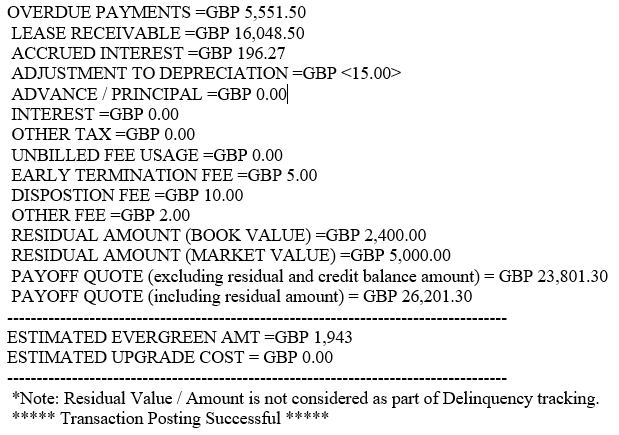
- The Residual Amount field is now labeled as RESIDUAL AMOUNT (BOOK VALUE).
- Introduced new row RESIDUAL AMOUNT (MARKET VALUE), refer to Collateral → Valuations → Retail Value.
- While calculating value for PAYOFF QUOTE (including residual amount), system refers either Residual Income Book Value or Market Value based on contract parameter → Residual valuation (under Residual Details' block).
- If the 'Residual Valuation' is None/BV, refer Book Value, If its Market value, refers market value (Collateral → Valuations Tab → Retail Value or if no market value record is existing, system refers the book value.
- In case of a back dated Payoff Quote, the system considers the Payoff Generate Date to refer the valuation dates in collateral screen.