Multiple Tax Definitions
This topic provides information about enhancements in the multiple tax definitions.
Support Multiple internal tax definitions and corresponding balances/transactions to
handle the payments.
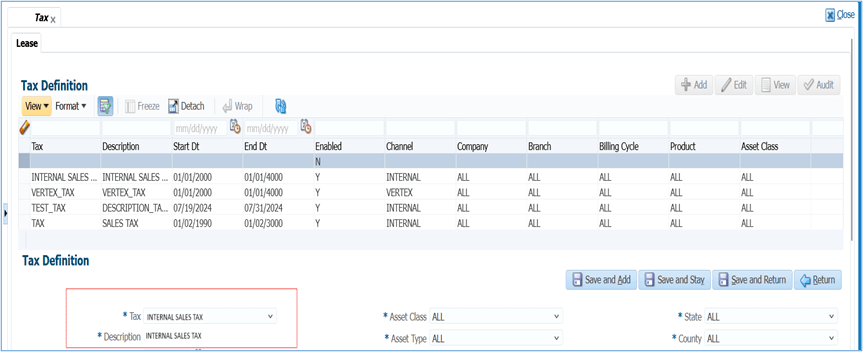
- Renamed the screen label from Sales Tax Definition to Tax Definition.
- User can define the tax definitions and description values in the lookup → Tax Definitions.
- Existing Tax screen which allows user to input Name and description
of Tax Definition details; takes reference of new lookup and values.
- Provided seed data in the lookup with corresponding balances (Following balances indicating corresponding tax definitions part from existing Sales Tax codes) in OFSLL.
Table 2-1 Tax Type
Tax Type Itemization Balance Type Value Added Tax Upfront ITM CASH VALUE ADDED TAX - Value Added Tax Stream - Value Added Tax Sales Tax Upfront ITM CASH SALES TAX - Sales Tax Stream - Tax (Description: Sales/Use Tax) Property Tax Upfront ITM CASH PROPERTY TAX - Property Tax Stream - Property Tax Other Tax Upfront ITM CASH OTHER TAX - Other Tax Stream - Other Tax
Limitation and Assumptions:
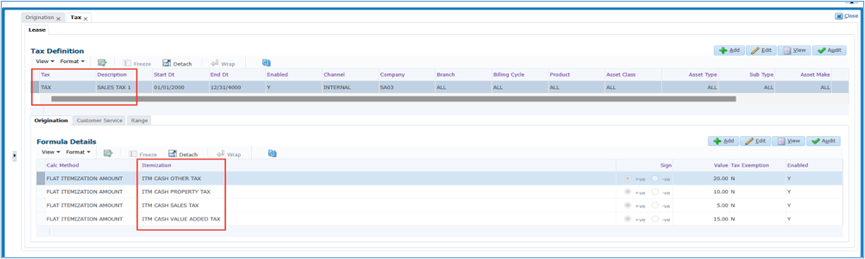
- In tax definition screen → Origination / Customer Service → Formula Details system allowing to define multiple calculation methods for same tax definition (Ex: Flat or %Method). No explicit validation is built to restrict this, but system support only either method of calculation and hence user is expected to define only one calculation method for each tax type.
- Users are not expected to disable the tax definition record in the setup. If an active tax definition is not defined, the system will not generate any tax component records.
- On the Setup → Tax definition → Customer Service → Calculation
method → This lookup displays three values → Bill, Late Charge and Payoff
Quote.
- When Bill is configured, the system captures the tax dues and displays them in the summary under five tax due buckets.
- When Late Charge is configured, the system displays the tax dues as Other Dues in the summary screen.
- When Payoff Quote is configured, the system displays the tax values for reference only, with no impact on the account.
- For Tax Definition, the system allows multiple itemization records to be added. However, this is not a recommended configuration. Users are expected to maintain only the relevant itemization for each tax definition record.
Setup Screen Changes:
Lease Contract Screen:
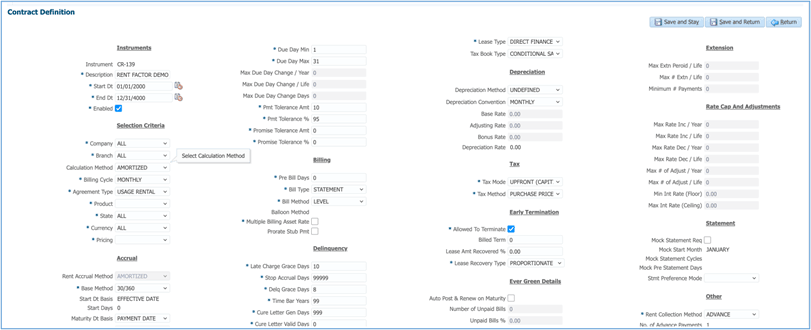
- Renamed the Screen labels.
- Renamed Sales Tax Method to Tax Method.
- Renamed Sales Tax Mode to Tax Mode.
Origination Changes:
- System taking reference of TAX itemization to display Estimated
Sales Tax in Origination → Funding.
- If user defines more than one tax definition (Ex: Sales Tax and Property Tax) and provided inputs of tax amount in itemization. System does the sum of all TAX itemization to display Estimated Tax for Stream method only. For upfront, this sum of the tax amounts will be part of Lease Receivables.
- Renamed the Funding Screen labels.
- Renamed Estimated Sales Tax to Estimated Tax.
- Renamed Sales Tax to Tax.
- Renamed Sales Tax Method to Tax Method.
- Renamed Sales Tax Mode to Tax Mode.
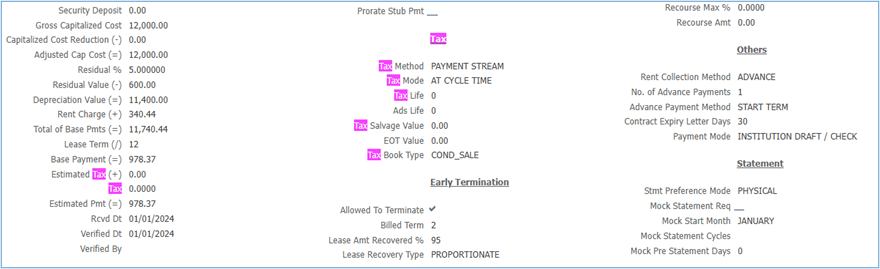
Origination → EDIT Impact:
ORIGINATION CONTRACT EDITS → XVL:CONTRACT SALES TAX ITEMIZATION AMT SHOULD BE ZERO FOR CYCLE SALES TAX MODE
The above EDIT is currently referring to Sales Tax only. From current release onwards, the EDIT validates all four tax definitions.
Servicing Changes:
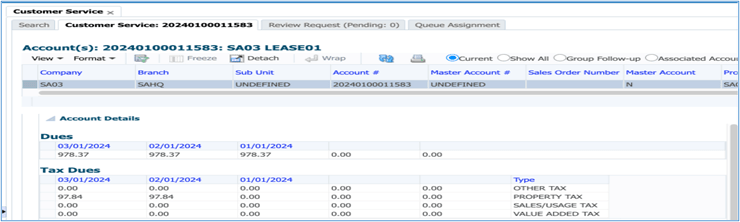
- Renamed the Summary Screen label.
- Renamed Sales Tax Dues to Tax Dues.
- Displays information of all the dues independently.
- Provided script to move sales tax balances from accounts table to new proposed tax definition table.
- Impact on Vertex integration handled to call the tax calculation for configured tax balance.
- Since the contract parameter 'Sales Tax Mode/Sales Tax Method' is at contract
level, it has the following limitation:
- User will be able to define multiple taxes, but all the tax types should be defined as either Upfront or Stream.
- Combination of these methods are not supported.