2.9 GL Setup - Copy Feature
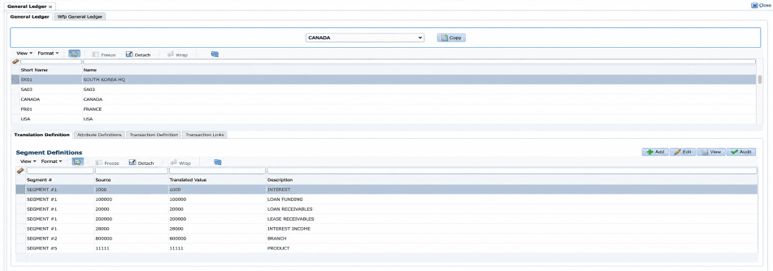
COPY facility in GL setup screen
Introduced a lookup in Setup → General Ledger Screen.
- The lookup lists companies by their short names.
- To copy a GL setup, the user selects the source company in the table, chooses a different destination company from the drop-down list, and clicks Copy.
- Access to the Copy button and destination company drop-down list is controlled by permissions.
Example: User selects 'South Korea' in the table and selects 'Canada' from lookup and select COPY button, system does the following actions:
- Prompts the user with popup 'Do you want to create/replace GL entries for selected company' with Yes/No options.
- Selection of NO option will simply close the popup
- Selection of YES will do the following action.
- If any existing GL definitions are there for Canada company, it will truncate the definitions in table.
- Copies the GL definitions from South Korea company to Canada company for all tabs → Translation Definition, Attribute Definition, Transaction Definition, and Transaction Links.
Figure 2-12 Copy Option in General Ledger Setup
Parent topic: Release Enhancements