5 Configuring Content Data
Introduction
Content Data in the Communication Cloud Service represents structured informational elements that are used to build, display, and manage the information within communication. Unlike traditional HTML body tags, Content Data uses newly defined elements designed to provide relational integrity, reusability, and contextual structure. Each element utilizes User Defined Data Fields for displaying, formatting, and editing content, and may include rules to set conditions. These elements support nesting and enables the association of dynamic data in ways that closely align with standard HTML elements.
Content Data provides users enhanced flexibility and efficiency in designing Communications Content. Data elements can be configured once and reused across multiple Communications, ensuring consistency, reducing duplication, and maintenance efforts. The structured approach enables context-aware and dynamic content, supports custom styles, and provides powerful rule-driven conditions. This not only improves the manageability and scalability of communication assets but also ensures communications are both visually consistent and contextually relevant to each recipient.
Elements of Content Data Structure
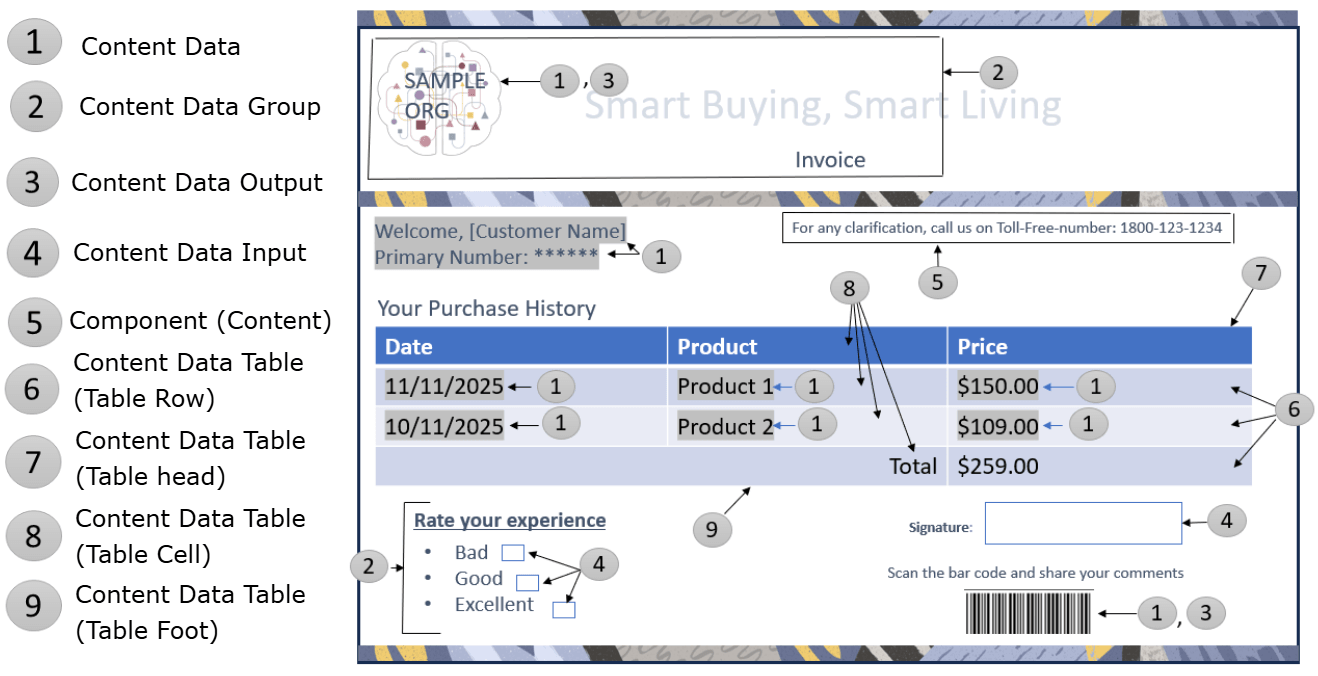
- Content Data Group: Specifies a container for repeated or grouped data, such as lists and loops. It supports nesting, and repetition is driven by arrays, lists related User Defined Data fields.
- Content Data: Defines a single data field, static value, or User Defined Data reference. It acts as a link to source data and can also encapsulate input or output representations and can be nested in Data Groups.
- Content Data Output: Specifies how data from a Content Data entity is rendered for display, such as barcode, image, PDF, and so on. It is always tied to a Data entity which is non-editable.
- Content Data Input: Defines how users interact with input data, such as signature, and checkbox. Enables templates to become interactive. It is always tied to a Data entity.
- Table: Specifies a specialized, dynamic container for tabular data. Unlike a Data Group, it includes support for captions, headers, rows, columns, cells, and footers, enabling complex, multi-dimensional layouts.
- Content Component: Defines standalone pieces, like such as content, or page breaks. These are used for formatting and layout purposes.
- Content Division: General-purpose container for grouping and positioning other elements. It has no inherent structure and is used for logical grouping, nesting, and potential conditional visibility.
Functionalities
- Data Integrity ensures clear, strong links between content and data sources.
- Reusability allows common content elements to be built once and can be reused throughout the different Communications.
- Maintainability makes the data components to act as a single source of data that can easily updated once according to business requirements.
- Personalized Greeting: “Welcome, Jane Smith!” where the customer's name is dynamically displayed.
- Favorite Products: An unordered list of the customer’s favorite products, dynamically generated from an array of Favorite Products.
- Customer Comments: A QR code allowing customers to submit survey comments.
- Experience Ratings: A checkbox input for rating customer experience with checkboxes for each type.
- Recent Purchases: A table displaying the customer’s purchase history.
- Page Break: A printable page break when rendering communications as PDF or print.
Let us see how Communication Cloud Service helps in this scenario:
- Content Data: Configure Content Data to demonstrate the dynamic, array-driven nature of the content (for example, customer name or static values).
- Content Data Group: Configure a Content Data Group to display the customer’s favorite products as a list, iterating through the Favorite Products array.
- Content Data Output: Configure Content Data Output to generate and display a QR code, enabling customers to submit their comments.
- Content Data Input: Configure Content Data Input to provides a space for the customer to add their signature.
- Content Data Input (Group and Loop): Configure Content Data Input to collect feedback from the customer, prompting them to check off their experience with various products.
- Table: Configure Table to display the customer's past purchases as a dynamic table, with rows populated by the details of their transactions.
- Content Component: Configure Content Component to insert an invisible page break, which will not display on the screen but will be visible when printing or generating a PDF.
- Content Division: Configure Content Division as a wrapper for all the content elements, providing structure and organization for the data configuration.
Configuration Movement
Configuring a Content Data follows the configuration movement process; that is, if you configure a Contet Data in one tenancy (non-production), you can move the configuration to different tenancies (pre-production and production) sequentially.
For more information see, Understanding Configuration Movement topic.