3.1 Installation Overview
This section describes the installation overview.
This release (8.1.2.0.0) of the OFS BD Applications Pack bundles the upgrade patch set along with the base installer. Users/Administrators who wish to install a new OFS BD Applications Pack 8.1.2.0.0 instance or upgrade an existing OFS BD Applications Pack 8.0.x instance to 8.1.2.0.0 must download this installer.
To upgrade an existing OFS BD Applications Pack 8.0.x.x.x instance to
8.1.2.0.0 release, see Upgrading the OFS BD Applications Pack.
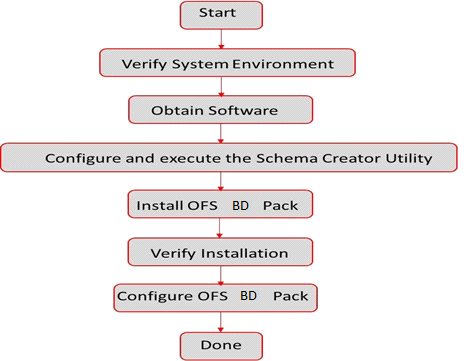
Figure 3-1 Installation Overview
Table 3-1 OFS BD Application Pack Installation Tasks and Descriptions
| Tasks | Details and Documentation |
|---|---|
| Verify Systems Environment | To verify that your system meets the minimum necessary requirements for installing and hosting the OFS BD Application Pack, see Verifying System Environment. |
| Obtain the software | To access and download the OFS BD Application Pack, see Obtaining Software. |
| Configure and Execute the Schema Creator Utility | To create the database schema, see Configuring and Executing Schema Creator Utility. |
| Install OFS BD Pack | To install the OFS BD Application Pack, see Installing OFS BD Application Pack. |
| Configure OFS BD Pack after installation | To configure the OFS BD Application Pack post installation, see Post Installation Configuration. |