4.3.3.1 Searching Exemptions Using Simple Search/Advanced Components
This page allows you to filter the Search and List page using the search components. To search Exemptions using simple search components, follow these steps:
- Go to the Search and List page. Click Search/Advanced Search. The search components page displays.
Figure 4-3 Search Fields

- Enter the required fields as explained in the following table.
Table 4-1 Simple Search Field Descriptions
Field Description Exemption ID Selectthe exemption ID from the drop-down list. EntityType Selectthe entity type from the drop-down list. EntityName Enterthe entity name. Exemption Status Selectthe exemption status. Entity Identifier Enterthe identifier. ExemptionClass Selectthe exemption class. DOEPStatus Selectthe DOEP status. - ClickGo. The filtered list is displayed.
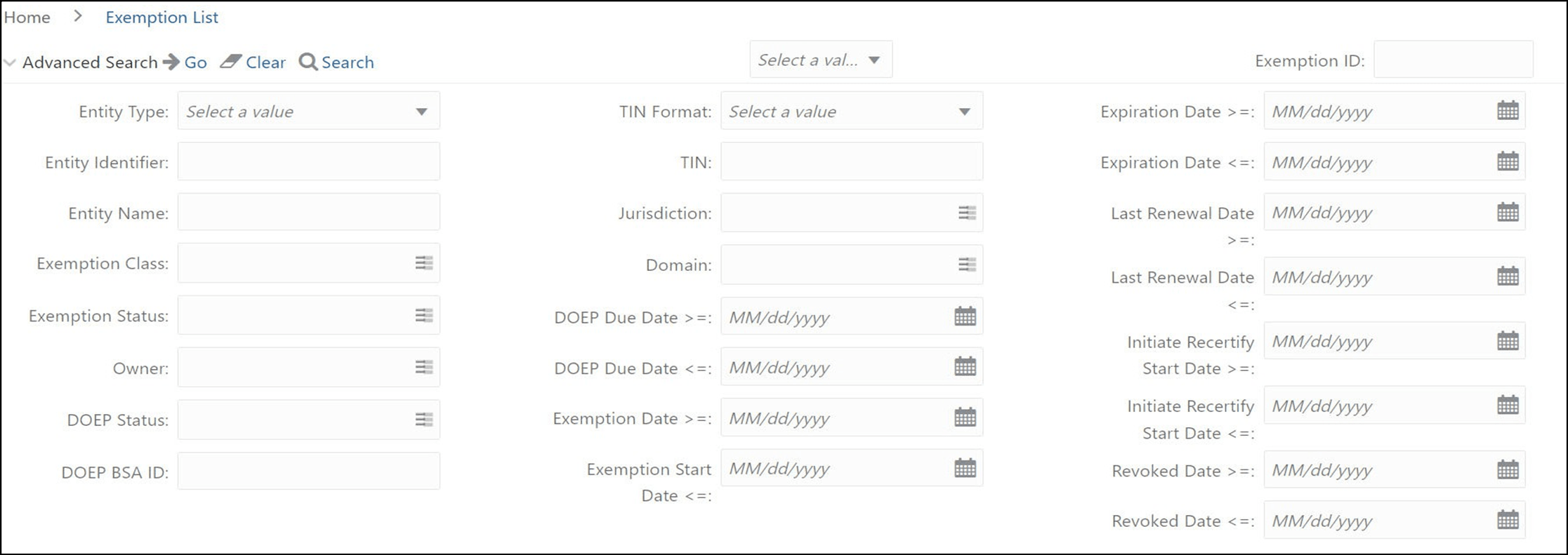
Figure 4-4 Search and List Search Components
- Enter the required fields as explained in the following table.
Table 4-2 Advanced Search Field Descriptions
Field Description Exemption ID Select the exemption ID from the drop-down list. Entity Type Select the entity type from the drop-down list. TIN Format Select the TIN format from the drop-down list. Expiration Date >= Select the expiration date from the calendar. The date greater than or equal to the entered date. Expiration Date <= Select the expiration date from the calendar. The date lesser than or equal to the entered date. Entity Name Enter the entity name. Jurisdiction Select the jurisdiction from the drop-down list. Last Renewal Date >= Select the last renewal date from the calendar. The date greater than or equal to the entered date. Last Renewal Date <= Select the last renewal date from the calendar. The date lesser than or equal to the entered date. Exemption Status Select the exemption status. Entity Identifier Enter the identifier. Exemption Class Select the exemption class. DOEP Status Select the DOEP status. DOEP Due Date <= Select the DOEP due date from the calendar. The date lesser than or equal to the entered date. DOEP Due Date >= Select the DOEP due date from the calendar. The date greater than or equal to the entered date. Initiate Recertify Start Date >= Select the Initiate Recertify Start Date from the calendar. The date greater than or equal to the entered date. Initiate Recertify Start Date <= Select the Initiate Recertify Start Date from the calendar. The date lesser than or equal to the entered date. Exemption Date >= Select the Initiate exemption date from the calendar. The date greater than or equal to the entered date. Exemption Start Date
<=
Select the Initiate exemption Start Date from the calendar. The date lesser than or equal to the entered date. DOEPBSA ID Enter the DOEP BSA ID. Revoked Date >= Select the revoked date from the calendar. The date greater than or equal to the entered date. Revoked Date <= Select the revoked date from the calendar. The date lesser than or equal to the entered date. - ClickGo. The relevant search list page displays.