3.2.3.1 Searching Using Search Components
This page allows you to filter the Search and List using the search components. To filter the Search and List using search components, follow these steps:
- On the Search and List page, click Search. The Search Components page displays.
Figure 3-2 Search and List Search Components
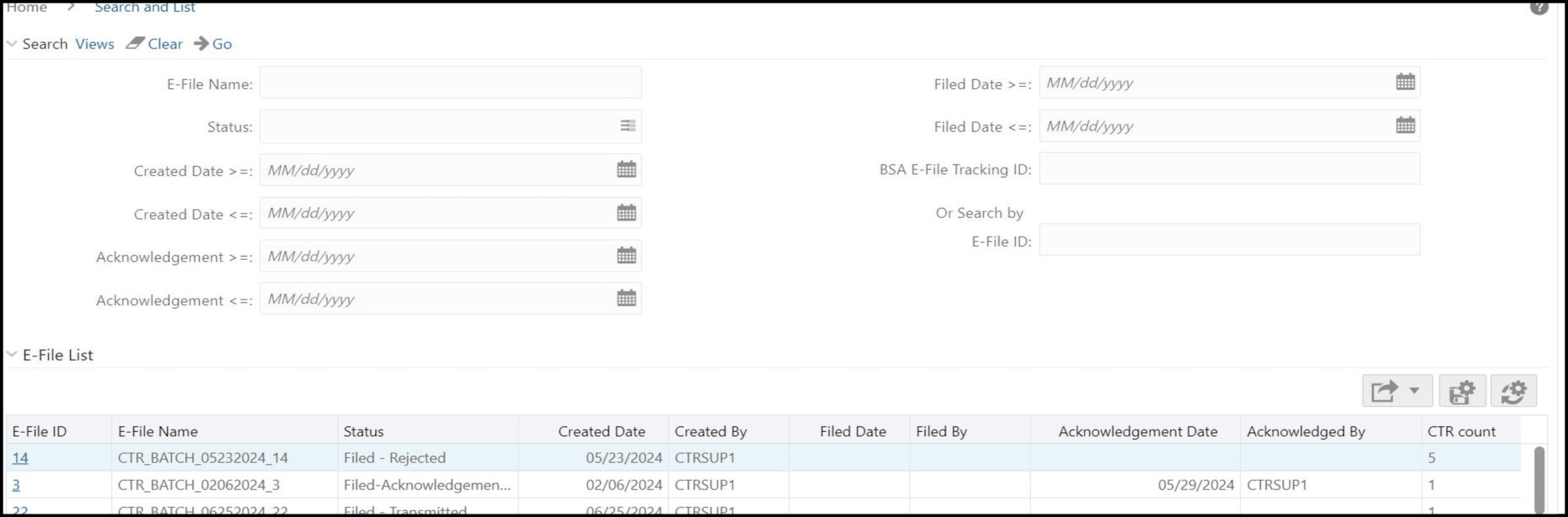
- Enter the details in the search fields as explained in the following table:
Table 3-2 E-File Search Field Descriptions
ColumnName Description E-File Name This field displays the name of the created batch file. The entered name must be the file name when it is submitted to FinCEN. This field supports wildcard. Filed Date >= Enter the date range for when submitted to FinCEN and submission tracked. This field searches for an E-File based on user action date that specifies the E-File site submission status namely, E-File Transmitted, E-File Transmitted w/Warnings, and E-File Rejected.
CTR searches for the E-File with filed date greater than or equal to the entered date.
Filed Date <= Enter a date range to search for E-Files which were submitted to FinCEN and whose submission was tracked. This field searches for an E-File based on user action date that specifies the E-File submission status namely, E-File Transmitted, E-File Transmitted w/Warnings, and E-File Rejected.
CTR searches for the E-File with filed date lesser than or equal to the entered date.
Status Select the required statuses from the options listed in the drop-down. The options listed in the status drop-down are as follows:
- E-File Generated
- Filed- Transmitted
- Filed- Transmitted w/Warnings
- Filed- Rejected
- Filed- Ack Received
- Filed- Ack Processed
- E-File Regenerated
Created Date <= Enter the date range for when the E-File was generated. This field defaults to the current date.
CTR searches for an E-File with a created date lesser than or equal to the entered date.
Created Date >= Enter the date range for when the E-File was generated. This field defaults to the current date.
CTR searches for an E-File with a created date more than or equal to the entered date.
Acknowledgment Date
>=
Enter the date range for acknowledgment from FinCEN that was received. This field searches for E-File based on the action date of user action Ack Rcvd.
CTR searches for an E-File with an Acknowledgment date more than or equal to the entered date.
Acknowledgment Date
<=
Enter the date range for acknowledgment from FinCEN that was received. This field searches for an E-File based on action date for user action of Ack Rcvd.
CTR searches for an E-File with an Acknowledgment date lesser than or equal to the entered date.
BSA E-File Tracking ID Enter the BSA E-File Tracking ID to search for Tracking IDs associated with the submitted E-File. The tracking ID is defined by the FinCEN. This search is based on Tracking ID that were added to the E-File record by the user as part of one of the post E-File submission actions namely, E-File Transmitted, E-File Transmitted w/ Warnings, and E-File Rejected. Or Search by E-File ID Search by E-File ID is mutually exclusive of other search filters. Searching by ID will ignore other filters. - ClickGo. The relevant search list page displays.