Detail - TIN
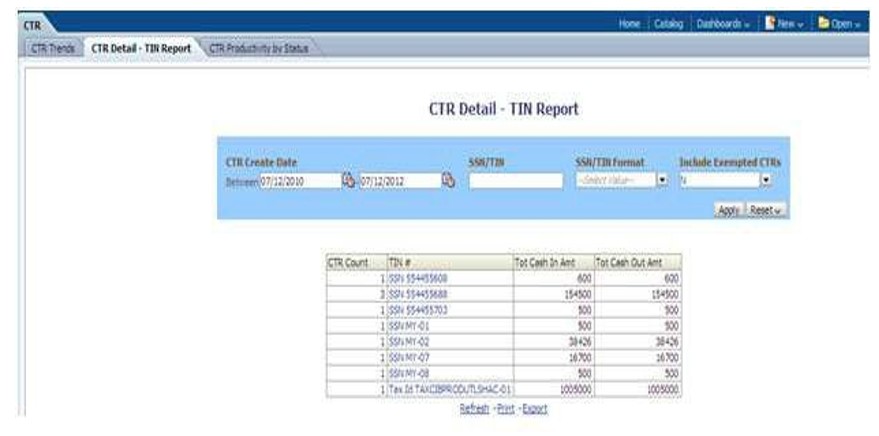
The Currency Transaction Report Detail - TIN dashboard shows the Currency Transaction Report history for last two years on each TIN with various accounts on a TIN with Cash Ins and Cash Outs amounts. This tabular report displays the Currency Transaction Report Count, TIN #, Total Cash In Amount, and Total Cash Out Amount. This report includes the Currency Transaction Reports in the following statuses:
- Filed – Success
- Filed - Success w/errors
- Closed - Exempted status (If Include Exempted Currency Transaction Reports option is set to Y)
Figure 4-52 CTR Detail - TIN Report
To generate the Currency Transaction Report Detail – TIN Report, follow these steps:
- Navigate to the MIS Reports.
- Expand the CTR option displayed on the left-hand side.
Different report types related to CTR Dashboards are displayed in tabs depending upon the user role.
- Click the Currency Transaction Report Detail – TIN Report tab.
The Currency Transaction Report Detail – TIN Report page is displayed with default values entered in the filters.
- To view the Currency Transaction Report Detail – TIN Report, enter the details as described in the following table:
Table 4-19 CTR Detail - TIN Report Filter Descriptions
Filter Name Description Currency Transaction Report Create Date Between
Enter a date range for the search using the Select Date icon. This field defaults to two years less than the current date.
Currency Transaction Report Create Date To
Enter a date range for the search using the Select Date icon. This field defaults to the current date.
SSN/TIN
Enter the SSN or TIN in this field.
SSN/TIN Format
Select a SSN/TIN format from the drop-down options namely, SSN,Tax ID, ITIN, EIN, and Foreign.
Include Exempted Currency Transaction Reports
Select Y or N if you want to include exempted Currency Transaction Reports in your report. This field defaults to N.
Note: If you select ‘Include Exempted Currency Transaction Reports’ option as N, Audit Currency Transaction Reports from the search results is excluded.
- Click Apply.
A tabular report showing Currency Transaction Report Detail – TIN Report is displayed. You can also click Reset to reset all the field values to default values.
- Click any TIN # value in the tabular report to view a detailed report on that TIN.
Figure 4-53 CTR Detail - TIN Report
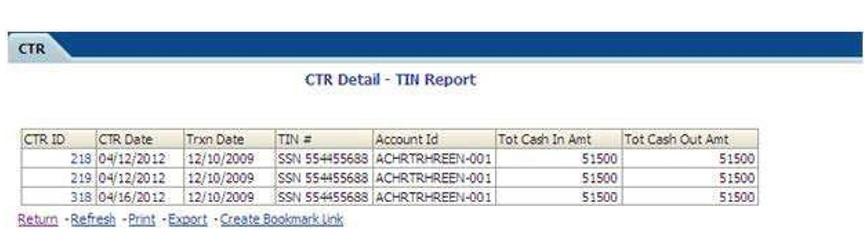
- From detailed report, you can choose Refresh, Print, Export, and Create Bookmark Link.
- Click Return on the detailed report to navigate back to the Currency Transaction Report Detail - TIN Report.