Cash Flow Engine Home Page
When you log in, you see the Cash Flow Engine Home page.
The Home page contains these main areas:
-
Navigator Screen to access menu items.
Figure 3-7 Navigator Screen

-
to Navigate to Admin Console.
Figure 3-8 Admin Console

-
Displays the language of service.
Figure 3-9 Language of service
-
The User Name menu with your user name in the header.
Figure 3-10 User Name
-
Click it to view setup information.
Figure 3-11 View Setup Information

-
Shows the details of Last Login Date and Time.
Figure 3-12 Last Login Date and Time

Figure 3-13 Navigation Screen
Figure 3-14 Navigation Path
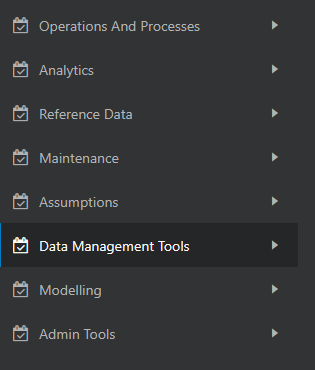
PBSM Cash Flow Engine Cloud Service Navigation Paths are displayed in the List of Navigation Paths. Access all these pages through the CFE Administrator, CFE Auditor, or CFE Analyst Responsibility.
Table 3-6 List of Navigation Paths for Cash Flow Engine Cloud Service
| Page | Navigation Path |
|---|---|
| Operations and Processes | |
| Cash Flow Process | Select Cash Flow Engine Cloud Service menu, select Operations and Processes, and then select Cash Flow Process |
| Cash Flow Edits Process | Select Cash Flow Engine Cloud Service menu, select Operations and Processes, and then select Cash Flow Edits Process |
| Scheduler |
Select Cash Flow Engine Cloud Service menu, select Operations and Processes, and then select Scheduler. |
| Object Administration |
Select Cash Flow Engine Cloud Service menu, select Operations and Processes, and then select Object Administration. Following sub-menus are available under Object Administration: Export Object Import Object |
| Analytics | |
| Report Home Page | Select Cash Flow Engine Cloud Service menu, select Analytics, and then select Home Page |
| SQL Query Browser | Select Cash Flow Engine Cloud Service menu, select Analytics, and then select SQL Query Browser |
| Raw Data Analysis | Select Cash Flow Engine Cloud Service menu, select Analytics, and then select Raw Data Analysis |
| Operational Analysis | Select Cash Flow Engine Cloud Service menu, select Analytics, and then select Operational Analysis |
| Cash Flow Report | Select Cash Flow Engine Cloud Service menu, select Analytics, and then select Cash Flow Report |
| Processed Data Insights | Select Cash Flow Engine Cloud Service menu, select Analytics, and then select Processed Data Insights |
| Data Insights | Select Cash Flow Engine Cloud Service menu, select Analytics, and then select Data Insights |
| Reference Data | |
| Economic Indicator | Select Cash Flow Engine Cloud Service menu, select Reference Data, and then select Economic Indicators |
| Interest Rates | Select Cash Flow Engine Cloud Service menu, select Reference Data, and then select Interest Rates. |
| Currency | Select Cash Flow Engine Cloud Service menu, select Reference Data, and then select Currency. |
| Currency Rates | Select Cash Flow Engine Cloud Service menu, select Reference Data, and then select Currency Rates |
| Dimension Management |
Select Cash Flow Engine Cloud Service menu, select Reference Data, and then select Business Management. Following sub-menus are available under Dimension Management: Attribute Member Hierarchy |
| Holiday Calendar | Select Cash Flow Engine Cloud Service menu, select Reference Data, and then select Holiday Calendar |
| Maintenance | |
| Preferences | Select Cash Flow Engine Cloud Service menu select Maintenance, and then select Preferences |
| Payment Patterns | Select Cash Flow Engine Cloud Service menu, select Maintenance, and then select Payment Patterns. |
| Behavior Patterns | Select Cash Flow Engine Cloud Service menu, select Maintenance, and then select Behavior Patterns. |
| Repricing Patterns | Select Cash Flow Engine Cloud Service menu, select Maintenance, and then select Repricing Patterns. |
| Cash Flow Edits | Select Cash Flow Engine Cloud Service menu, select Maintenance, and then select Cash Flow Edits . |
| Filter | Select Cash Flow Engine Cloud Service menu, select Maintenance, and then select Filter. |
| Management Ledger Configuration | Select Cash Flow Engine Cloud Service menu, select Maintenance, and then select Management Ledger Configuration. |
| Ledger Load History | Select Cash Flow Engine Cloud Service menu, select Maintenance, and then select Ledger Load History. |
| Assumption | |
| Prepayment Rule | Select Cash Flow Engine Cloud Service menu, select Assumption, and then select Prepayment Rule |
| Prepayment Models | Select Cash Flow Engine Cloud Service menu, select Assumption, and then select Prepayment Models |
| Forecast Rates | Select Cash Flow Engine Cloud Service menu, select Assumption, and then select Forecast Rates |
| Discount Methods | Select Cash Flow Engine Cloud Service menu, select Assumption, and then select Discount Methods |
| Behavior Pattern Rule | Select Cash Flow Engine Cloud Service menu, select Assumption, and then select Behavior Pattern Rule |
| Data Management Tools | |
| Data Model Extension | Select Cash Flow Engine Cloud Service menu, select Data Management Tools, and then select Data Model Extension |
| Data File Administration |
Select Cash Flow Engine Cloud Service menu, select Data Management Tools, and then select Data File Administration. Following sub-menus are available under Data File Administration: Data File Specification File Upload and Download Data File History |
| Data Management Interface |
Select Cash Flow Engine Cloud Service menu, select Data Management Tools, and then select Data Management Interface. Following sub-menus are available under Data Management Interface: Data View Designer View |
| Data Quality Framework |
Select Cash Flow Engine Cloud Service menu, select Data Management Tools, and then select Data Quality Framework. Following sub-menus are available under Data Quality Framework: Data Quality Rules Data Quality Groups Execution Summary |
| Data Verification | Select Cash Flow Engine Cloud Service menu, select Data Management Tools, and then select Data Verification. |
| Balance Reconciliation | Select Cash Flow Engine Cloud Service menu, select Data Management Tools, and then select Balance Reconciliation |
| Data Housekeeping | Select Cash Flow Engine Cloud Service menu, select Data Management Tools, and then select Data Housekeeping. |
| Redaction Framework | Select Cash Flow Engine Cloud Service menu,
select Data Management Tools, and then select Redaction.
Following sub-menus are available under Redaction: Redaction Functions Redaction Policies Redaction Approval |
| Data Stratification | Select Cash Flow Engine Cloud Service menu,
select Data Management Tools, and then select Data
Stratification.
Following sub-menus are available under Data Stratification: Stratification Rules Stratification Tiers |
| Extract Data | Select Cash Flow Engine Cloud Service menu,
select Data Management Tools, and then select Extract Data
.
Following sub-menus are available under Extract Data : Datasets Export Data |
| Modelling | |
| Prepayment | Select Cash Flow Engine Cloud Service menu, select
Modelling, and then select Prepayment.
Following sub-menus are available under Prepayment: Prepayment Data Creation Process Prepayment Model Analysis |
| Non Maturity | Select Cash Flow Engine Cloud Service menu, select
Modelling, and then select Non Maturity.
Following sub-menus are available under Non Maturity: Non Maturity Data Creation Process Non Maturity Products Model Analysis |
| Admin Tools | |
| Custom PLSQL | Select Cash Flow Engine Cloud Service menu, select Admin Tools, and then select Custom PLSQL. |
| PLSQL Archive Summary | Select Cash Flow Engine Cloud Service menu, select Admin Tools, and then select PLSQL Archive Summary. |
| Data Foundation Integration | Select Cash Flow Engine Cloud Service menu, select
Admin Tools, and then select Data Foundation
Integration.
Following sub-menus are available under Data Foundation Integration: Data Services Subscriptions ADS Run History |