Configure config.sh File
This section describes how to configure the config.sh file.
config.sh file for installing Compliance
Studio:
- Configure the applicable
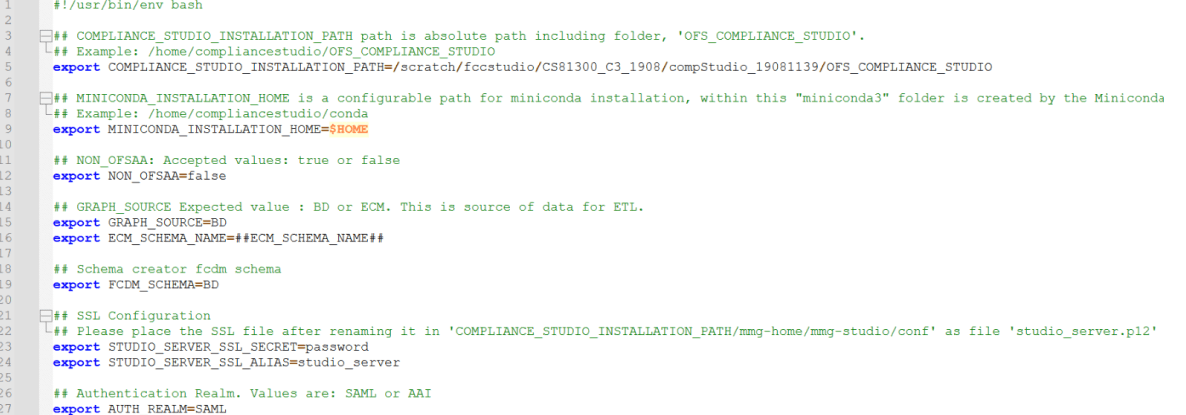
config.shattributes are shown in the following table.A sampleconfig.shfile is shown below for reference.Figure 2-5 Snapshot of config.sh file
Note:
- You must manually set the parameter value in the
config.shfile. If a value is not applicable, enter NA and ensure that the value is not entered as NULL. - If the parameter STUDIO_DB_SERVICE_NAME has been filled, the parameter STUDIO_DB_SID should be left blank, and vice versa.
- If the parameter ATOMIC_DB_SERVICE_NAME has been filled, the parameter ATOMIC_DB_SID should be left blank, and vice versa.
Table 2-9 Configuration parameters
Parameter Significance Value COMPLIANCE_STUDIO_INSTALLATION_PATH Indicates the path where the Compliance Studio installer file is extracted. Provide the path where the new
For example: /scratch/testuser/ OFS_COMPLIANCE_STUDIO.
MINICONDA_INSTALLATION_HOME Indicates configured path for miniconda installation.
By default, the value is set to $HOME, which refers to the user's home directory.
By default, the value is $HOME. NON_OFSAA To install Compliance Studio with OFSAA, enter "false".
To install Compliance Studio without OFSAA, enter "true".
Enter the value as false.
For example:
NON_OFSAA=false
SSL Configuration STUDIO_SERVER_SSL_SECRET Indicates the password for Studio Server P12 that is required for HTTPS configuration. Enter the password created for the studio_server.p12 file.
For example: password.
STUDIO_SERVER_SSL_ALIAS Indicates the alias name for P12 for the Studio Server. Enter alias name of the P12 file for the studio server.
For example: studio_server.
Authentication Realm AUTH_REALM Realm indicates the functional grouping of database schemas and roles that must be secured for an application. Realms protect data from access through system privileges; realms do not give its owner or participant’s additional privileges.
Compliance Studio uses realmbased authorization and authentication for its users.
The Compliance Studio application can be accessed using the following realms:
FCCMRealm Value=AAI
FCCSamlRealm Value=SAML
Enter AUTH_REALM value as SAML or AAI.
For example: SAML
COOKIE_DOMAIN The domain of the server where Compliance Studio is installed. Enter the domain of the server where Compliance Studio is installed.
For example: in.oracle.com
AAI related configuration AUTH_AAI_AUTH_URL The Application URL of ECM/BD application.
URL: http://<Server Hostname>:<Application URL PORT>/ <Context Path>
Enter Application URL of ECM/BD.
For example: http://testserver.in.oracle.com:4000/BDTEST
Note: This parameter is applicable only if AUTH_REALM is AAI
AUTH_AAI_OAUTH_CLIENT_SECRET Indicates the Bearer token (STP_ACC_TKN) To get the instance name, see the Generating the Bearer Token section AUTH_AAI_OAUTH_CLIENT_ID Indicates the Instance Name (STP_ACC_NM) of the Bearer Token. To get the instance name, see the Generating the Bearer Token section IS_USER_AUTHZ_FROM_AAI Indicates the Auth type for Data Studio Set the value as true for AAI AuthZ while using SAML AuthN for Data Studio.
Set the value as false for SAML AuthZ while using SAML AuthN for Data Studio.
MMG SAML related Configuration AUTH_SAML_IDP_URL Indicates the endpoint on the IDP side where SAML requests are posted. The Service Provider (SP) needs to obtain this information from the Identity Provider (IDP). For example, http(s)://idcsxxxx.com/fed/v1/idp/sso
Note: This parameter is applicable only if AUTH_REALM is SAML
AUTH_SAML_LOGOUT_URL Indicates the SAML client identifier provided by the SAML Administrator for the Logout URL information while creating the SAML application for Compliance Studio. Enter the Logout URL for SAML application.
For example: http://<IDCS_APP_SLO_URL>
Note: This parameter is applicable only if AUTH_REALM is SAML
AUTH_SAML_SIGN_AUTHN_REQ It is used to enable authentication through SAML signed request. Set the value as true or false.
By default, the value is false.
AUTH_SAML_SP_KEY_PATH Indicates the file path where the private key for signing SAML assertions or request is stored.
For generating .pem file, see the Generating Files for SAML Signed Request section.
Enter the file path where private key is stored.
For example:
<COMPLIANCE_STUDIO_INSTALLATION_PATH>/spprivatekey. pem
This parameter is applicable only when SAML_SIGN_AUTHN_REQ is set to true.
AUTH_SAML_SP_X509_CERT_PATH Indicates the file path where the service provider’s X509 certificate is stored. It is used by the service provider to validate the authenticity of the SAML assertions or to encrypt/decrypt information exchanged with the Identity Provider.
For generating .cer file, see the Generating Files for SAML Signed Request section.
Enter the file path where service provider’s X509 certificate is stored.
For example:
<COMPLIANCE_STUDIO_INSTALLATION_PATH>/spcertificate. Cer
AUTH_SAML_SIGN_ALGORITHM Indicates algorithm for signing SAML assertions, request or responses. Set this field as blank AUTH_SAML_BINDING_TYPE Indicates how SAML messages are transported between Identity Providers and Service Providers Allowed values are POST and REDIRECT AUTH_SAML_INCLUDE_SP_CERT Flag to indicate if the SAML service provider's X509 certificate should be required for authentication. Set to true if the certificate is required, false otherwise Datastudio SAML related Configuration AUTH_SAML_DS_DESTINATION Indicates the endpoint on the IDP side where SAML requests are posted. The Service Provider (SP) needs to obtain this information from the Identity Provider (IDP). For example, http(s)://idcsxxxx.com/fed/v1/idp/sso
Note: This parameter is applicable only if AUTH_REALM is SAML
AUTH_SAML_DS_ROLE_ATTRIBUTE Indicates the SAML client identifier provided by the SAML Administrator for the Role and Attributes information while creating the SAML application for Compliance Studio. Enter the SAML client identifier.
For example: group.
Note: This parameter is applicable only if AUTH_REALM is SAML.
AUTH_SAML_DS_STUDIO_LOGOUT_URL Indicates the SAML client identifier provided by the SAML Administrator for the Logout URL information while creating the SAML application for Compliance Studio. Enter the Logout URL for SAML application.
For example: http://<IDCS_APP_SLO_URL>
Note: This parameter is applicable only if AUTH_REALM is SAML
MMG Service Configurations DATASTUDIO_CSP_FRAME_ANCESTORS This parameter allows Datastudio UI to be embedded as iFrame in any external application and this controls the allowed origins where datastudio UI can be embedded. In case of ECM-IH integration use case, update the DATASTUDIO_CSP_FRAME_ANCESTORS parameter as follows:
https://<Hostname>:<Compliance_Studio_Gateway_Port>,http://<ecm_webserver_hostname>:<ecm_ui_port>
For example:
DATASTUDIO_CSP_FRAME_ANCESTORS=https://testCSserver.oraclevcn.com:7071,http://testECMserver:8019
DATASTUDIO_HADOOP_HOME Indicates the directory path where Hadoop is installed. Retain the placeholder as it is.
For example, ##HADOOP_HOME##
DB Details of Studio Schema and Atomic schema STUDIO_DB_USERNAME Indicates the username of the Compliance Studio Schema Enter username of the Compliance Studio Schema (newly created Oracle Schema).
For example: CS8130_XXX_XX
ATOMIC_DB_USERNAME Username of the Atomic schema. Enter Username of the Atomic schema.
For example: XXX_ATOM8125
ECM_SCHEMA_NAME Indicates the name of the ECM Atomic Schema. The value should be name of the ECM Atomic Schema.
For example: ATOM8130
Note: If Legacy Graph (ETL connector job using Hadoop) is not required, then set the value as NA.
FCDM_SCHEMA This indicates the datasource for the Production workspace. The available options are ECM and BD. The value of this parameter should be provided either BD or ECM.
For example: ECM
STUDIO_ALIAS_NAME Indicates the Studio schema alias name. Enter Studio alias name.
For example: CS8130_XXX_XX_alias
Note: Enter the alias name that was created during wallet creation.
ATOMIC_ALIAS_NAME Indicates alias name of FCDM source atomic schema given in wallet. Enter alias name of FCDM source atomic schema given in wallet.
For example: XXX_ATOM8125_alias
Note: If Legacy Graph (ETL connector job using Hadoop) is not required, then set the value as NA.
Wallet and TNS Path Details TNS_ADMIN_PATH Indicates the path of the tnsnames.ora file where an entry for the STUDIO_ALIAS_NAME is present. Enter the path of the tnsnames.ora file where an entry for the STUDIO_ALIAS_NAME is present.
For example: <COMPLIANCE_STUDIO_INSTALLATION_PATH>/wallet
WALLET_LOCATION Indicates the Compliance Studio’s wallet location.
Note: For information on creating a wallet, Setup Password Stores with Oracle Wallet.
Enter wallet location of the Compliance Studio.
For example: <COMPLIANCE_STUDIO_INSTALLATION_PATH>/wallet
Logstash home LOGSTASH_HOME Indicates the Logstash home.
Note: Logstash is a supporting software for data ingestion to the OpenSearch.
Enter the path where Logstash is configured.
For example: <COMPLIANCE_STUDIO_INSTALLATION_PATH>/Logstash/logstash-7.16.3
Note: If Graph Pipeline and Entity Resolution functionalities are not required, then set the value as NA.
Graph Schema configuration GRAPH_DB_SERVER_NAME Indicates the Graph Database server name.
Note: The following parameters for graph service are mandatory for successful Compliance Studio installation, and the parameters cannot be set as blank or NA. If you do not want to use graph pipeline functionality, studio schema details should be provided for these parameters.
Enter the server name where the Graph Database is installed.
For example: <testserver>.com
GRAPH_DB_PORT Indicates the Graph Database server port Enter the Graph Database server port.
For example: 1521.
GRAPH_DB_SERVICE_NAME Indicates the Graph Database service name Enter the Graph Database service name.
For example: fccmdb
GRAPH_KEYSTORE_PASSWORD Indicates the password of the keystore file, which stores the password of the graph schema. Enter the password of the keystore file, which stores the password of the graph schema.
For example: passwordXXX
Note: If Graph Pipeline functionality is not required, then set the value as NA.
GRAPH_SCHEMA_DB_SCHEMA_NAME Indicates the Database schema name of the graph schema. Enter the Database schema name of the graph schema.
For example: GSCS8130_XXX_XX.
GRAPH_SCHEMA_WALLET_ALIAS Indicates the wallet alias of the graph schema. Enter the wallet alias of the graph schema.
For example: GSCS8130_XXX_XX_alias.
ENABLE_MATCHING_FOR_GRAPH It is used to enable or disable matching for the graph. The value is either true or false.
For example: ENABLE_MATCHING_FOR_GRAPH=true
GRAPH_AUDIT_DATASOURCE_NAME Indicates the datasource name which points to the database schema where Investigation Toolkit audit log is saved. Enter the datasource name which points to the database schema where Investigation Toolkit audit log is saved.
For example, GS is the datasource name which points to the Graph Schema
GRAPH_FGAC_ENABLE_POLICY_CREATION This parameter is required for fine-grain access control. By default, the value is false. PGX server configuration PGX_MAX_TOTAL_SHARED_DATA_MEMORY_SIZE The absolute memory limit of shared data (includes published graphs and pinned nonreferenced graphs). Enter the absolute memory limit of shared data (includes published graphs and pinned non-referenced graphs).
For example: 20G.
PGX_MAX_TOTAL_PRIVATE_DATA_MEMORY_SIZE The memory limit of private data (includes non-published graphs and PGQL results) relative to the total PGX engine memory limit. Enter the memory limit of private data (includes nonpublished graphs and PGQL results) relative to the total PGX engine memory limit.
For example: 8G.
PGX_MAX_DATA_MEMORY_SIZE_DSUSRGRP Absolute memory limit for any user of the PGX engine whose role is DSUSRGRP. Enter the Absolute memory limit for any user of the PGX engine whose role is DSUSRGRP.
For example: 2G.
PGX_MAX_DATA_MEMORY_SIZE_IHUSRGRP Absolute memory limit for any user of the PGX engine whose role is IHUSRGRP. Enter the Absolute memory limit for any user of the PGX engine whose role is IHUSRGRP.
For example: 10G.
PGX_MAX_PER_SESSION_DATA_MEMORY_SIZE Absolute memory limit for any one session of the PGX engine. Enter the Absolute memory limit for any one session of the PGX engine.
For example: 700M.
PGX_SERVER_URL Indicates the URL of the PGX server. Enter URL of the PGX server.
Note: If SSL is enabled, the URL should be provided with https.
If SSL is disabled, the URL should be provided with http. Ensure to provide the correct hostname for the URL of the PGX service.
If Legacy Graph (ETL connector job using Hadoop) and Graph Pipeline functionalities are not required, then set the value as NA.
Spark Interpreter Configurations DATASTUDIO_SPARK_ENABLED It is used to enable or disable the spark interpreter The value is either true or false. DATASTUDIO_SPARK_MASTER Indicates master URL for the cluster or environment in which the spark job will run. Retain the placeholder as it is.
For example: ##SPARK_MASTER##
DATASTUDIO_SPARK_HOME Indicates the absolute path of the Apache Spark library. Retain the placeholder as it is.
For example: ##SPARK_HOME##
DATASTUDIO_SPARK_DEPLOY_MODE Indicates the mode how the spark application will be deployed. Retain the placeholder as it is.
For example: ##SPARK_DEPLOY_MODE##
R interpreter Settings DATASTUDIO_R_ENABLED It is used to enable or disable the R interpreter.
Note:
• If this parameter is set to true, the DATASTUDIO_R_PYTHON_BINARY and DATASTUDIO_PYTHON_BINARY values must be provided
• If you are using an older Studio schema with an R interpreter already present and install with R_ENABLED set to false, the R interpreter will remain in Studio’s interpreter menu and must be deleted manually
The value is either true or false.
Note: For configuration, see the R Interpreter section in the OFS Compliance Studio Administration and Configuration Guide.
DATASTUDIO_R_PYTHON_BINARY Specifies the exact path to the Python executable within a Conda environment that is configured for use with the R interpreter. For example:
/user/test/miniconda3/envs/default_8.1.3.1.0/bin/python
DATASTUDIO_PYTHON_BINARY Specifies the exact path to the Python executable within a Conda environment. For example:
/user/test/miniconda3/envs/default_8.1.3.1.0/bin/python
Additional environmental variables LD_LIBRARY_PATH Indicates the Oracle Instant client path. Enter the Oracle Instant client path.
For example:
/opt/oracle/instantclient_19_8/:$LD_LIBRARY_PATH
Matching Mechanism MATCHING_MECHANISM Indicates the matching mechanism for Entity Resolution and Graph. The value can be either OS or OT.
OS refers to OpenSearch.
OT refers to Oracle Text.
By default, the value is OS.
OpenSearch Cluster Details OPEN_SEARCH_HOSTNAME Indicates the hostname of the server where the OpenSearch service is installed. OpenSearch is a distributed search and analytics engine. Compliance Studio leverages the search feature offered by OpenSearch.
Note: The parameter related to OpenSearch is applicable for Entity Resolution and Graph use cases when MATCHING_MECHANISM is set to OS.
Enter the hostname of the server where the OpenSearch service is installed.
For example: <testserver>.com.
Note: If Graph Pipeline and Entity Resolution functionalities are not required, then set the value as NA.
OPEN_SEARCH_PORT Indicates the port number where the OpenSearch service is installed. Enter the port number where the OpenSearch service is installed.
For example: 9202.
Note: If Graph Pipeline and Entity Resolution functionalities are not required, then set the value as NA.
OPEN_SEARCH_USERNAME Indicates the OpenSearch Username. Enter the OpenSearch Username. (It is Not Applicable when https enabled is false and authentication is not supported).
For example: admin.
Note: If Graph Pipeline and Entity Resolution functionalities are not required, then set the value as NA.
OPEN_SEARCH_ENCRYPTED_PASSWORD Indicates the encrypted password of the OpenSearch Enter the Encrypted password. (It is Not Applicable when https enabled is false and authentication is not supported).
Note: To generate an encrypted password, see Generate an Encrypted Password for OpenSearch.
If Graph Pipeline and Entity Resolution functionalities are not required, then set the value as NA.
OPEN_SEARCH_HTTPS_ENABLED Indicates if SSL is enabled on the OS server Set it to true when OpenSearch is https enabled. Otherwise set it as false.
Note: If Graph Pipeline and Entity Resolution functionalities are not required, then set the value as false.
OPEN_SEARCH_TRUSTSTORE_FILE_NAME The filename of the OpenSearch keystore that contains the certificates of OS host to trust. (Not Applicable, if https enabled is false). Enter the filename of the OpenSearch keystore that contains the certificates of OS host to trust. (Not Applicable, if https enabled is false).
For example: admin.p12.
Note: If Graph Pipeline and Entity Resolution functionalities are not required, then set the value as NA.
OPEN_SEARCH_TRUSTSTORE_SECRET The password of the OpenSearch keystore file. (Not Applicable, if https enabled is false). Enter the password of the OpenSearch keystore file. (Not Applicable, if https enabled is false).
Note: If Graph Pipeline and Entity Resolution functionalities are not required, then set the value as NA.
DTP Integration Configuration DTP_PIPELINE_FILES Indicates the path the deployed DTP pipeline service files Enter the value as <COMPLIANCE_STUDIO_INSTALLATION_PATH>/deployed/mmg-home/mmg-dtp/dtp-pipeline/dtp-pipeline-service
Replace <COMPLIANCE_STUDIO_INSTALLATION_PATH> with the absolute installation path in the server filesystem
DTP_PIPELINE_SCHEMA_ALIAS Indicates the Studio schema alias name. Enter Studio alias name.
For example: CS8130_XXX_XX_alias
Note: Enter the alias name that was created during wallet creation.
CEL Configuration APP_USERNAME Username used to login to Application Enter one of the users authorized for application usage.
For example: FCCMDSADMIN
WORKSPACE_ID Workspace Name in which event layer needs to be deployed. Enter the workspace name in which the CEL schema is referred
For example: CELWRKSPC
DATASTORE_ID Datastore Name in which event layer needs to be deployed. Enter the datastore name in which the CEL schema is referred to as in the application.
For example: CELDATSTR
USER_ACTION Indicates the user action to be performed while deploying CEL To deploy the CEL ODM to the schema, give the value as UPLOAD CEL_TARGET_ALIAS Indicates Target Schema alias where consolidated event layer is going to be deployed For example: CEL_SCHEMA_ALIAS CEL_SOURCE_ALIAS Source Schema alias from where the data required for consolidated event layer processing is fetched Set the value as source schema alias if the LOAD_TYPE is blank.
For example: BD_ATOMIC_ALIAS
If the LOAD_TYPE value is DB_LIN+C105K, provide the DB_LINK name.
For example: BD_ATOMIC
LOAD_TYPE Indicates the mehod to configure CEL Set as 'DBLINK' if the Source schema and Event layer schema are in different databases, otherwise leave it blank USERNAME Indicates the username of the Compliance Studio server For example: compliance_studio Serivce startup flags
Set the value of the parameter, DEPLOY_ALL_SERVIC E, as true for starting all services and false for starting the selected services.
For example, Compliance Studio independent of OFSAA: set "false" for service(s): entity resolution, matching service, and load-to-open. Compliance Studio lite: set "false" for service(s): fcc-pgql, fcc-pgx-algorithm, fccpgx-java and pgx-server.
DEPLOY_ALL_SERVICE Indicates the service to be started Set the value as true GRAPH_SERVICE_ENABLED This service has to be enabled for Graph use case Set the value as true FCC_UI_ENABLED This service has to be enabled for Entity Resolution and Graph use cases Set the value as true ENTITY_RESOLUTION_ENABLED This service has to be enabled for Entity Resolution use case Set the value as true MATCHING_SERVICE_ENABLED This service has to be enabled for Entity Resolution and Graph use cases Set the value as true LOAD_TO_OPEN_SEARCH_ENABLED This service has to be enabled for Entity Resolution and Graph use cases when MATCHING_MECHANISM=OS Set the value as true MATCHING_SERVICE_OT_ENABLED This service has to be enabled for Entity Resolution and Graph use cases when MATCHING_MECHANISM=OT Set the value as true SCORING_ENGINE_ENABLED This service has to be enabled for Entity Resolution and Graph use cases Set the value as true MATCHING_RULES_ENABLED This service has to be enabled for Entity Resolution and Graph use cases Set the value as true EVENT_SERVICE_ENABLED This service has to be enabled for Consolidated Event Layer Set the value as true MMG_SERVICE_ENABLED This service has to be enabled for all use cases Set the value as true - You must manually set the parameter value in the