5.4.1 Creating Sandbox Workspace
On the Workspace Summary page, click Add Workspace. The Create Workspace window is displayed with the following process:
- Basic Details
- Workspace Schema
- Data Sourcing
- Metadata Sourcing
- Validate
- Summary Basic Details.
To create a basic details of the sandbox workspace, follow these steps:
-
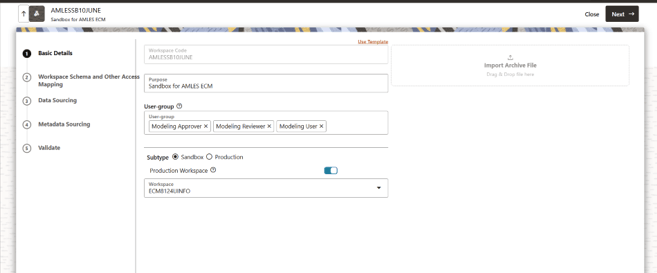
- Enter the Workspace Code and Purpose of the workspace.
- From the drop-down list, select the User-group.
- Select the subtype as Sandbox.
- Select the workspace created in AML Event Production Workspace from the Production Workspace drop-down.
- Click Next.
Figure 5-68 Basic Details
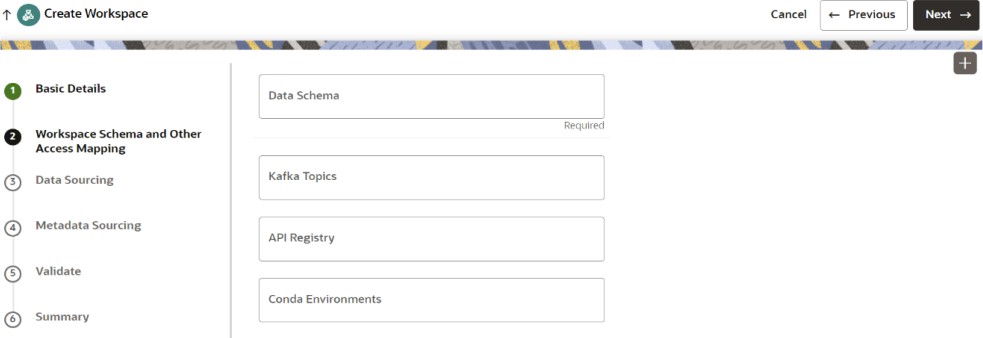
To create the workspace schema, follow these steps:Data Sourcing- Select the Data Schema as ECM Schema alias name.
Note:
Leave the Kafka Topics and API Configurations fields as blank.For more information about creating Data Store, see How to Create Data Store.
- Select the following Conda Environments:
- default_8.1.3.2.0
- ml4aml_8.1.3.2.0
- Click Next.
To select Database objects from the data stores, perform the following steps:Metadata Sourcing- From the Source Data Schema drop-down list, select the Data Store. For more information about creating Data Store, see How to Create Data Store.
- From the Object Type drop-down list, select the following tables from the production data store where sufficient historical data is present:
- FCC_DM_AUDIT
- FCC_DM_DEFINITION
- FCC_DM_FIELD_MAPPING
- FCC_DM_ERROR_DETAILS
- FCC_DM_GATHER_STAT_CONFIG
- FCC_DM_EXEC_LOG
- FCC_DM_DEPENDENT_TABLE
- FCC_BATCH_DATAORIGIN
- Click Next to navigate to the Metadata Sourcing tab.
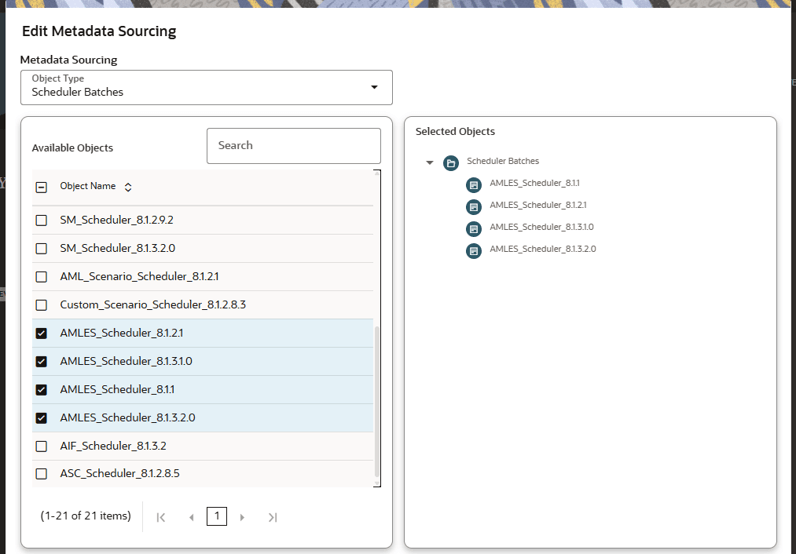
To select available objects from the Metadata Sourcing, follow these steps:Validate Workspace- From the Object Type drop-down list, select AMLES related Scheduler batches.
- In the Available Objects, select AMLES_Scheduler_8.1.1, AMLES_Scheduler_8.1.2.1, AMLES_Scheduler_8.1.3.1, and AMLES_Scheduler_8.1.3.2.0.
- Click Next.
Figure 5-70 Metadata Sourcing
You can validate the Basic details, Workspace schema, Data Sourcing and Metadata sourcing before you physicalize the workspace.
To Physicalize the workspace, Click Finish and then select Physicalize Workspace.SummaryFigure 5-71 Physicalize Workspace
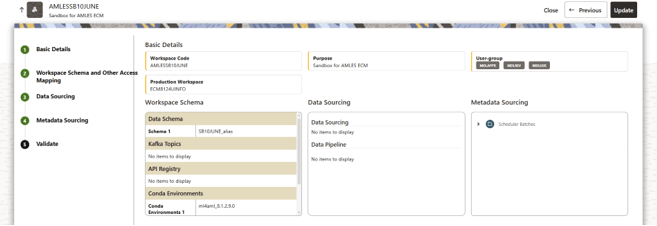 You can view summary of the created workspace.
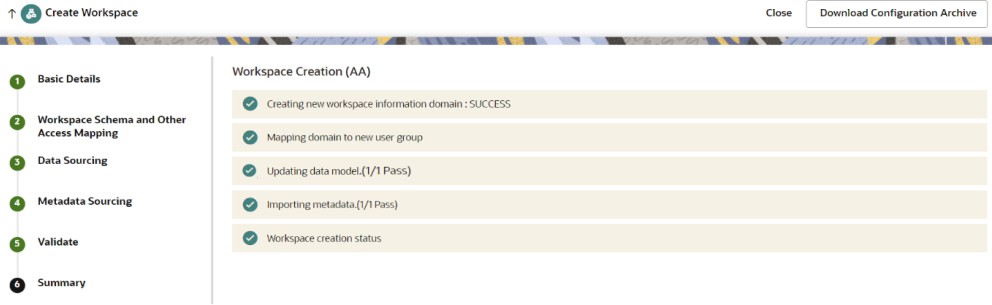
Creating Additional Tables in the Sandbox Schema
Create additional supporting tables by using the following steps:
- Provide grants to the users via the respective SYS user.
GRANT READ, WRITE ON DIRECTORY <DATA_PUMP_DIRECTORY> TO <SOURCE_SCHEMA>; GRANT READ, WRITE ON DIRECTORY <DATA_PUMP_DIRECTORY> TO <TARGET_SCHEMA>; - Replace the placeholders with the appropriate schema values and table name and run the following commands in the terminal.
- Export metadata for each selected table from the source database:
expdp <SOURCE_SCHEMA>/<PASSWORD>@<DB_SERVICE_NAME> \ directory =DATA_PUMP_DIR \ dumpfile=<TABLE_NAME>.dmp \ logfile=<TABLE_NAME>.log \ content=METADATA_ONLY \ INCLUDE=TABLE:\"=\'<TABLE_NAME>\'\" - Run the export script for the following tables:
FCC_DM_CONN_CONFFCC_DM_EXEC_STATUS
- Confirm that every table export log reports successful completion.
- Transfer each table dump file to the target database server’s DATA_PUMP_DIRECTORY:
scp <TABLE_NAME>.dmp <UNIX_USER>@<TARGET_SERVER>:<TARGET_DIRECTORY_PATH> - Import each table into the sandbox schema:
impdp <TARGET_SCHEMA>/<PASSWORD>@<DB_SERVICE_NAME> \ directory=DATA_PUMP_DIR \ dumpfile=<TABLE_NAME>.dmp \ logfile=<TABLE_NAME>_target.log \ INCLUDE=TABLE:\"=\'<TABLE_NAME>\'\" \ REMAP_SCHEMA=<SOURCE_SCHEMA>:<TARGET_SCHEMA> \ REMAP_TABLESPACE=<SOURCE_TABLESPACE>:<TARGET_TABLESPACE> \ TABLE_EXISTS_ACTION=SKIP - Run the import script for the following tables with appropriate
<TARGET_SCHEMA>and<TARGET_TABLESPACE>values:FCC_DM_CONN_CONFFCC_DM_EXEC_STATUS
- Review each import log and confirm that all selected tables were imported successfully into
<TARGET_SCHEMA>.
Create the PKG_FCC_DM_FTP and PKG_FCC_DM package on the Sandbox schema
Create the PKG_FCC_DM_FTP and PKG_FCC_DM package using the following steps:
- Provide grants to the users via the respective SYS user.
GRANT READ, WRITE ON DIRECTORY <DATA_PUMP_DIRECTORY> TO <SOURCE_SCHEMA>; GRANT READ, WRITE ON DIRECTORY <DATA_PUMP_DIRECTORY> TO <TARGET_SCHEMA>; - Log in as a database user in the source database.
- Navigate to
DATA_PUMP_DIR. - Replace the placeholders with the appropriate schema values and run the following commands in the terminal.
- Export
PKG_FCC_DM_FTPfrom the source database:expdp <SOURCE_SCHEMA>/<PASSWORD>@<DB_SERVICE_NAME> \ directory=DATA_PUMP_DIR \ dumpfile=PKG_FCC_DM_FTP.dmp \ logfile=PKG_FCC_DM_FTP.log \ content=METADATA_ONLY \ INCLUDE=PACKAGE:\"=\'PKG_FCC_DM_FTP\'\" - Export
PKG_FCC_DMfrom the source database:expdp <SOURCE_SCHEMA>/<PASSWORD>@<DB_SERVICE_NAME> \ directory=DATA_PUMP_DIR \ dumpfile=PKG_FCC_DM.dmp \ logfile=PKG_FCC_DM.log \ content=METADATA_ONLY \ INCLUDE=PACKAGE:\"=\'PKG_FCC_DM\'\" - Confirm that both package export logs report successful completion.
- Update permissions on the package dump and log files before transfer:
chmod 755 PKG_FCC_DM_FTP.dmp PKG_FCC_DM_FTP.log PKG_FCC_DM.dmp PKG_FCC_DM.log - Transfer the package dump and log files to the target database server’s Data Pump Directory:
scp PKG_FCC_DM_FTP.dmp PKG_FCC_DM_FTP.log PKG_FCC_DM.dmp PKG_FCC_DM.log <UNIX_USER>@<TARGET_SERVER>:<TARGET_DIRECTORY_PATH> - As a DBA on the target database, grant the following access to TARGET Schema:
GRANT SELECT_CATALOG_ROLE TO <TARGET_SCHEMA>; GRANT EXECUTE ON SYS.DBMS_CRYPTO TO <TARGET_SCHEMA>; GRANT EXECUTE ON SYS.DBMS_METADATA TO <TARGET_SCHEMA>; - Import PKG_FCC_DM_FTP into TARGET Schema:
impdp <TARGET_SCHEMA>/<PASSWORD>@<TARGET_DB_SERVICE_NAME> \ directory=DATA_PUMP_DIR \ dumpfile=PKG_FCC_DM_FTP.dmp \ logfile=PKG_FCC_DM_FTP _target.log \ REMAP_SCHEMA=<SOURCE_SCHEMA>:<TARGET_SCHEMA> - Import PKG_FCC_DM into TARGET Schema:
impdp <TARGET_SCHEMA>/<PASSWORD>@<TARGET_DB_SERVICE_NAME > \ directory=<DATA_PUMP_DIRECTORY> \ dumpfile=PKG_FCC_DM.dmp \ logfile=PKG_FCC_DM_target.log \ REMAP_SCHEMA=<SOURCE_SCHEMA>:<TARGET_SCHEMA> - Compile both package specifications and package bodies:
ALTER PACKAGE <TARGET_SCHEMA>.PKG_FCC_DM_FTP COMPILE; ALTER PACKAGE <TARGET_SCHEMA>.PKG_FCC_DM_FTP COMPILE BODY; ALTER PACKAGE <TARGET_SCHEMA>.PKG_FCC_DM COMPILE; ALTER PACKAGE <TARGET_SCHEMA>.PKG_FCC_DM COMPILE BODY; - Review compilation errors if any.
- Confirm that each package specification and body is in valid state.
SELECT object_name, object_type, status
FROM all_objects
WHERE owner = '<TARGET_SCHEMA>'
  AND object_name IN ('PKG_FCC_DM', 'PKG_FCC_DM_FTP')
  AND object_type IN ('PACKAGE', 'PACKAGE BODY')
ORDER BY object_name, object_type;
Parent topic: AML Event Scoring