2 User Access and Permissioning Management
Compliance Studio uses a realm based on unique authentication and authorization for its users. Realm is a security policy domain defined for the application server. It is used to authenticate and authorize users of Compliance Studio.
SAML Realm is selected based on the Identity Provider (IDP) during the
installation. The Compliance Studio application is accessed using the following realm
that you have selected during the installation of the Compliance Studio application:
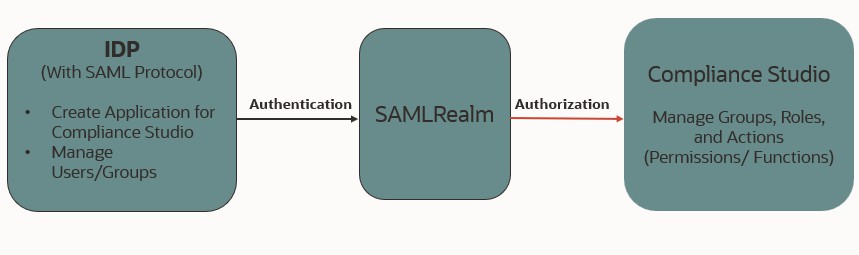
- SAMLRealm: The SAMLRealm uses an identity provider (IDP) Identity Management system to support the SAML2.0 protocol for user authentication. Security Assertion Markup Language (SAML) is an open standard that allows identity providers (IDP) to pass authorization credentials to service providers (SP). IDP acts as the Single Sign-On (SSO) service. Users and Groups are created in the IDP.
The following image illustrates the authentication and authorization process in the Compliance Studio.
Figure 2-1 Compliance Studio - Authentication and Authorization process
- Mapping User Groups
Users must be mapped to User Groups that are mapped to access Oracle Financial Services Compliance Studio (OFS CS). The following subsections provide information about the user groups and roles required in addition to the information about configuring the user groups. - Access Compliance Studio Using SAML Realm
This section provides information on managing users who can access Compliance Studio with Identity Provider (IdP or IDP). The IdP acts as the Single Sign-On (SSO) service provider for implementations between Compliance Studio, Investigation Toolkit, and Enterprise Case Management. This configuration prevents separate login for each application. - Access Data Studio Using SAML Realm
This section provides information on managing users who can access Data Studio with Identity Provider (IdP or IDP). The IdP acts as the Single Sign-On (SSO) service provider for implementations between Compliance Studio, Data Studio, Investigation Toolkit, and Enterprise Case Management. This configuration prevents separate login for each application.