6.3.2.1 Configure the OFS_CRA_SCHEMA_IN.xml File
This section describes how to create database schemas, objects within schemas, and assigning appropriate grants.
Specify the Database Schemas required for the installation in the OFS_CRA_SCHEMA_IN.xml file. Update the values of the various tags and parameters available in this file before executing the Schema Creator Utility.
This file must be configured only if the database is RDBMS.
To configure the OFS_CRA_SCHEMA_IN.xml file, follow these steps:
- Log in to the system as a Non-Root User.
- Navigate to the OFS_CRA_PACK/schema_creator/conf directory.
- Edit the OFS_CRA_SCHEMA_IN.xml file using a Text Editor.
Figure 6-2 Sample OFS_CRA_SCHEMA_IN.xml File
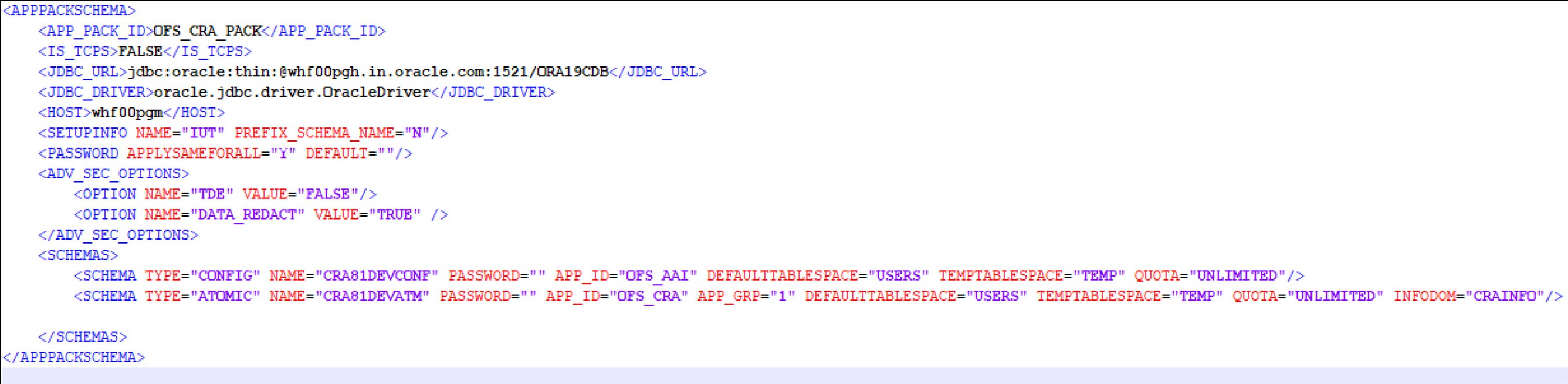
- Configure the values as mentioned in the following table and save the file.
Note:
On successful execution of the utility, the passwords entered in theOFS_CRA_SCHEMA_IN.xmlfile are nullified.
Table 20: OFS_CRA_SCHEMA_IN.xml file Parameters
Table 6-3 OFS_CRA_SCHEMA_IN.xml file Parameters
| Tag Name or Attribute Name | Description | Mandatory (Y or N) | Default Value or Permissible Value | Comments |
|---|---|---|---|---|
| <APP_PACK_ID> | Seeded unique ID for the OFSSAA Application Pack | Y | OFS_CRA_PACK | Do not modify this value. |
| <IS_TCPS> | Enter if the TCPS configuration is required. | Y | Seeded, with FALSE as the default value. | Do not modify this value. |
| <JDBC_URL> |
Enter the JDBC URL. NOTE: You can enter the following JDBC URL type: RAC or NON-RAC enabled database connectivity URL. |
Y |
Example:
|
Ensure that you add an entry (with SID or SERVICE NAME) in the tnsnames.ora file on the OFSAA server. The entry must match the SID or SERVICE NAME used in the JDBC URL. Ensure that you have configured the JDBC URL as follows: jdbc:oracle:thin:/@ |
| <JDBC_DRIVER> | The name of the driver is seeded. | Y | Example: oracle.jdbc.driver.OracleDriver | Only JDBC Thin Driver is supported. Do not modify this value. |
| <HOST> | Enter the Hostname or IP Address of the system on which you are installing the OFSAA components. | Y | Hostname or IP Address | |
| <SETUPINFO>/PREFI X_SCHEMA_NAME |
Identifies whether the value specified in <SETUPINFO>/NAME attribute must be prefixed to the schema name. |
N | Y or N | The default value is N. |
| <SETUPINFO>/NAME |
Enter the acronym for the type of implementation. This information is displayed in the OFSAA Home Page. On executing the schema creator utility, this value is prefixed with each schema name. For example: dev_ofsaaconf, uat_ofsaatm. |
Y |
Seeded, with REG PREFIX_SCHEMA_NAME="N as the default value. Accepts strings with a minimum length of two and a maximum of four. Example: DEV, SIT, PROD |
This message appears in the OFSAA Landing Page as "Connected To: xxxx". The schemas that are created get this prefix. For example, dev_ofsaaconf, uat_ofsaaconf, and so on. |
| <PASSWORD>/ DEFAULT* |
Enter the password if you want to set a default password for all schemas. You also must set the APPLYSAME-FORALL attribute as Y to apply the default password for all the schemas. |
N | The maximum length allowed is 30 characters. Special characters are not allowed. | On successful execution of the utility, the entered password in the OFS_CRA_SCHEMA_IN.xml file is cleared. |
| <PASSWORD>/ APPLYSAMEFORALL |
If you have entered Y in APPLYSAME-FORALL attribute and have specified individual passwords for all the schemas, then the specified individual passwords will take precedence. |
Y |
Default N Permissible: Y or N. Enter Y if you want to apply the password specified in the DEFAULT attribute for all the schemas. If you enter N, provide individual passwords for all schemas. |
Setting this attribute value is mandatory if the DEFAULT attribute is set. |
| <SCHEMA>/TYPE |
The types of schemas supported in this release are ATOMIC, CONFIG, SANDBOX, and ADDON. By default, the schema types are seeded based on the Application Pack. |
Y | ATOMIC or CONFIG |
Only One CONFIG schema can exist in the file. Do not edit this attribute value. This schema identifies as the CONFIGURATION schema that holds the OFSAA setup details and other Metadata information. Multiple ATOMIC schemas can exist in the file. |
| <SCHEMA>/NAME |
The schemas’ names are seeded based on the Application Pack by default. You can edit the schema names if required. The Schema Name will have a prefix of the SETUPINFO/ NAME attribute. SCHEMA NAME must be the same for all the ATOMIC Schemas of the applications within an Application Pack. |
Y |
Seeded, with OFSCONFIG as the default value. The permissible length is 15 characters and only alphanumeric characters are allowed. No special characters allowed except underscore '_'. |
SETUPOINFO/NAME attribute value is prefixed to the schema name being created. For example, if a name is set as 'ofsaatm' and setupinfo as 'uat', then schema created is 'uat_ofsaatm'. NAME must be the same where APP_GRP=1 for all SCHEMA tags (Not applicable for this Application Pack). |
| <SCHEMA>/PASSWORD |
Enter the password of the schema to be created. If this attribute is left blank, then the password specified in the <PASSWORD>/DEFAULT attribute is taken as the Schema Password. |
N | The maximum length allowed is 30 characters. Special characters are not allowed. | It is mandatory to enter the password if you have set the <PASSWORD>/ APPLYSAMEFORALL attribute as N. |
| <SCHEMA>/APP_ID | The Application ID is seeded based on the Application Pack. | Y |
Unique seeded values are: OFS_AAI OFS_CRA |
Identifies the Application or Product for which the schema is being created. Do not modify this attribute value. |
| <SCHEMA>/DEFAULT TABLESPACE |
Enter the available default tablespace for DB User. If this attribute is left blank, then USERS is set as the default tablespace. |
N |
Seeded, with USERS as the default value. Any existing valid tablespace name is Permissible. |
Modify this value to associate any valid tablespace with the schema. |
| <SCHEMA>/TEMPTA BLESPACE |
Enter the available temporary tablespace for DB User. If this attribute is left bank, TEMP is set as the default tablespace. |
N |
Seeded, with TEMP as the default value. Any existing valid temporary tablespace name is Permissible. |
Modify this value to associate any valid tablespace with the schema. |
| <SCHEMA>/QUOTA |
Enter the quota to be set on the DEFAULTTABLESPACE attribute for the schema or user. By default, the quota size is set to 500M. Minimum: 500M or Unlimited on default Tablespace. |
N |
Seeded, with UNLIMITED as the default value. Example: 600M/m 20G/g UNLIMITED/unlimited |
Modify this value to grant the specified quota on the mentioned tablespace to the user. |
| <SCHEMA>/ INFODOM |
Enter the name of the Information Domain to associate this schema. The schema creator utility automatically derives an Information Domain Name based on the Application Pack if no value is specified for this attribute. |
N |
Seeded, with OFSINFDOM as the default value. Permissible length is 16 characters and only alphanumeric characters are allowed. No special characters are allowed. |
|
|
<ADV_SEC_OPTIONS> / |
Parent tag to hold Advance Security Options. | N |
Uncomment the tag and edit if you want to add security options. For example, TDE and Data Redact. For details, see the example in the comments for the <TABLESPACE>/ENCRYPT tag. |
|
|
<ADV_SEC_OPTIONS> /TDE |
Tag to enable or disable TDE. | N | The default is FALSE. To enable TDE, set this to TRUE. | Ensure this tag is not commented if you have uncommented <ADV_SEC_OPTIONS> |
|
<ADV_SEC_OPTIONS> /DATA_REDACT |
Tag to enable or disable the Data Redaction feature. | N | The default is FALSE. To enable DATA_REDACT, set this to TRUE | Ensure this tag is not commented if you have uncommented<ADV_SEC_OPTIONS> |
| <TABLESPACES> |
Parent tag to hold <TABLESPACE> elements |
N | NA |
Uncomment the tag and edit. ONLY if tablespaces are to be created as part of the installation. For details, see the example following the table. When TDE is TRUE in ADV_SEC_OPTIONS, then the <TABLESPACES> tag must be present in the XML file. |
| <TABLESPACE>/NAM E | Logical Name of the tablespace to be created. | Y |
Name, if specified, must be referred in the <SCHEMA DEFAULTTABLESPACE= "##NAME##"> attribute. Note the ## syntax. |
|
| <TABLESPACE>/VAL UE | Physical Name of the tablespace to be created. | Y | NA | Value, if specified, is the actual name of the TABLESPACE. |
| <TABLESPACE>/DAT AFILE | Specifies the location of the data file on the server. | Y | NA | Enter the absolute path of the file to be created. |
| <TABLESPACE>/AUTOEXTEND | Specifies if the tablespace must be extensible or have a hard limit. | Y | ON or OFF | Set to ON to ensure that the tablespace does not run out of space when full. |
| <TABLESPACE>/ENCRYPT | Specifies if the tablespace(s) must be encrypted using TDE | Y | ON or OFF |
Set to ON to ensure that the tablespaces when created are encrypted using TDE. NOTE: Encryption of tablespaces requires enabling Transparent Data Encryption (TDE) on the Database Server. Example: The following snippet shows that TDE is enabled and hence the tablespace is shown with encryption ON.
|