3.4.11 Alert Decision
You can add new alert level action and standard comments to Alert Decision. For more
information, see Appendix N in OFS Customer Screening Administrator
Guide.
Note:
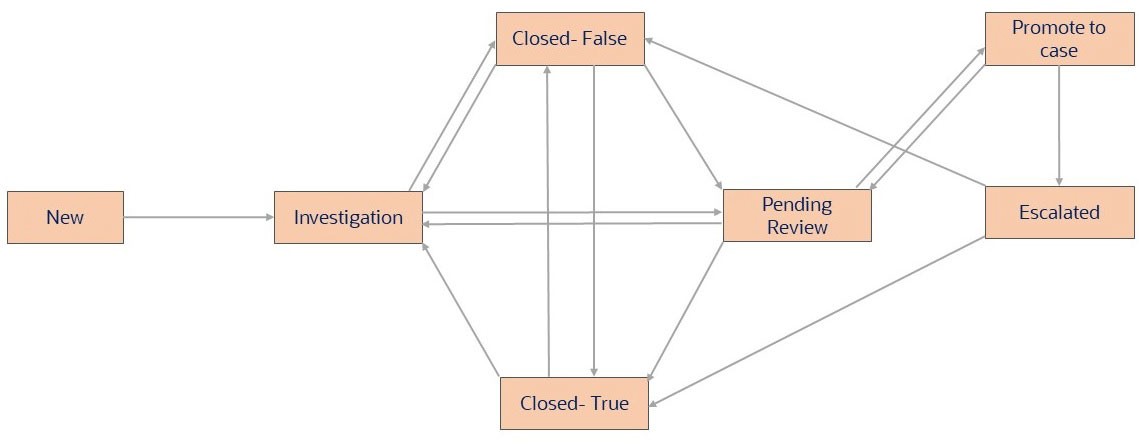
A Reviewer user cannot access the alert decision.When an alert is created the status of the alert will be New, when that alert is opened by an analyst the status of the alert changes to Investigation.
Alert Decision (For all Alert types) - Analyst
- Close as False Positive – This decision in sanctions screening is available for Analyst’s action. This decision means that an alert from a watchlist screening (such as for FATF, EU, UN, etc.) has been reviewed and found to be a mistaken match. The customer does not pose a risk, does not need monitoring, and can proceed with onboarding. This is applicable for all types of alerts. The status will change to False Positive.
- Recommend True Match- This decision in sanctions screening
is available for Analyst’s action. This decision means that an analyst has
investigated an alert from a watchlist screening (such as for FATF, EU, UN,
etc.) and determined the individual or entity is a genuine match to a watchlist.
When an analyst takes action as Recommend True Match the status of the alert
changes to Pending Review. The case is then assigned to a supervisor for final
review and approval according to a configurable 4-eyes workflow. This is
applicable for all types of alerts.
Note:
When the event is selected as False Positive, Recommend True Match decision cannot be taken or vice versa
Alert Decision for (SAN and Prohibition) - Supervisor
- Approve Recommend- This decision in sanctions screening is available for Supervisor’s action. This decision in sanctions screening means that the person or entity being screened has been positively identified as a match to a sanctioned party (as listed by authorities such as OFAC, the EU, UN, etc.) by the analyst and approved by supervisor. As a result, the organization is required to terminate any business relationship or transaction with that person or entity. The status will change to True Match Exit Required.
- Reject Recommend – Further Information Required - This decision in sanctions screening is available for Supervisor’s action. If a supervisor needs more information on an alert recommended as a true match, they can reject the analyst's recommendation. The alert goes back to the analyst for further investigation with ‘status-investigation’ for providing additional evidence. The status will change to Investigation.
- Reject Recommend – Close as False Positive - This decision in sanctions screening is available for Supervisor’s action. If the supervisor rejects the analyst's true match recommendation, they can close the alert as a false positive. Alert status is ‘False Positive’. This is the final decision, and the alert is closed with no further action needed. The status will change to False Positive.
- Re-Open- This decision in sanctions screening is available for Supervisor’s action. If an analyst closes an alert as a false positive, the supervisor can reopen it. This changes the alert status to "Investigation" and assigns the alert back to the analyst for an investigation. The status will change to Investigation.
Alert Decision (PEP and EDD) - Supervisor
- Approve Recommend- This decision in sanctions screening is available for Supervisor’s action. This decision in sanctions screening means that the person or entity being screened has been positively identified as a match to a sanctioned party (as listed by authorities such as OFAC, the EU, UN, etc.) by the analyst and approved by supervisor. As a result, the organization is required to terminate any business relationship or transaction with that person or entity. The status will change to True Match Exit Required.
- Confirm Exit Required - This decision in sanctions screening is available for Supervisor’s action. When the analyst investigates a person or entity and positively identifies as a match to a PEP or Adverse media, exclusion list, and so on. As a result, the organization is required to terminate any business relationship or transaction with that person or entity. The status will change to True Match Exit Required.
- Confirm True Match Monitored – This decision in sanctions screening is available for Supervisor’s action. A person or entity being screened has been positively identified as a match to a PEP or Adverse media, exclusion list, and so on. As a result, the organization is required to subject this particular relationship or transaction to ongoing monitoring. The status will change to True Match Monitored.
- Confirm True Match Not Monitored -This decision in sanctions screening is available for Supervisor’s action. A sanctions or watchlist has been identified by supervisor as a match to a PEP or Adverse media, exclusion list, and so on. Despite the true match, the institution has decided not to subject this particular relationship or transaction to ongoing monitoring. The status will change to True Match Not Monitored.
- Re-Open- This decision in sanctions screening is available for Supervisor’s action. If an analyst closes an alert as a false positive, the supervisor can reopen it. This changes the alert status to "Investigation" and assigns the alert back to the analyst for an investigation. The status will change to Investigation.
Promoting to Case for SAN - Supervisor
The Promote to Case status is available when the Enterprise Case Management (ECM) L2
is enabled and status of the Alert is in Pending Review. See Promoting to case PMF
work flow for the Process Modeling Framework (PMF) work flow.
Note:
Bulk Alerts cannot be promoted to case.To promote to case for SAN, follow these steps:
- From the Alert Decisionsection, select the Promote to Casebutton.
- Select the Standard Comments and then enter the comments to explain your analysis. Click Clear if you want to clear the comments.
- Add the attachments, if any and, click Save and Close or Clear to Clear the attachment and details.
When you select Promote to Case, a new case will be created in ECM for the same Alert
for the next level analysis.
Figure 3-29 Promoting to Case PMF Work Flow
Note:
To integrate TF alerts with ECM post promoting to case, see the Configuring Sanctions Server Details for L2 Feedback section in the ECM Administration and Configuration Guide.