5 Getting Started
To get started, you must activate the Data Foundation Cloud Service (DFCS). After activating the Cloud Service, you can onboard Application Users to use the subscribed cloud services.
Figure 5-1 Illustration of the Cloud Subscription Workflow
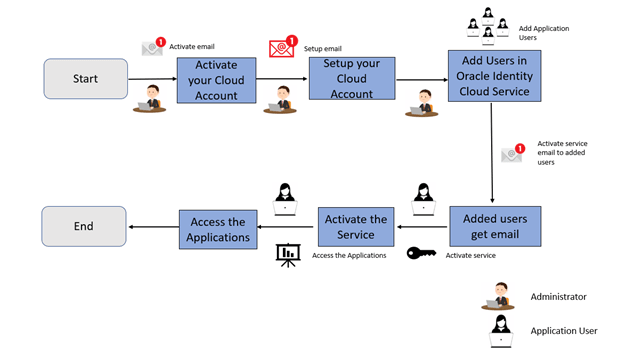
Illustration of the Cloud Subscription Workflow
This document describes the set of actions that can be performed by:
- An Administrator to activate the Cloud Account and onboard Applications Users for the subscribed Cloud Services.
- The Application Users to activate and use the Cloud Services that are provisioned by the Administrator.
- Activate Application User Account
After the administrator successfully adds an application user, they can log in and activate their cloud account and use the subscribed cloud services provisioned by the administrator.
Choosing Between a New or Existing Cloud Account
Every administrator in a cloud account (tenancy) has access to all subscriptions within that account. To ensure that new administrators cannot access existing subscriptions, you should activate new subscriptions in a separate tenancy by creating a new Oracle Cloud Account. If separate access controls are not needed, you may add new subscriptions to an existing Oracle Cloud Account.