7.2 Data Maintenance Interface
Data Maintenance Interface (DMI) helps to design a Data Form in a user-specified format. Further, it allows performing data entry-type actions using the Designed Form.
The Form Builder allows the user to build a form to maintain the underlying data.
- Data Entry: This allows the user to maintain the data either through the form that has been defined or do a bulk upload using the excel upload mechanism. A strong data governance process is enabled through an approval workflow of the data maintained.
Process of DMI Windows
The DMI Process starts with a user creating forms in the Form Builder. After
the creation of forms, a user with Authorization Privileges authorizes the forms. The
Authorized Forms are then used by users to enter data into the database.
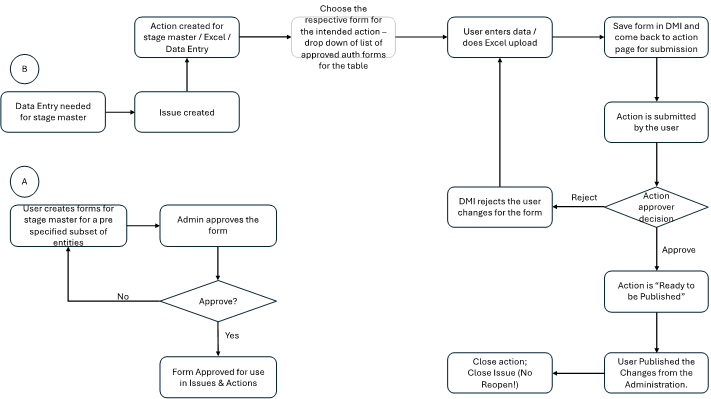
Figure 7-1 DMI Process Flowchart
-
Refer to the Identity Management User Guide for details on user roles and their descriptions, which define the permissions required to perform the actions described above.