3.2.1 Download the Application Certificate
The Application Certificate is required for verification purposes when you use cURL commands. You may choose not to download the certificate if you plan to turn off the cURL Certificate Verification and use an insecure connection (if you add the --insecure Flag to the cURL command).
Downloading the Application Certificate in Firefox
- Log in to the DFCS Application.
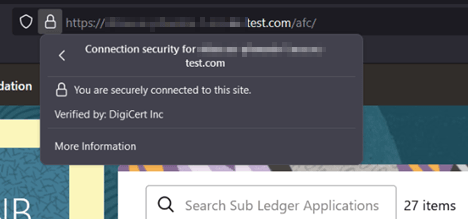
- Click the View site information/Verified by
 Icon in the Browser URL Address Bar.
- Select More information.
Figure 3-1 Certificates - More information
- Click View Certificate and then click
PEM(cert) to download the certificate.
Figure 3-2 Download PEM (cert)

Downloading the Application Certificate in Google Chrome and Microsoft Edge
- Open Chrome or edge and go to the web application you wish to download the certificate from.
- In the address bar, click on the lock icon next to the URL.
- A small dropdown will appear. Click on Connection is secure. Then, click on Certificate is valid.
- In the certificate window, navigate to the Details tab.
- Click on the Export button to begin downloading the certificate.
- When prompted, choose Base-64 encoded X.509 (.CER). This will provide a PEM file.
- Save the file with the .pem extension.