15 ML Integration for AML Event Scoring
AML Event Scoring brings in Machine Learning capabilities into case investigation. Our target is to reduce false positives, enhance efficiency and accuracy of investigation and ensure timely disposition of alerts and cases. This will ensure lower investigation time, reduce investigation cost, and prevent Fis from getting hefty fines by regulators. This will improve trust with regulatory bodies and with customers.
AML Event Scoring
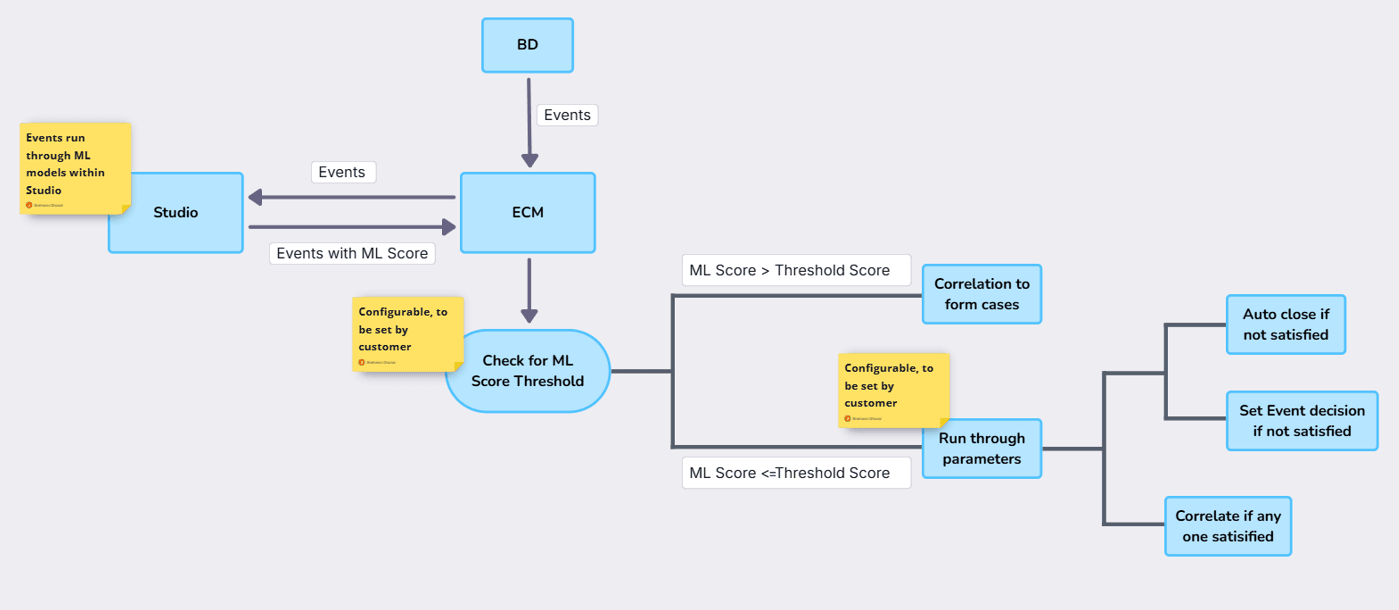
- Threshold scores: Banks will configure threshold scores for each model. If ML score of events is more than the threshold score, then they will directly take part in correlation. Otherwise, they will move to the next steps.
- Parameter check: Customers will be able to pick from a list of five parameters – customer risk rating, PEP, customer tenure, prior SAR filed from ECM and first-time alert.
- If any event is not meeting any of the parameter conditions, then users will be able to either auto close the events or set decision on the events.
- If an event meets any of the set parameter conditions, then they will take part in correlation to form cases.
Figure 15-1 AML Event Scoring
- Customer risk rating – Users will be able to choose from five different risk ratings, namely, KYC risk, geography risk, business risk, watchlist score and effective risk
- PEP – Check whether a politically exposed person is involved
- Customer Tenure – users will be able to configure the tenure of the customer, that is, they can have a check against how long the focal entity has been a customer of the bank
- Prior SAR filed from ECM – This will check if a prior SAR was filed on the entity from ECM in the past ‘x’ months, users can also configure which statuses to check against.
- First time alert – Users can set a look-back period to check if the alert generated was a first time alert in the last ‘x’ months (x being a configurable value).
Configuration
We are giving users the ability to configure several items as part of AMLES.
- Configure whether to auto close alerts or set decision on the alerts. When decision is set on the alert as false positive, it will take part in correlation and will not be auto closed
- Configure the threshold score of each model
- Configure the type of customer risk to be used
- Configure the customer tenure
- Configure the status and look-back period for prior SAR check.
- Configure the look-back period for first time alerts
For more information, see the ML Integration for AML Event Scoring chapter in Oracle Financial Services Enterprise Case Management Administration and Configuration Guide.