19.2 Post-installation Steps

  1. Log in as ECM Administrator.
  2. Select Case Management Configuration and then select Manage Common Parameters.
  3. Under the Parameter category, select Deployment Based and under Parameter name, select Compliance Studio Integration for AMLES. Update the following fields with required values:
    • Parameter Value = Y
    • Attribute 1 Value = Replace #SOURCE_SCHEMA# with the BD Atomic Schema which is the Source Schema for BD-ECM batches. If its pack on pack (BD and ECM Atomic schema is same), then it will be same as ECM Schema name.
  4. In batch configuration do the following:
    1. Run the following scripts:
      • If BD and ECM schema are in same DB and different schema then replace <<BD_ATOMIC_SCHEMA>> placeholder with BD schema and run below script and commit.
        UPDATE pr2_process_task_parameter SET v_task_parameter_value = 
        replace(replace(v_task_parameter_value, '"SOURCENAME=##AMLSOURCE##"', '"SOURCENAME=<<BD_ATOMIC_SCHEMA>>"'), '"LOADTYPE=##AMLLOADTYPE##"', '"LOADTYPE="') 
        WHERE v_process_id IN (SELECT v_process_id FROM pr2_process_b 
        WHERE v_process_name IN ( 'BD_EVENT_ENTITY_MAP_GENERICML', 'BD_GENERIC_ENTITY_ML' )); 
      • If BD and ECM are in pack on pack then run below script in config schema:
        UPDATE pr2_process_task_parameter SET v_task_parameter_value = 
        replace(replace(v_task_parameter_value, '"SOURCENAME=##AMLSOURCE##"', '"SOURCENAME="'), '"LOADTYPE=##AMLLOADTYPE##"', '"LOADTYPE="') 
        WHERE v_process_id IN (SELECT v_process_id FROM pr2_process_b 
        WHERE v_process_name IN ( 'BD_EVENT_ENTITY_MAP_GENERICML', 'BD_GENERIC_ENTITY_ML' ));
        
    2. Add below processes or Data Transformation Tasks inside BD_Correlation in below order.
      1. BD_ML_Score - Oracle Behavior Detection to CA ML Score- This is to fetch the ML Score from Studio and populate in FCC_EVENTS table.
      2. Either ML_SCORE_BASED_EVNT_AUTO_CLSR or ML_SCORE_BASED_EVENT_DECISION based on client requiremnt:
        • If client needs to autoclose and update decision of Events based on the Threshold configured (outlined below) then Add ML_SCORE_BASED_EVNT_AUTO_CLSR Data Transformation Task.
        • If client needs to just update decision of Events based on the Threshold configured (outlined below) and allow them to participate in Correlation then Add ML_SCORE_BASED_EVENT_DECISION Data Transformation Task.

          Figure 19-1 Autoclosure and Autodecisioning of Events
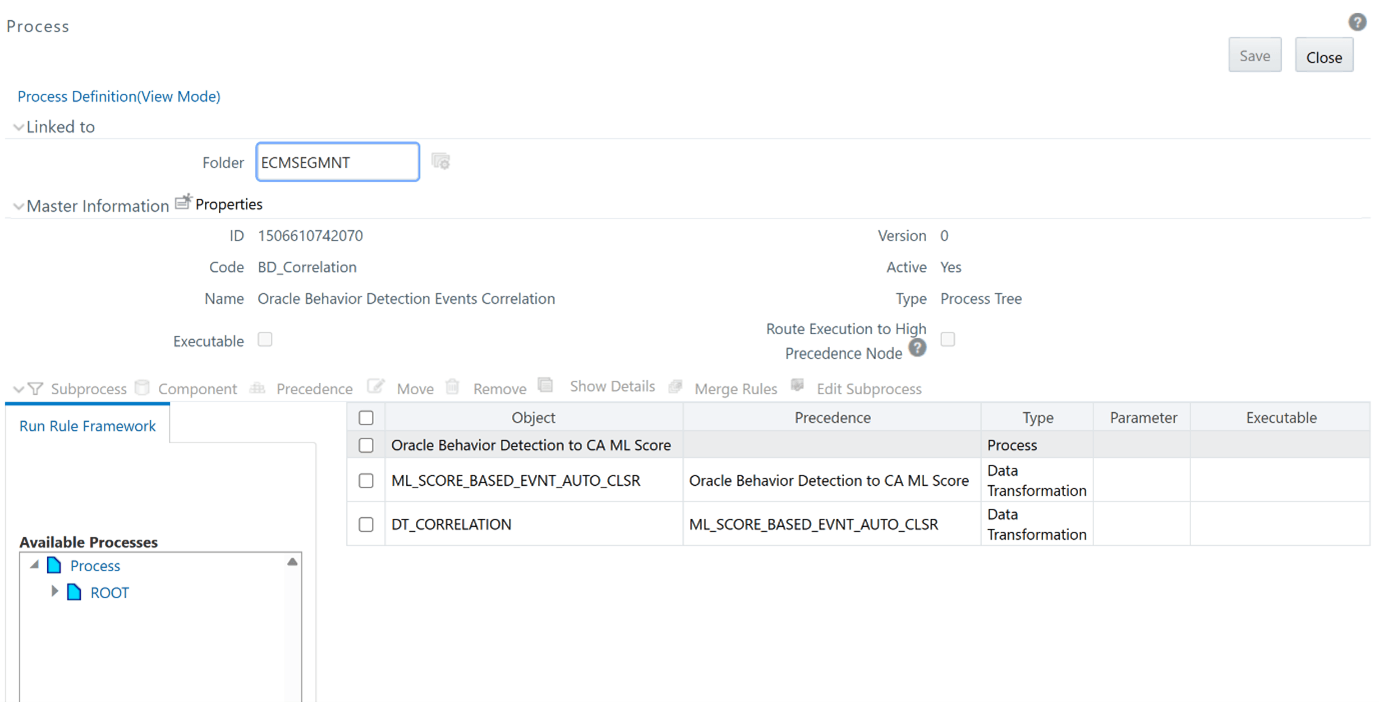

          Autoclosure and Autodecisioning of Events

          Figure 19-2 Only Autodecisioning of events
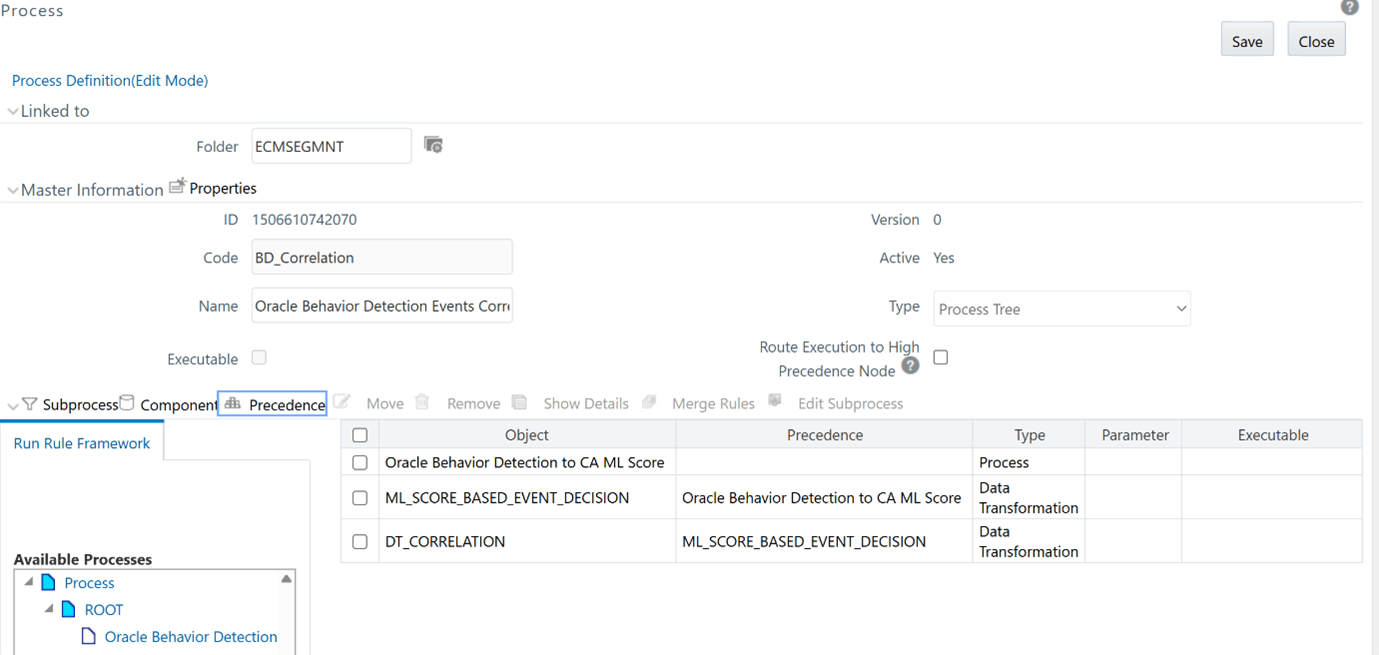

          Only Autodecisioning of events

    3. Set the precedence of the task before DT_CORRELATION
  5. In threshold configuration do the following:
    1. Run the following scripts:
      • If BD and ECM schema are in same DB and different schema then replace <<BD_ATOMIC_SCHEMA>> placeholder with BD schema and run below script and commit.
        UPDATE pr2_process_task_parameter SET v_task_parameter_value = 
        replace(replace(v_task_parameter_value, '"SOURCENAME=##AMLSOURCE##"', '"SOURCENAME=<<BD_ATOMIC_SCHEMA>>"'), '"LOADTYPE=##AMLLOADTYPE##"', '"LOADTYPE="') 
        WHERE v_process_id IN (SELECT v_process_id FROM pr2_process_b 
        WHERE v_process_name IN ( 'BD_EVENT_ENTITY_MAP_GENERICML', 'BD_GENERIC_ENTITY_ML' )); 
      • If BD and ECM are in pack on pack then run below script in config schema.
        UPDATE pr2_process_task_parameter SET v_task_parameter_value = 
        replace(replace(v_task_parameter_value, '"SOURCENAME=##AMLSOURCE##"', '"SOURCENAME="'), '"LOADTYPE=##AMLLOADTYPE##"', '"LOADTYPE="') 
        WHERE v_process_id IN (SELECT v_process_id FROM pr2_process_b 
        WHERE v_process_name IN ( 'BD_EVENT_ENTITY_MAP_GENERICML', 'BD_GENERIC_ENTITY_ML' ));
      • Add below processes or Data Transformation Tasks inside BD_Correlation in below order. Set the precedence of the task before DT_CORRELATION
        1. BD_ML_Score - Oracle Behavior Detection to CA ML Score- This is to fetch the ML Score from Studio and populate in FCC_EVENTS table.
        2. Either ML_SCORE_BASED_EVNT_AUTO_CLSR or ML_SCORE_BASED_EVENT_DECISION based on client requiremnt- If client needs to Autoclose and update decision of Events based on the Threshold configured(outlined below) then Add ML_SCORE_BASED_EVNT_AUTO_CLSR Data Transformation Task. If client needs to just update decision of Events based on the Threshold configured(outlined below) and allow them to participate in Correlation then Add ML_SCORE_BASED_EVENT_DECISION Data Transformation Task.

          Figure 19-3 Autoclosure and Autodecisioning of Events
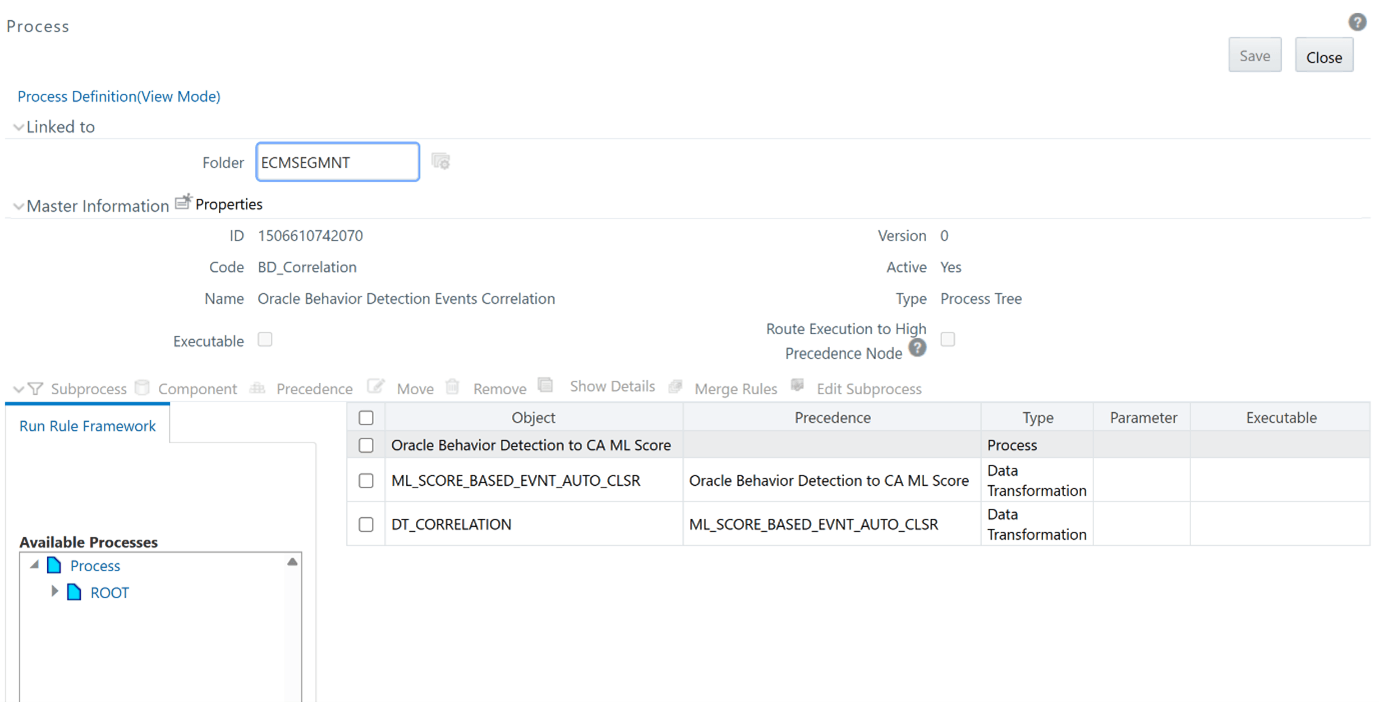

          Autoclosure and Autodecisioning of Events

          Figure 19-4 Only Autodecisioning of events
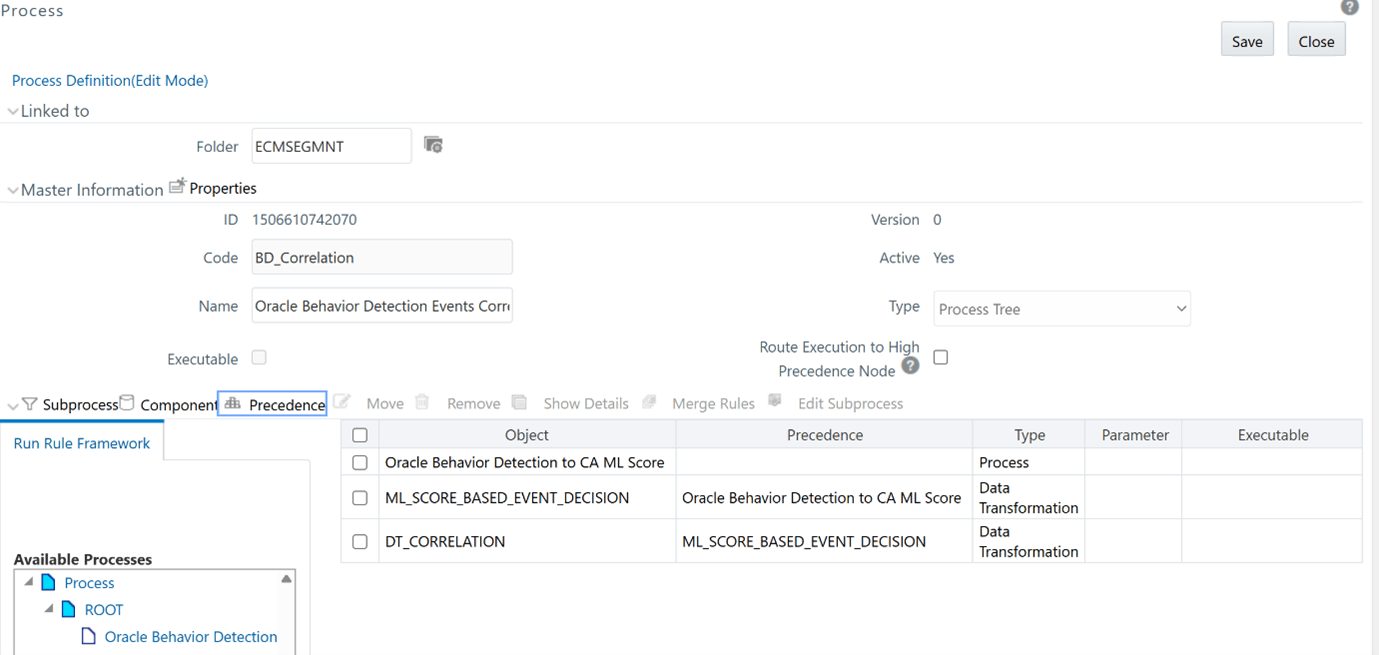

          Only Autodecisioning of events

  6. In threshold configuration do the following:
    Two new tables are introduced:
    • FCC_MODEL_GROUP_THRSLD_MAP - Used to configure threshold at each Model group level. Provide the range between 0 to1. If the ML Score of the Event is less than or equal to that of the threshold value configured in FCC_MODEL_GROUP_THRSLD_MAP for its Model group, then System will further consider the threshold param values configured in the FCC_MODEL_GROUP_ENTITY_PARAM table.
    • FCC_MODEL_GROUP_ENTITY_PARAM - Used to configure threshold Params and its values at each Model group level.
    Only following focus types of the events are considered here:
    • CUSTOMER
    • ACCOUNT
    • HOUSEHOLD
    • CLIENT_BANK
    • EXTERNAL_ENTITY

    If CUSTOMER is the Focus Type of the Event, then System will look for Customer related Params.

    If ACCOUNT is the Focus Type of the Event, then System will pick the Primary Customer of that Account and look for Customer related Params.

    If HOUSEHOLD is the Focus Type of the Event, then System will pick the Primary Account of that Household and then pick Primary Customer of that Account and look for Customer related Params.

    If CLIENT_BANK is the Focus Type of the Event, then System will look for Client Bank/Correspondent Bank related Params.

    If EXTERNAL_ENTITY is the Focus Type of the Event, then System will look for External entity related Params.

    If CUSTOMER is the Focus Type of the Event, then System will look for Customer related Params.

    If ACCOUNT is the Focus Type of the Event, then System will pick the Primary Customer of that Account and look for Customer related Params.

    If HOUSEHOLD is the Focus Type of the Event, then System will pick the Primary Account of that Household and then pick Primary Customer of that Account and look for Customer related Params.

    If CLIENT_BANK is the Focus Type of the Event, then System will look for Client Bank/Correspondent Bank related Params.

    If EXTERNAL_ENTITY is the Focus Type of the Event, then System will look for External entity related Params.

    Below are the fixed Threshold PARAMs supported from which you can choose which all PARAMs to be configured and these are optional params.

    Note:

    If you are configuring CUST_CASE_CLOSE_SAR_STR_LOOKBACK_MONTHS then, ensure that you configure the CUST_CASE_CLOSE_SAR_STR_STATUS also.

    Table 19-1 List of parameters

    Focus Type Parameter Code Description Valid Values
    Customer CUST_PEP_FLAG PEP Flag of the Customer Y/N
    CUST_EFCTV_RISK_NB Effective Risk of the Customer Numerical value
    CUST_BUSINESS_RISK_NB Business Risk of the Customer Numerical value
    CUST_LIST_RISK_NB List Risk of the Customer Numerical value
    CUST_GEO_RISK_NB Geographical Risk of the Customer Numerical value
    CUST_KYC_RISK_NB KYC Risk of the Customer Numerical value
    CUST_TENURE_LOOKBACK_MONTHS Customer Tenure Lookback period Lookback period in months
    CUST_FIRST_TIME_ALERT_LOOKBACK_MONTHS To check If the Event if First Time Alert in a configured Period Lookback period in months
    CUST_CASE_CLOSE_SAR_STR_LOOKBACK_MONTHS To check If the Case was closed with SAR filed in a configured Period Lookback period in months
    CUST_CASE_CLOSE_SAR_STR_STATUS- Case SAR Filed Status Status codes comma separated
    Client Bank CB_LIST_RISK_NB List Risk of the Correspondent bank Numerical value
    External Entity EXTRL_NTITY_LIST_RISK_NB List Risk of the External Entity Numerical value
    Conditions supported for Autoclosure/Auto decisions:
    • Customer:

      If the Risk rating of Customer is less than or equal to any of the corresponding Risk related Threshold param values then system will auto-close and auto-decision or just auto-decision based on the configuration.

      If the PEP Flag of Customer is not equal to Threshold param value set for CUST_PEP_FLAG, then system will auto-close and auto-decision or just auto-decision based on the configuration.

      If the Tenure of the Customer is not within Threshold param value set for CUST_TENURE_LOOKBACK_MONTHS then system will auto-close and auto-decision or just auto-decision based on the configuration.

      If this is a first time Event on this Customer within Threshold param value set for CUST_FIRST_TIME_ALERT_LOOKBACK_MONTHS then system will auto-close and auto-decision or just auto-decision based on the configuration.

      If there are no Prior SAR on this Customer within Threshold param value set for CUST_CASE_CLOSE_SAR_STR_LOOKBACK_MONTHS (where CUST_CASE_CLOSE_SAR_STR_STATUS being the Case Closed SAR File statuses) then system will auto-close and auto-decision or just auto-decision based on the configuration.

    • Client Bank/Correspondent bank Entity:

      If the Risk rating of Customer is less then or equal to any of the corresponding Risk related Threshold param values then system will auto-close and auto-decision or just auto-decision based on the configuration.

    • External Entity:

      If the Risk rating of Customer is less then or equal to any of the corresponding Risk related Threshold param values then system will auto-close and auto-decision or just auto-decision based on the configuration.

  7. A new UI field named ML Score is added to the Case Details - Event List and Search Events - Event Details - Event List grids. To enable the ML Score field in the ECM UI, run the ML_SCORE_ENABLEMENT_INSERTS.sql script in the Config schema. In addition to this, the reason for the ML score will also be available under Event Information section under Event List.
  8. Execute the BD-ECM batch.