14.48 Configuring for Relationship Entities Exclusion Criteria
This section describes how to configure relationship entities exclusion criteria.
This attribute specifies the parameters to exclude when identifying relationships. Provide the attribute names as a comma-separated list. For example, to exclude ACCOUNT_TAXID and CUSTOMER_TAXID, configure the value as ACCOUNT_TAXID,CUSTOMER_TAXID. These parameters are then ignored during relationship identification.
The Relationship tab uses the following configurable parameters for identifying the Relationship(Apart from the default criteria of linking and the Involved parties).
- ACCOUNT
- ACCOUNT_TAXID
- CUSTOMER
- CUSTOMER_TAXID
- EMPLOYEE
- EXTERNAL_ENTITY
- EXTERNAL_ENTITY_ID
- EXTERNAL_ENTITY_NM
- INVESTMENT_ADVISOR
- CLIENT_BANK_SEQ
- CLIENT_BANK_ID
- CLIENT_BANK
- RT_EXTERNAL_ID
To configure the Relationship Entities Exclusion criteria, follow these steps:
- Navigate to Case Management Configuration and select the Manage Common Parameters option.
- Open the Manage Common Parameters screen.
- Select Used for Design from the Parameter Category drop-down list.
- Select Relationship Entities Exclusion Criteria from the Parameter Name drop-down list.
Figure 14-15 Manage Common Parameters Screen
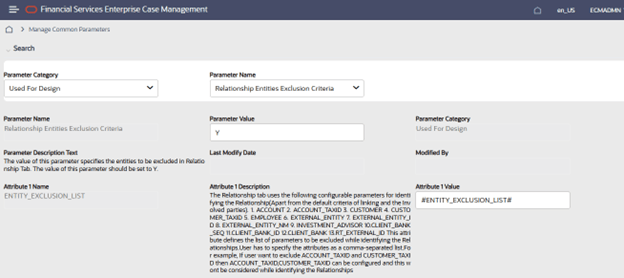
- On the Manage Common Parameters page, enter values in the Attribute 1 Value field, and click Save.
Figure 14-16 Set Relationship Entities Exclusion
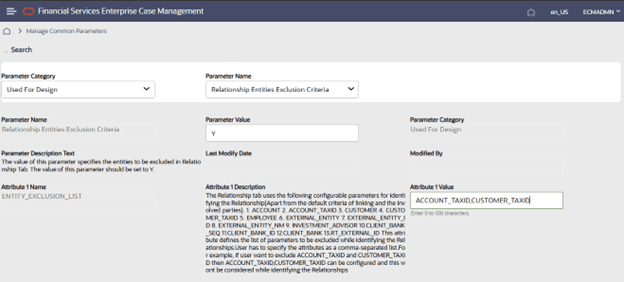
- Scroll down and click Save.
- A pop-up Would you like to Save these actions appears, click Save.
- A pop-up Update Operation Successful appears, click Save.
Once the values are configured, before executing the batch, ensure the following steps are completed.