4.1.3 PLSQL Starter Kit User Interface
The PLSQL Starter Kit UI will allow users to generate a Starter Kit. UI has options to Include Custom tables & Include data for all Custom tables. The UI will display the current status and previously generated Starter Kit Status. The UI has a Download button using which you can download the generated Starter Kit.
User must be mapped to below groups to access PLSQL Starter Kit UI:
- UG_GEN_STARTER_KIT_ADMIN
- UG_GEN_STARTER_KIT_ANALYST
For more details on mapping user groups, refer to Managing User Groups.
From the LHS menu, select Admin Tools, and then select PLSQL Starter Kit.
Figure 4-2 PLSQL Starter Kit
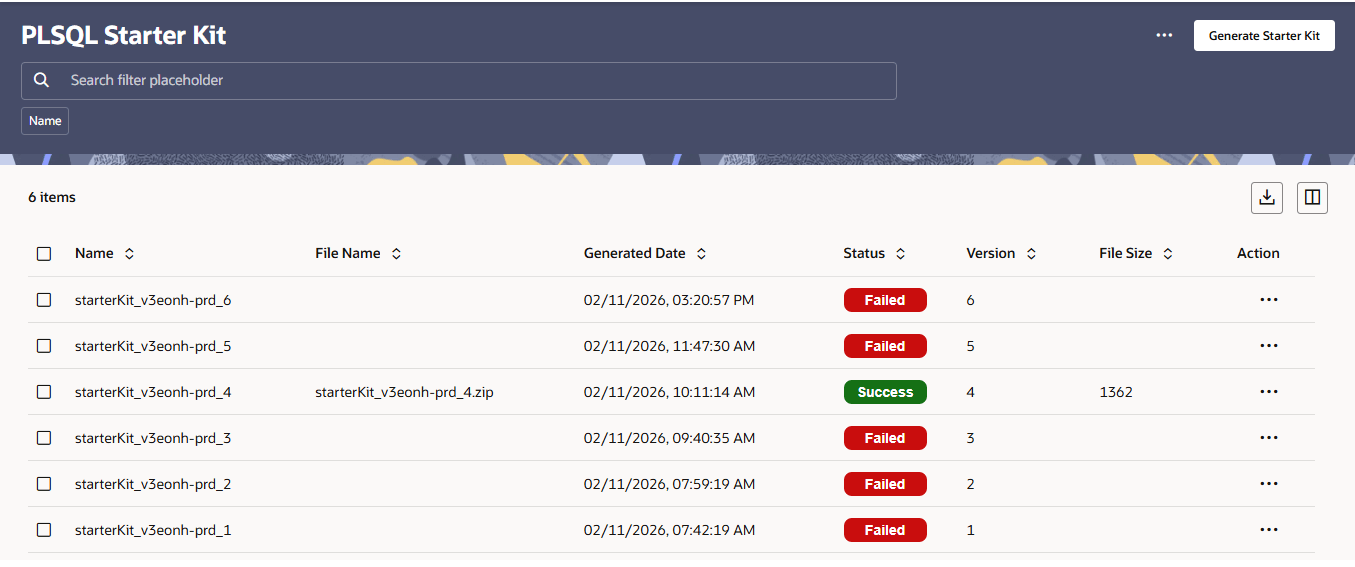
The PLSQL Starter Kit UI displays the following details:
- Name: Displays the name of the starter kit generation instance.
- File Name: Displays the Starter Kit file name (only populated for successful generations).
- Generated Date: Displays the date and time of starter kit generation.
- Status: Displays the status of Starter Kit generation (Success or Failed).
- Version: Displays the version number of the starter kit.
- File Size: Displays the Starter Kit file size (only populated for successful generations).
- Action: Provides additional actions for each starter kit entry.
- Execution Status:
- Last Generated on: Displays the date of starter kit generation.
- Version: Displays the Version number if starter kit.
- File Name: Displays the Starter Kit File Name.
- File Size: Displays the Starter Kit File Size.
- Status: Displays the Status of Starter Kit Generation.
- Previous Execution Status shows the details of a previously generated Starter
Kit:
- Generated on: Displays the date of starter kit generation.
- Version: Displays the Version number if starter kit.
- File Name: Displays the Starter Kit File Name.
- File Size: Displays the Starter Kit File Size.
- Status: Displays the Status of Starter Kit Generation.
- Click Generate Starter Kit button to start generating the Starter Kit.
- Refresh button can be used to refresh the page to view the latest Status.
- Download button can be used to download the latest generated Starter Kit.