3.16.3 Account Summary Load Configuration
The Account Summary Load Configuration screen allows you to select the columns that must be populated into the Account Summary table from the Portfolio table class. Columns are grouped into two categories: Mandatory columns, which are populated out-of-the-box, and User-selected columns, which you choose from the Available Columns list. You can also select the dynamic output columns generated from FTP, PFT, or other rule executions, to include in the Account Summary table.
To configure the Account Summary Load Configuration:
- From the LHS menu, select Maintenance, and then select Account Summary Load Configuration.
Figure 3-122 Account Summary Load Configuration Screen
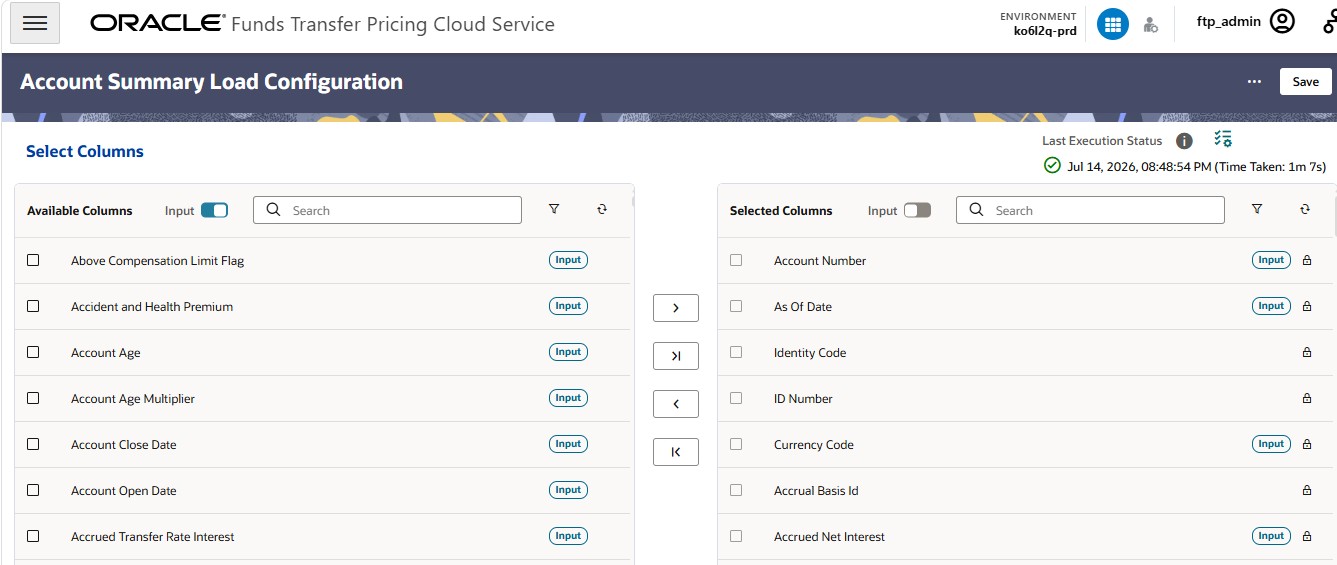
- Use the shuttle controls to move columns between the Available Columns and Selected Columns lists:
Table 3-42 Available Columns and Selected Columns lists
Control Action Figure 3-123 Move icon

Moves the selected column(s) to the Selected Columns list Figure 3-124 Move All icon

Moves all columns to the Selected Columns list Figure 3-125 Remove icon

Removes the selected column(s) from the Selected Columns list and returns them to Available Columns Figure 3-126 Remove All icon

Removes all columns from Selected Columns and returns them to Available Columns