4.3.3 Data Services Subscription
It is necessary to have the subscription to the Data Foundation Cloud Service to operate.
To fill in subscription details of Data Foundation Services, select Admin Tools, select Data Foundation Integration, and then select Data Services Subscriptions.
The Data Services Subscriptions dashboard is displayed.
Figure 4-33 Data Services Subscriptions dashboardData Services Subscriptions dashboard
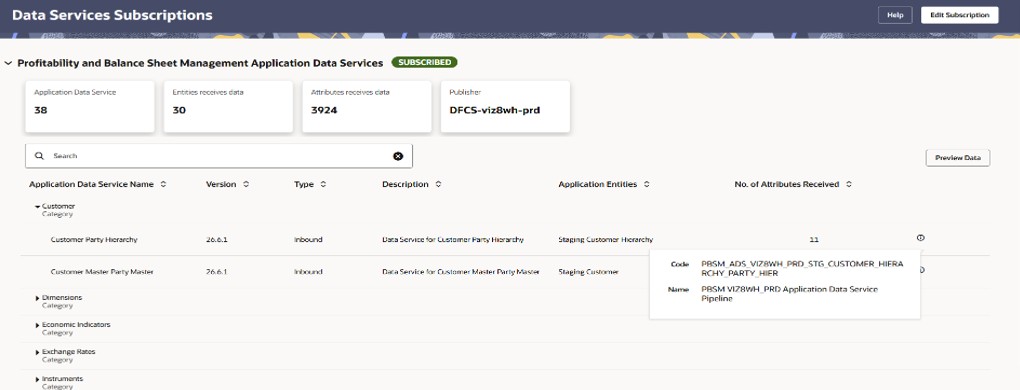
The dashboard displays the following details:
- Application Data Service: Displays the total number of ADS or Connectors present.
- Version: Displays the version number of the Application Data Service.
- Type: Displays the type of the Application Data Service, for example, Inbound.
- Entities receives data: The number entities receiving data.
- Attributes receives data: The number of attributes receiving data.
- Publisher: The Data Foundation Cloud Service tenant name. This option will be available if you have subscribed for Data Service subscription.
You can expand each of the Application Data Service Name to see the Name, Description, Application Entities, Number of Attributes received.
-
Figure 4-34 Data Services Subscriptions top pane

- Preview Data: Click Preview Data to view the available data for the selected Application Data Service. This opens the ADS Connector Summary Report, which displays the As of Date and Application Data Service Name filters, along with a Submit button. The report table displays the following columns:
- Category Name
- Group Name
- Connector Name
- As of Date
- Data Source Code
- Record Count
- More Details icon: Click or hover over the Information icon displayed for an Application Data Service to view its details, including the Code and Name of the Application Data Service pipeline.