35 Account Audit Portal
The Account Audit portal provides users a tool to validate account attributes along with calculated FTP results and the related cash flows:
- Transfer Rates, Adjustment Rates, and Economic Cost results.
- Audit information like method used for transfer rate or adjustment rate calculations.
- Interest rate curves used for calculations.
- Cash flows generated for the account, which are helpful to verify the rate calculations.
- Process Error messages
- Current and Prior “As-of-Date” data is also accessible.
All these details can be verified in a single UI portal by functional
users, without taking any technical help to query multiple DB tables.
To open the Account Audit
- From the LHS menu, click Funds Transfer Pricing, and
then select FTP Account Audit.
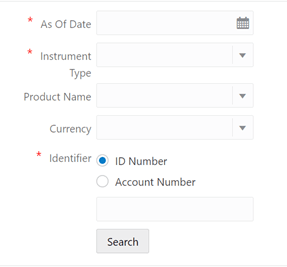
Figure 35-1 FTP Account Audit page
- Account Attributes Tab
The account attributes tab displays account/deal attributes, so you can get an idea if the account is fixed or floating rate, rate of interest charged, original balance, remaining balance, account maturity etc., which would be required to verify the calculations in subsequent tabs. - Audit Details Tab
The audit details tab contains two sections. The first section will display all the calculated rates, for example: - Cash Flows Tab
The Cash Flow tab details all the cash flows for the searched account. Same account can have multiple processes one for transfer rate, a different process for adjustment rate calculations, and so on, all processes which have generated cash flows for the record are listed here. - Process Errors Tab
The Process errors tab lists all the errors logged for the concerned account (Transfer Rate, Adjustment Rate, and Economic Cost Calculations, and so on). You could have Run the multiple processes for Transfer Rate or Adjustment Rate Calculations for the same account and the Process errors tab will collate all the errors spread across various processes for a particular account and display on one screen.