7 Expression
An Expression is a user-defined tool that supplements other IDs and enables to manipulate data flexibly. Expression has three different uses:
- To specify a calculated column that the Oracle Financial Services Analytical Application derivatives from other columns in the database.
- To calculate assignments in data correction.
- To create calculated conditions in data and relationship filters.
Example:- Calculations like average daily balances, current net book balance, average current net book balance, and weighted average current net rate can be created through Expressions.
Based on the role that you are mapped to, you can access read, modify or authorize Expression window. For all the roles and descriptions, see Appendix A.
The roles mapped to Expression are as follows:
- Expression Access
- Expression Advanced
- Expression Authorize
- Expression Phantom
- Expression Read Only
- Expression Write
Figure 7-1 Expression Summary window
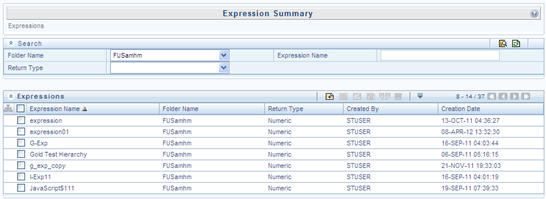
The Expression Summary window displays the list of pre-defined Expressions with other details such as the Expression Name, Folder Name, Return Type, Created By, and Creation Date. For more information on how object access is restricted, see Object Security in Dimension Management module section.
You can also search for a specific Expression definition based on Folder Name, Expression Name, or Return Type and view the list of existing definitions within the system.
- Adding Expression Definition
This option allows you to add an expression definition using variables, functions, and operators. The Write role should be mapped to your user group. - Viewing Expression
You can view individual Expression details at any given point. - Modifying Expression
You can modify the Expression details as required in the Edit – Expression screen. - Copying Expression
The Copy Expression facilitates you to quickly create a new Expression based on the existing parameters or by updating the values. - Checking Dependencies
You can view the dependencies of a defined Expression in the Expression Summary screen: - Deleting Expression
You can delete an expression which has Read/Write Access Type.