8.7.5.9 Back Dated Run
This feature is available for Contractual Runs, for the run purpose EBA Delegated Act Liquidity Ratio Calculation, RBI Basel III Liquidity Ratio Calculation, US Fed Deposit Insurance Calculation and U.S Fed Liquidity Ratio Calculation.
Prior to Release 8.1.0.1, during a Contractual Run execution for a previous date, the application considered the dimensions that are currently used having the Latest Record Indicator (LRI) as Y, for execution.
Back Dated Execution feature enables you to specify a back dated MIS Date which will consider the dimensions which were being used during that specific period, for execution.
- SCD_COMPONENT
- SCDINSTRCONTRACT
- DimAccountPop
- SCDCUSTOMER
- SCD for ALM LRM integration
Navigate to Common Objects Maintenance, select Data Management, select Data Management Framework select Data Management Tools and then select DMT Configurations to update the SCD Mode..
Figure 8-33 Back Dated - SCD Mode
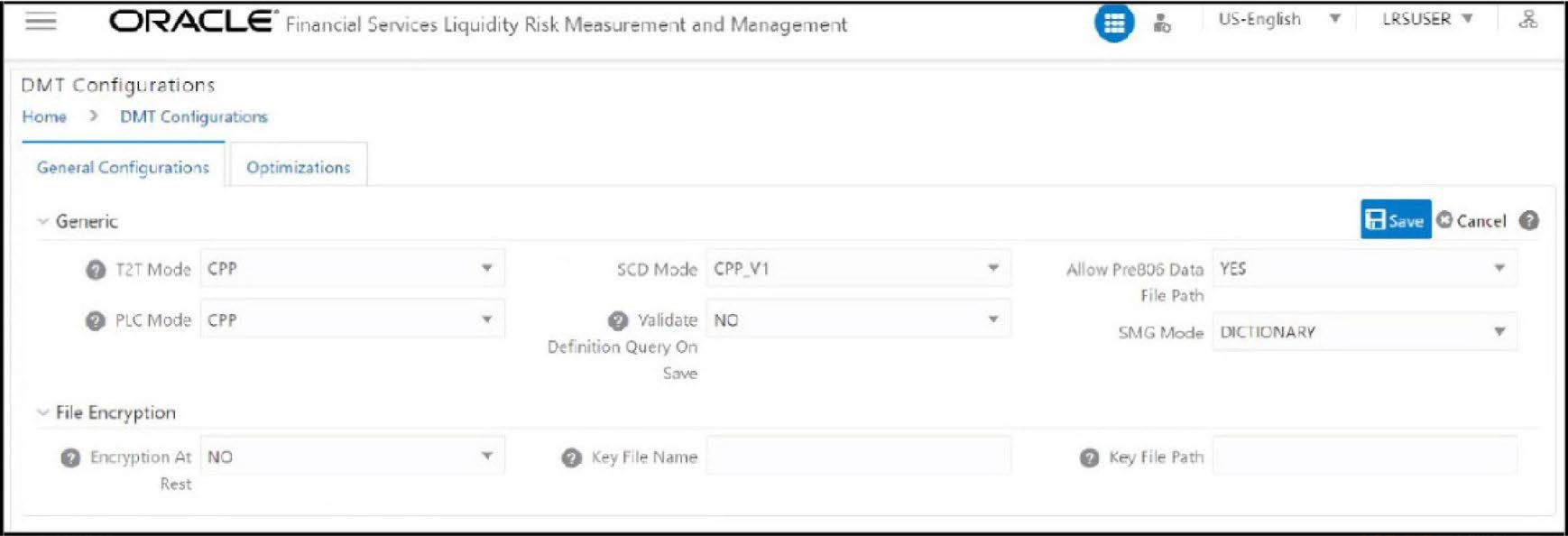
The SCD Mode field is applicable only if SCD uses a merge approach.
- CPP_V1- Select this option to perform SCD execution using CPP engine with a single Merge query for both Update and Insert. This is the default execution mode.
- CPP_V2- Select this option to perform SCD execution using CPP engine with a Merge query for updates and Insert query for inserts. Since Insert is a separate query, the sequence used for SKEY will be incremented only for the required records making the SKEY column value continuous.
- BACKDATED_V1-Backdated support for CPP_V1.
- BACKDATED_V2- Backdated support for CPP_V2.
Note:
For the Backdated Executions containing type 2 column mappings, below column mappings are mandatory :- Start date
- End date