9.2 Understanding Counterbalancing Strategy Summary
In the Oracle Financial Services Analytical Applications Infrastructure home screen select Financial Services Liquidity Risk Management.
To open the Counter Balancing Strategy window, choose Liquidity Risk Management > Counter Balancing Strategy on the Left-Hand Side (LHS) menu.
Figure 9-7 Counterbalancing Strategies Summary
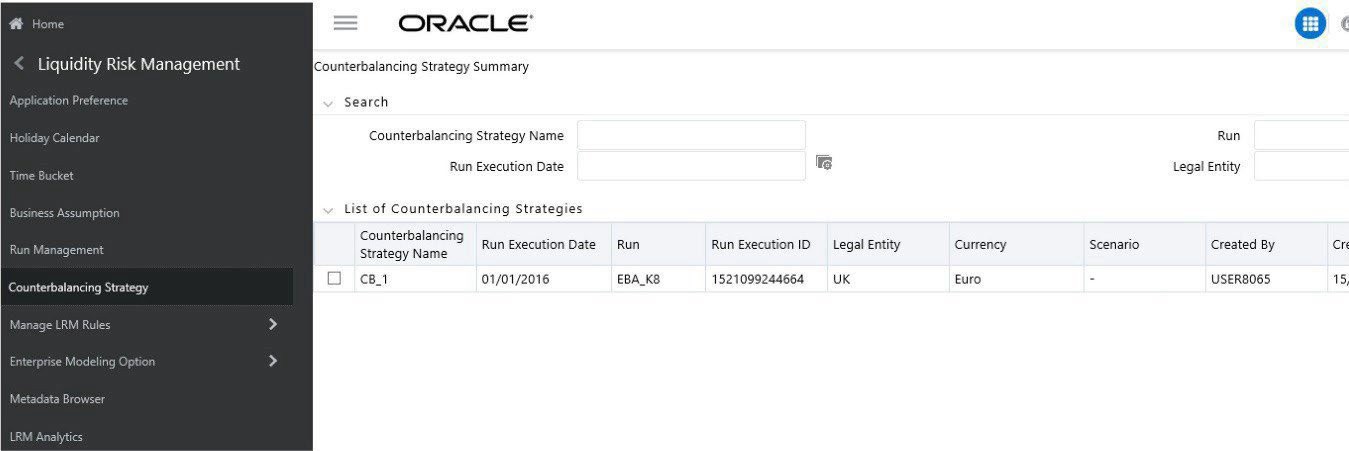
The Counterbalancing Strategies Summary window of the application allows you to define and execute a Counterbalancing Strategy in the application.
The search section contains multiple parameters. You can specify one or more search criteria in this section. When you click the Search icon, depending upon the search criteria, this filters and displays the relevant search combination parameters under the list of Counterbalancing Strategies.
Table 9-1 Counterbalancing Strategy – Fields and Descriptions
| Search Field or Icon | Description |
|---|---|
| Search | This icon allows you to search the counterbalancing strategy based on the search criteria specified. Search criteria include a combination of Name, Run Name, Execution Date, or Legal Entity. The counterbalancing strategies displayed in the Counterbalancing Strategy summary table are filtered based on the search criteria specified on the clicking of this icon. |
| Reset | This icon allows you to reset the search section to its default state that is, without any selections. Resetting the search section displays all the existing counterbalancing strategies in the Counterbalancing Strategies Summary table. |
| Counterbalancing Strategy Name | This section allows you to search the pre-defined Counterbalancing Strategy based on the Counterbalancing Strategy name. Specify the Counterbalancing Strategy Name to search for the pre-defined Counterbalancing Strategy. |
| Run | This section allows you to search the pre-defined Counterbalancing Strategy based on the Run Name. Specify the Run Name here to search for the pre-defined Counterbalancing Strategy. |
| Run Execution Date | This section allows you to search the pre-defined Counterbalancing Strategy based on Execution Date. Specify the Execution Date here to search for the pre- defined Counterbalancing Strategy. |
| Legal Entity | This section allows you to search the pre-defined Counterbalancing Strategy based on Legal Entity. Specify the Legal entity to search for the predefined Counterbalancing Strategy. |
Table 9-2 Counterbalancing Strategy Summary - Icons
| Runs Icon Name | Icon | Description |
|---|---|---|
| Add |
Figure 9-8 Add icon  |
Counterbalancing This icon allows you to define a new Counterbalancing Strategy. |
| View |
Figure 9-9 View icon  |
This icon allows you to view the selected Counterbalancing Strategy. |
| Edit |
Figure 9-10 Edit icon  |
This icon allows you to edit the selected Counterbalancing Strategy. |
| Delete |
Figure 9-11 Delete icon  |
This icon allows you to delete the selected Counterbalancing Strategy. |