When Component is Model
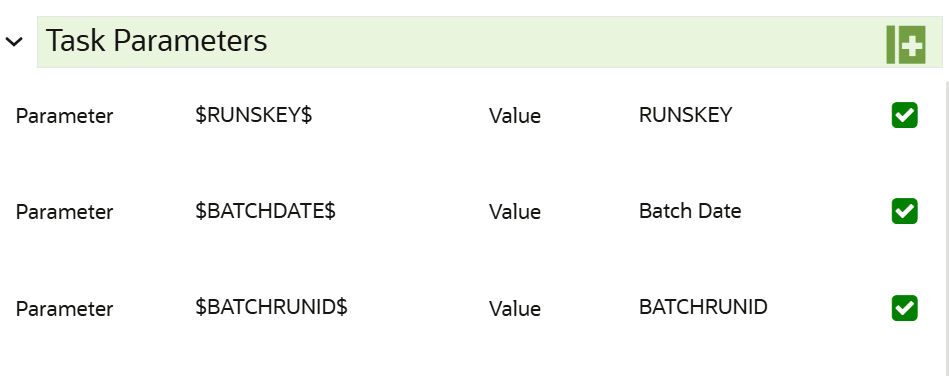
Figure 11-126 Task Parameters
Note:
Fields marked with * are mandatory fields.The Scheduler Service feature provides a system-generated runtime parameter RUNSKEY, $RUNSK$, to support the delta processing of the Data Pipeline and Match Rules. RUNSKEY is generated during execution and is propagated from the batch to downstream tasks or components so they can process specific execution context. You will see $RUNSK$ listed along with other runtime parameters such as; RUNSKEY and is not user-editable. This is populated by the scheduler service at runtime.
BatchRunID behavior.
- Rerun:
$RUNSK$changes. A new RUNSKEY is generated for the rerun execution. - Restart:
$RUNSK$remains the same. The restart continues the same execution context.
- Batch Date: Shows the batch execution date. You can enable or disable this parameter.
- Batch Run ID: Shows the batch execution run ID. You can enable or disable this parameter.
- Objective: Select the Object which you want to use for execution. For more information, see the Create Objective (Folders) section. The Sub Objective is displayed with path. For example, if Test1 is Objective and Test11 is Sub Objective, and you want to use Test11 Objective for execution, then select this field as Test1/Test11.
- Model: Select the Model of selected Objective. It can be
any specific model of Objective or All models of Objective.
- If the ALL_CHAMPION is selected here, then Objectives with no Champion Model is skipped, and the Objectives with Champion Models gets executed.
- If CHAMPION is selected, and no Champion is present, then Model Execution gets fail.
- Link Type: Select the link type for execution. For example: Training, Scoring, or Training+Scoring. For more information, see the Links in the Pipeline Designer section.
- Synchronous Execution: You can set this parameter to Yes
or No.
- If Synchronous Execution is set to Yes, then execution will wait for the notebook execution status.
- If Synchronous Execution is set to No, then execution will not wait for the notebook execution status, it will trigger the notebook and update task status as successful in batch monitor.
- Optional Parameters: This is used pass the parameters dynamically.
For example:
model_group_name=LOB1,benford_flag=Y,benford_digit=1,from_date=01-Jul-2020,to_date=31-Jul-2021
Model_group is parameter defined in model and value can be passed here.
The Create Task window also shows the following Header Parameters, which are not editable:
- User: logged in user name
- Workspace: shows the launched workspace name
- Locale: shows the locale. For example: en_US