PreviousNext
JavaScript must be enabled to correctly display this content
11.1.2.1.4.2 Add Data Transformation
To add the data transformation, follow these steps:
Click Add.
The Transform window is displayed.
Select the Transformation Type.
Following types are available:
Dataframe Transform: This is used to transform
entire dataframe. For example, if you want to remove all missing values
from all the columns of entire sampled data.
Feature Transform: This is used to transform a
particular column of dataframe.
Figure 11-18 Transformation screen
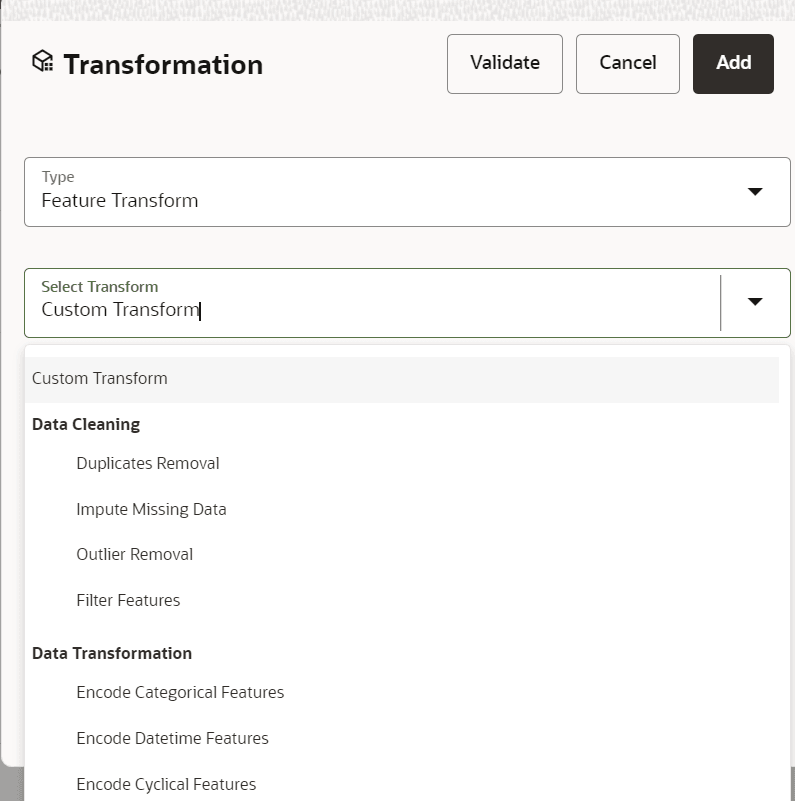
Select Transform: Here you either enter values using
Method and Argument fields, or script.
Click Validate to validate the details.
Click Add to add the new transformation.
The New Transform is created and displayed at RHS section.
Click Finish to navigate to Dataset Summary
window.
This saves the metadata of dataset.
Example:
If there is “missing value” for one of the columns, then perform
following steps to add the transform.
Click Add on Dataset Transformation window.
Select Type as Feature Transform.
Select Transform as Impute Missing Value.
Select the Physical Name from Physical Name drop-down
list.
Select the Method and enter parameter in Argument field. The
Method is updated on selected Column type. For example, if the selected
column type is numerical, then following methods will be available:
Simple, Constant, KNN, and Mice
OR
Enter the script
Below are the Sample Custom Scripts:
Directly pass input data frame to output:
df_out=df_prev
Drop first row of data frame:
df_out=df_prev.drop(0,axis=0) if not df_prev.empty else
df_prev
Drop column from data frame: df_out =
df_prev.drop('colname',axis=1)