Configure Data Sourcing

The schema type selected in the previous step requires the definition of database objects to be used for model creation. The data sourcing step of the workspace provisioning allows you to select tables from Oracle, Hive, or File based data sources through which data has to pulled into the Oracle based Workspace Data Schemas. However, unlike the data sourcing from RDBMS data sources, the tables will not get physicalized in the target schema, hence it is expected that the tables with compatible structures are already present in the target RDBMS Schema. You can also select DMM operations such as procedures, functions, sequences, and package while configuring the data sourcing. Once a workspace has been provisioned by using DMM, it is stored in ftpshare path - ftpshare/dmm/DATE.
In the case that the selected tables are not present in the target schema, those tables are included in the failed objects count in the workspace provisioning summary.
This window shows the different icons for Oracle, File, and Hive data sources.
Enter the details in this window.

Figure 6-7 Data Sourcing - External Data Source
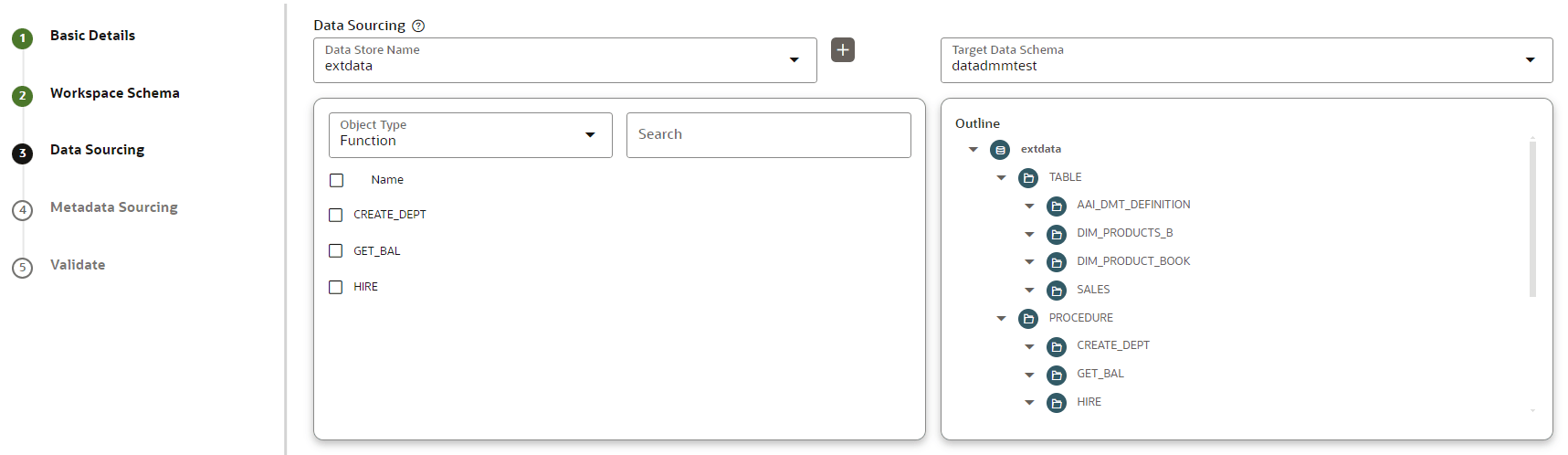

This image displays the Data Sourcing- External Data Source.

To configure Data Sourcing, perform the following steps:
  1. You can select Data Source from Data Source Name drop-down list or create a new Data Source. To create a new Data Source, see the Configure Workspace Schema section.
  2. Select the Target Data Schema. You can select multiple Data Sources for a Target Data Schema.
  3. For example, if there are D1, D2 and D3 Data Sources, then you can select the tables from all these Data Sources, tables from two Data Sources, tables from one Data Source, or as required. Here, multiple combination of tables are possible with Data Source and Target Data Source.
  4. If two Data Sources are having same tables (from different Data Sources), then the columns from the first selected table will be used. For example:
  5. If table A has columns C1, C2, C3 and Table B has columns C1, C2, and C4,then the data from the first table will be used.
  6. During the data population, only columns C1 and C2 will be used and those will be marked in Green color.
  7. Select the type of objects to be displayed in the pane that follows the drop-down list. The Object Type drop-down list will be enabled after selecting the Data Source from Data Source Name drop-down list. The following are the options in the drop-down list:
    • Table
    • View
    • Synonym
    • Function
    • Procedure
    • Package
    • Sequence
    • Materialized View
    • Trigger
    • Type
  8. Click Next to go to the next step. or Click Skip to skip the step.