9.7.1.5 Customer vs Segment
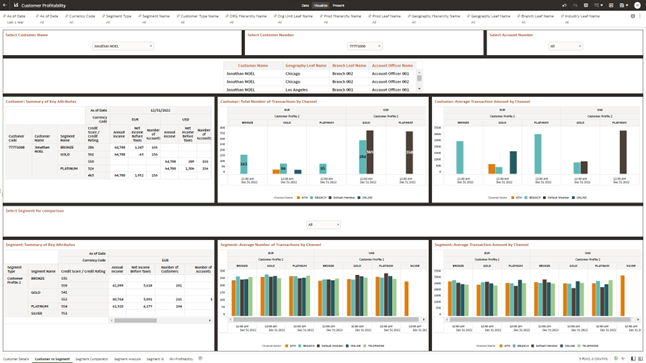
This dashboard presents the customer as a comparison with the segment that he belongs to or any other segment of interest to the analyst.
To compare customer and segment profiles, channel transaction counts, and average transaction amounts, open In App Dashboards, select Customer Profitability, and then select CP Customer vs Segment.
- As-of date:Select the reporting date.
- Segment Types:Select the segmentation type to compare.
For example, Select a specific customer as Jonathan Noel.
Exploring metrics around the customer’s annual income, the net income before taxes, the number of accounts belonging to the customer, credit score, and others.
Figure 9-168 Canvas Customer vs Segment
Report – Customer : Summary Key Attributes: This report displays the following customer attributes:
- Credit Score/ Credit Rating as is the case for a Retail or Wholesale customer
- Segment
- Annual Income
- NIBT
- # Accounts
Figure 9-169 Report – Customer : Summary Key Attributes
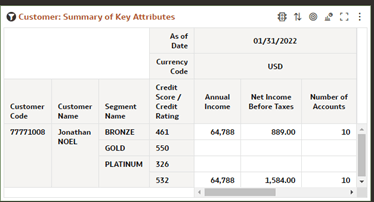
Figure 9-170 Report Total Number of Transactions by Channel
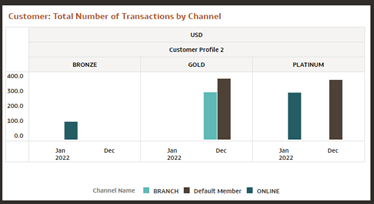
Figure 9-171 Report : Average Transaction Amount by Channel
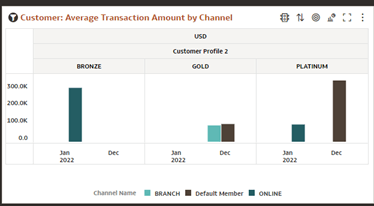
Figure 9-172 In-canvas Prompt Filter to select Segment for comparison
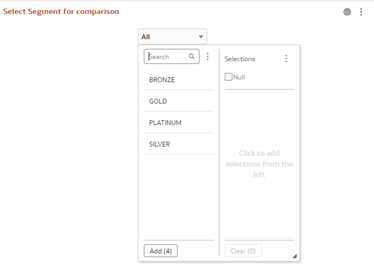
Figure 9-173 Report : Segment Summary Key Attributes

Figure 9-174 Report : Average Number of Transactions by Channel for selected Segment
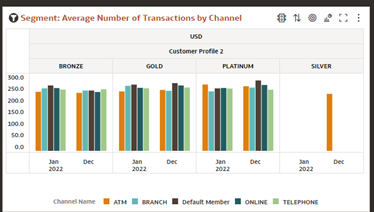
Figure 9-175 Report : Average Transaction Amount by Channel for selected segment
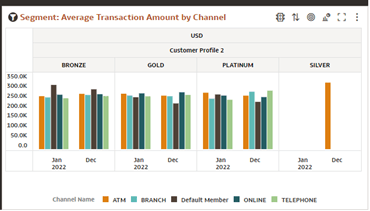
Parent topic: Instrument Level Aggregation and Insights