6.3.2.1 Detail Screen
Click Add from the Title bar of summary screen or Edit/View an allocation model from summary to launch into the Allocation Model Detail screen.
Navigation within the Detail Screen
When you Add, Edit, or View an Allocation Model, the Allocation Model Definition screen is displayed with the following panes:
- Allocation Model Details
- Allocation Model Type
- Allocation Model Container
Figure 6-50 Allocation Models - Detail Screen
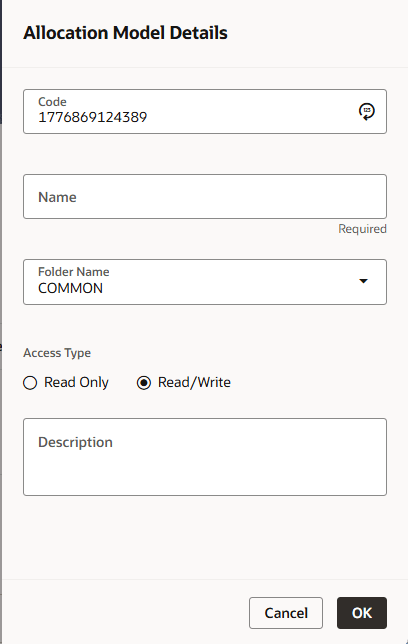
The Allocation Model Details opens up as a drawer on the right hand side of the screen and allows you to specify an allocation model's Code, Name, Description, Folder and the Access Type. The drawer window is shown in the above figure.
Note:
In the Code field, the code is auto-generated. You can also manually enter a numeric code. Only numerical values are allowed; special characters are not permitted.Allocation Model Type Pane
The Allocation Model Type pane allows you to specify the type of the model you want to construct.
The appearance of the Allocation Model Type pane depends on whether you are building a Standard Model or a Circular Model.
- Standard Model: To construct a Standard Allocation Model, select Standard from the Model Type drop-down list box.
- Circular Model: To construct a Circular Allocation Model, select Circular from the Model Type drop-down list. By default the screen is launched with the allocation model type selected as ‘Standard’.
By default the screen is launched with the allocation model type selected as ‘Standard’.
Figure 6-51 Allocation Model Type Pane – ‘Standard’ is selected as default

To build a Circular Model, the user needs to select the value as Circular in the Allocation Model Type drop-down. The user then needs to specify the number of iterations or cycles the user wants the circular part of the Allocation Model to execute, in text field “Number of Cycles”. The user needs to input positive integer values as the number of cycles.
Figure 6-52 Allocation Model Type Pane with Type selected as ‘Circular’

There is however, a maximum limit set for the number of cycles the user can input.
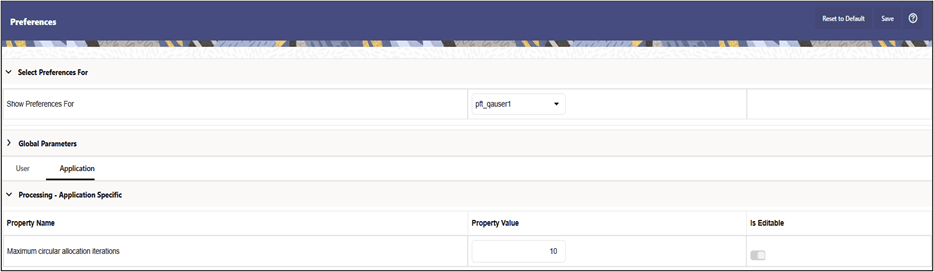
Maximum Circular Allocation Iterations: To omit an infinite loop of allocation rules, Allocation Models are governed by an overall limit on the maximum number of iterations or cycles that can be run before the circular part of a model completes. This maximum number of iterations is set in the User Preferences for Profitability Management.
Figure 6-53 User Preferences