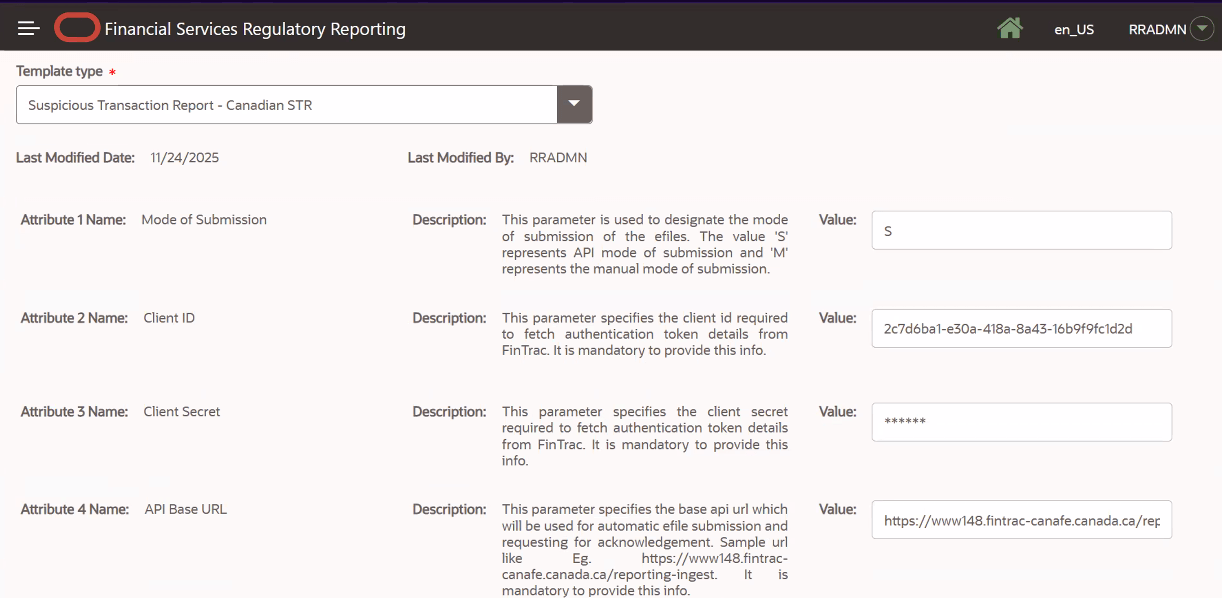
6.18 Configuring API Submission to FINTRAC
FINTRAC’s API submission enables automatic transfer of E-Files from the OFS CA STR application UI to FINTRAC’s E-Filing system.
If you select the submission mode to be manual, you have to manually submit the E-Files in FINTRAC’S E- Filing system.
Once the FINTRAC’S E-Filing system confirms the request, then you can download the Acknowledgement and upload it against the E-File from the E-Filed Status tab in the OFS CA STR application.
Using the API Submission feature, you can also perform the following configuration.
If you select to enable an automated submission, then E-Files are transferred automatically to the designated directory upon creation.
When you execute the E-File transfer batch, the system will push the E-File to FINTRAC system. When Acknowledgment batch is executed, the system will fetches all the acknowledgments from the FINTRAC system to be uploaded against respective E-Files in the application.
For more information, see Managing Batches. If the Acknowledgment batch is successful, the E-Files are transferred to the Archive directory.
- Select Suspicious Transaction Report - Canadian STR from the Template Type drop-down. The configuration details are displayed.
Figure 6-6 Configure API Submission