E Delta Watch List Configurations
Note:
These configurations are performed when you do not want to download the full watch list, and only want to download the delta watch list. This helps to reduce the download time and is not part of the screening process.Oracle recommends that you always use the full watch list during the screening process. Due to the clustering strategy which is implemented in the screening process, you do not need to download the delta watch list. There are certain cases in which you are required to download the delta watch list files, for example, if the full watch list files are not yet available for download or if you want to save time.
Customers who download the delta watch list files must first download the full watch list files and then download the delta watch list files. The delta watch list is then merged into the full watch list before screening.
Figure E-1 Flow for Delta Watch List
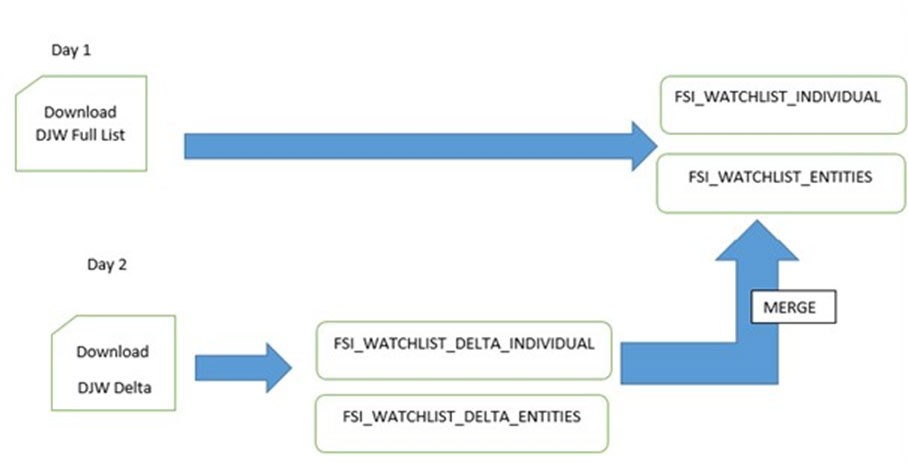
When you download the full watch list, data is stored in the
FSI_WATCHLIST_INDIVIDUAL and
FSI_WATCHLIST_ENTITIES tables. When you download the delta watch list, data
is first stored in the FSI_WATCHLIST_DELTA_INDIVIDUAL and
FSI_WATCHLIST_DELTA_ENTITIES tables. Then, based
on the value in the ACTION Flag tag in the delta watch list, it merges with the full watch list. The ACTION flag key is a non-editable value, and can be one of the following values:
-
new: If the value is
new, it means that these records are new and are added to the full watch list when the delta files are merged with the full watch list. -
chg: If the value is
chg, it means that these records are modified and are added to the full watch list when the delta files are merged with the full watch list. -
del: If the value is
del, it means that these records are no longer active and are removed from the full watch list when the delta files are merged with the full watch list.Note:
You must always run the full watch list files before you run the delta watch list files. The full watch list files must be downloaded if, for example, the download of the delta watch list files has failed for multiple days. You can also run the full watch list once every week to ensure that the complete data has been processed.
The following watchlist management jobs are used for the full list and the delta list:
- Analyze Reference Data Quality
- Download, Prepare, Filter, and Export All Lists
- Generate StopPhrases
- The following watchlist management job is used for the full list:
- Load List data from Stg to Processed table
- The following Transaction Filtering job is used for the full list and the delta
list:
- Main
Before you run the delta watchlist files, ensure that you run the full watchlist files. You can run the delta watch list files if, for example, the delta downloads have failed for multiple days or the filter criteria are changed. You can also run the delta watch list once every week to ensure that the complete data has been processed.