2.1 Transaction Filtering Workflow
The following image describes the Transaction Filtering workflow.
Figure 2-1 Transaction Filtering Workflow
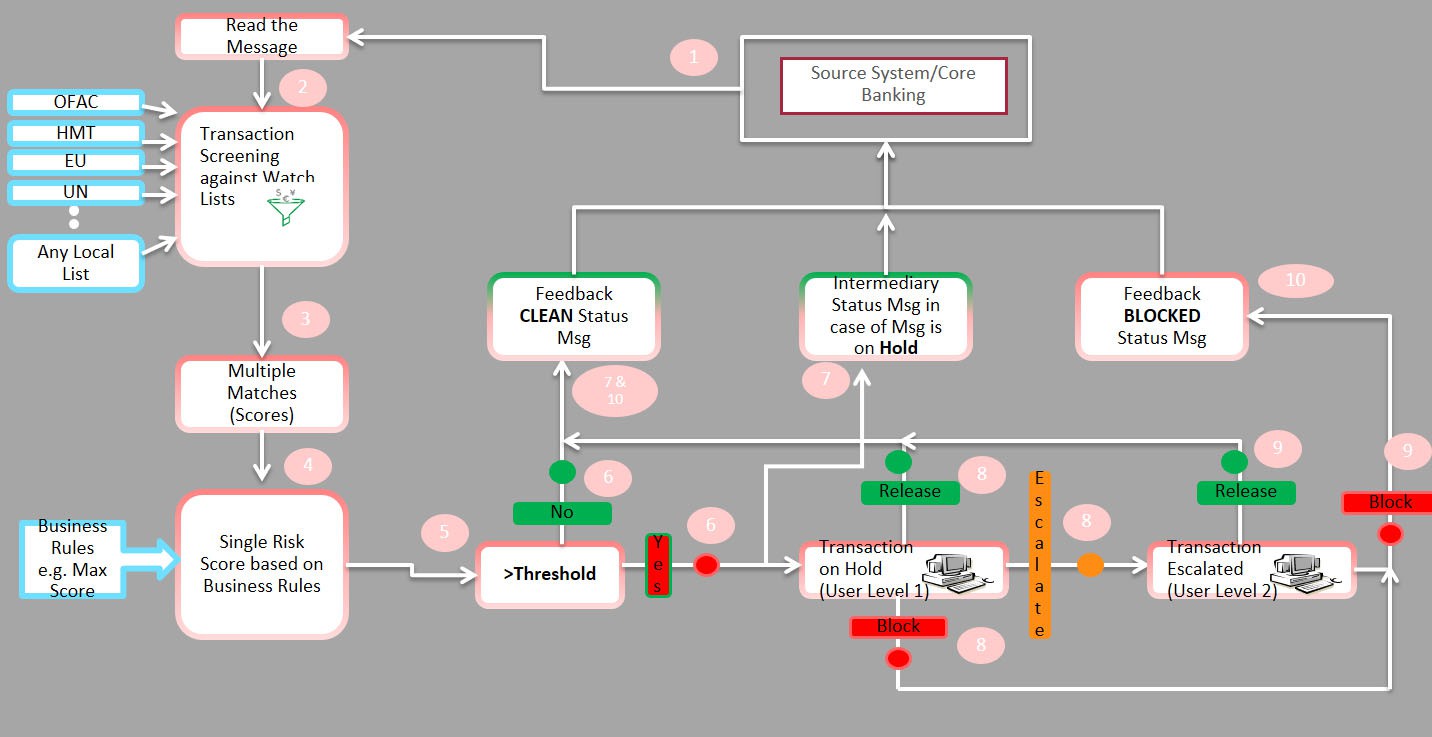
The application first receives a message from the payment system and scans it against the watch lists, then provides a risk score for the message. If no suspicious data is found during screening, then the Transaction Filtering application sends a feedback message with the status CLEAN back to the payment system through the message queue. If suspicious data is found during screening, then the message is sent to an Analyst who investigates it using the Transaction Filtering User Interface.
Feedback is sent to the payment system through a message queue, which indicates that the message is on hold. The Analyst reviews the message, which is the first level of review and decides to release, block, or escalate the message. Based on the decision, the system sends a feedback message, either CLEAN or BLOCKED, to the payment system for the reviewed message.
If the four-eyes workflow is enabled, then the Analyst can additionally Recommend to Release, Recommend to Block, or escalate the message to the Supervisor. If the Analyst escalates the message, then the message is sent to the Supervisor, which is the second level of review. The Supervisor can block or release the message and add comments. For a four-eyes workflow, the Supervisor can Release, Block, or Reject the message. You can view the associated matched data of a message from the Match Summary section. You can also view the risk score details from the Risk Summary section. Both these sections are present in the Investigation User Interface.
Note:
As a Senior Supervisor privilege, the senior supervisor can work on a queue only if there is a backlog.The Reviewer can view and review the messages and the alerts but cannot perform any other actions.