View a Patient in a Patient Cohort List
View recommendations for action on patient open care gaps.
Select a patient name to open the patient dialog box and view the targeted recommendations for that patient. The patient dialog box includes the following information:
- The reason the patient was included in the cohort. For example, No future appointments were found for this patient, therefore no further check for conflict with outreach recommendation is needed. Consider sending the provided outreach message to close the care gap.
- A sample patient outreach message for patients in an outreach cohort. This message can be used in a patient outreach effort. For example, Consider talking to your doctor about scheduling a colonoscopy to screen for colorectal cancer.
You can also select a thumbs up or thumbs down icon to provide feedback on the summary. This feedback is used to improve the models used to generate AI recommendations and is not directly provided to customer support.
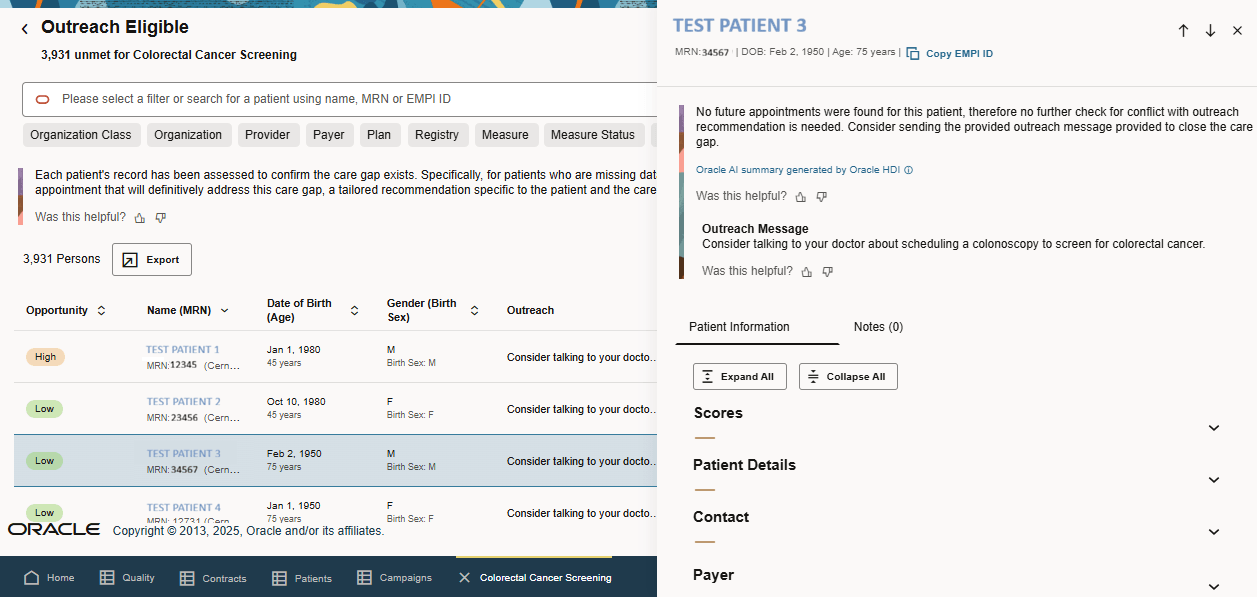
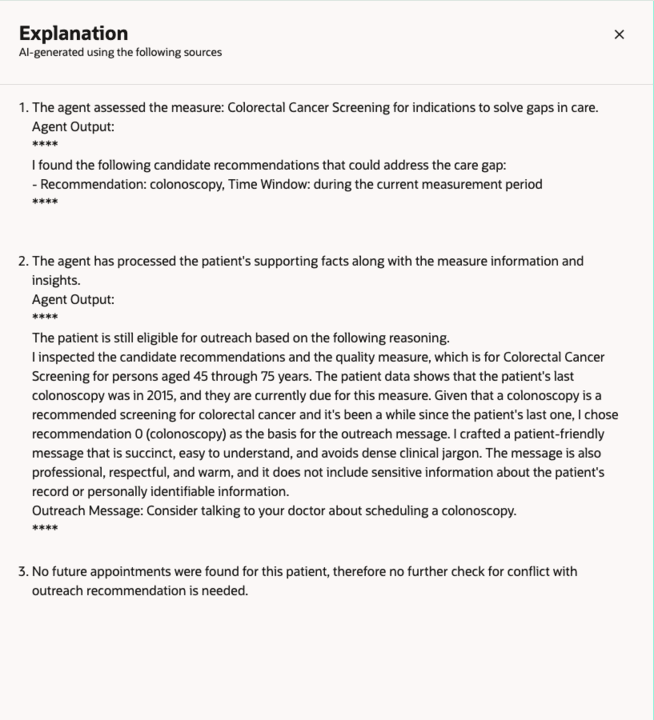
Select Oracle AI summary generated by Oracle HDI to view the steps taken by the system to generate recommendations. The system reviews patient clinical information, measure logic, appointment history, and future appointments to generate the summary.
Parent topic: Oracle Health Quality Management Introduction