Predefined Code Mapping
In the Norwegian E-Journal Report, it is necessary to display the standard predefined code instead of a system code, for example, the standard predefined code for VAT rate and main department. Therefore, code mapping between the standard predefined code and the system code is required. The Predefined Code Mapping button is enabled when the PAR Use Norwegian Fiscal Requirements is enabled, and you have the authorization to access this function.
To map the standard predefined code to the system code, log in to the Administration module and click the Administration, System Codes button, and then click the Predefined Code Mapping at the top of the menu.
Standard Predefined Code 04 — Article Group/Department Codes
Figure 30-2 Sample Predefined Article Group
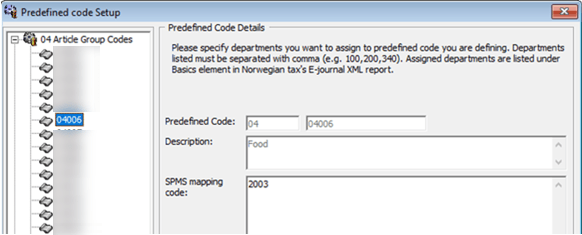
This code is used to configure the system debit department code. In the screen example above (Figure 2–2), the system debit department code 2003 for food is mapped to standard predefined code 04 and predefined ID 04006.
The report displays this standard predefined code
in <basicType> and <predefinedBasicID> under <basics> element.
Standard Predefined Code 11 – Transaction Codes
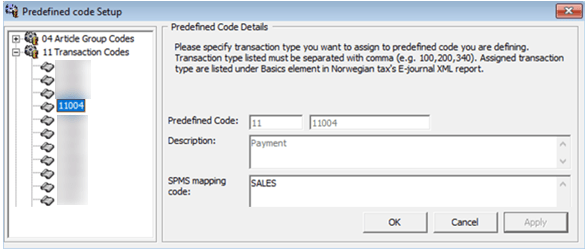
This code is used to configure the system transaction code. The payment transaction code SALES is mapped to the standard predefined code 11 and predefined ID 11004 as shown in the figure below.
Figure 30-3 Sample Predefined Transaction Codes
There are two categories of transaction code in the system:
Transaction code for Point-of-Sales (POS) record. This
appears in <lineType> under <ctLine> element on the report. There are five types of transaction codes
for POS record. You must follow the exact system
transaction code per the following and configure it into the user
interface to avoid unmapped data and incorrect information being displayed.
-
POST (add posting)
-
SALES (payment)
-
REFUND (return payment)
-
DIS (discount)
-
VOID (void posting)
Transaction code for receipt type. This appears in <transType> under the <cashtransaction> element on the report. There are four types of transaction codes
for receipt type. You must follow the exact system transaction code
shown below to configure it into the user interface.
-
SALES (Sales Receipt)
-
RETURN (Return Receipt)
-
PROFORMA (Pro Forma Receipt)
-
DELIVERY (Delivery Receipt)
Standard Predefined Code 12 — Payment Codes
Figure 30-4 Sample Predefined Payment Codes
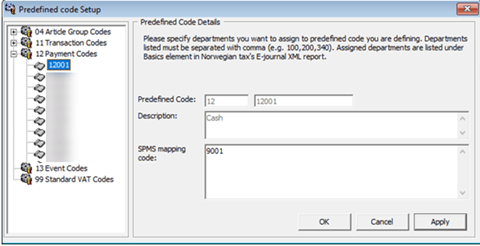
This code is used to configure the system credit department code or payment code. In the example above, the credit department code 9001 for cash is mapped to standard predefined code 12 and predefined ID 12001.
This
appears in <basicType> and <predefinedBasicID> under <basics> element on the report.
Standard Predefined Code 13 — Event Codes
Figure 30-5 Sample Predefined Event Codes
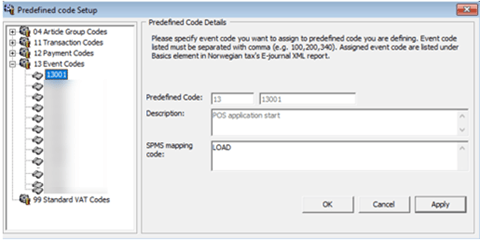
This code is used to configure system event code. In the below example, the system event code LOAD for application starting is mapped to standard predefined code 13 and predefined ID 13001.
This
appears in <event> under <cashregister> element on the report.
Standard Predefined Code 99 – Standard VAT Codes
Figure 30-6 Sample Predefined VAT Codes
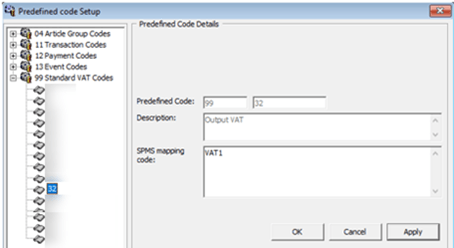
This code is used to configure system VAT code. In example above, the system VAT code VAT1 is mapped to standard predefined code 99 and predefined ID 32.
This is displayed in <standardVatCode> under <vatCodeDetails> element on report.