Configuring Salary at Sea Standard Parameter
In the Cashless Payroll menu, General tab, enter the value per the table below:
Figure 26-48 Cashless Payroll - Salary @Sea
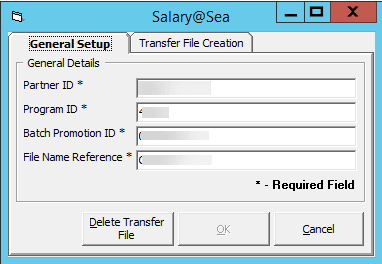
Table 26-17 Salary@Sea Field Definition
| Setup | Value | Remarks |
|---|---|---|
|
Partner ID |
0043 |
Default value will be set to 0043. |
|
Program ID |
4322 |
Default value will be set to 4322. |
|
Batch Promotion ID |
000000xx |
xx = refer to ship id. |
|
File Name Reference |
Citibank |
Default value will be set to Citibank. |
Generating a File
Once you have all the parameters in place, you can then generate the file from the Cashless Payroll menu, Transfer File Creation function.
-
Open the Cashless Payroll menu and navigate to the Transfer File Creation tab.
-
Select the Pay Period from the drop-down list.
-
You can receive multiple confirmation prompts depending on the records that are being processed. Read through each pop-up message and then click OK to continue.
-
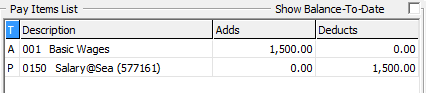
Once the file is generated, the PAY_ID appears with Salary@Sea Pay code in the pay item list, as shown in the diagram below.
Figure 26-49 Pay ID in Pay Items List
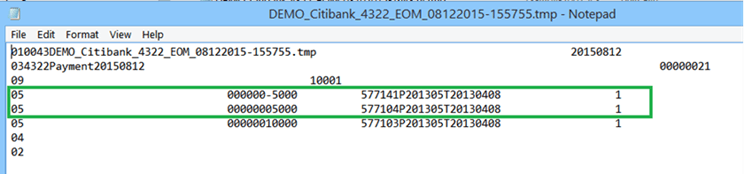
Below, there are sample transfer files for single, multiple and voided Salary@Sea transactions.
Figure 26-50 Single Salary@Sea Transaction
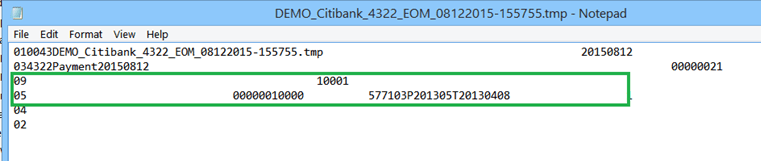
Figure 26-51 Multiple Salary@Sea Transactions
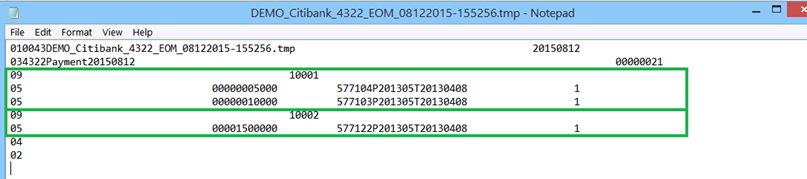
Figure 26-52 Voided Salary@Sea Transaction
File Transfer Specification
The file name generated by Salary@Sea in a ‘tmp’ file format is saved in the following format; <ShipName>_<FileNameReference>_<ProgramID>_EOM_MMDDYYYY-HHMMSS.tmp
Transfer File layout
Each of the transfer file types has a specific header and layout format, as described in the following tables.
Table 26-18 Header Code/ Report Type
| Header code/ report type | Description |
|---|---|
|
01 |
File Header Record |
|
03 |
Batch Header Record |
|
09 |
Request Record |
|
05 |
Add Funds Action |
|
04 |
Batch Footer Record |
|
02 |
File Footer Record |
Figure 26-53 Sample Transfer File
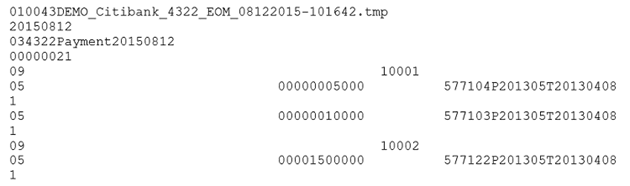
Table 26-19 Layout Specification — Header code/ report type: 01
| Field Name | Position | Length | Type | Comment | SPMS Mapping |
|---|---|---|---|---|---|
|
Record Type |
1 – 2 |
2 |
Numeric |
“01” |
Hardcode to 01. |
|
Partner ID |
3 – 6 |
4 |
Numeric |
“0043” |
Refer to Partner ID configured/specified in Payroll, Cashless Setup. |
|
File Name |
7 – 56 |
50 |
Character |
Unique name for each transfer file |
<ShipName>_<FileNameReference>_<ProgramID>_EOM_MMDDYYYY-HHMMSS.tmp |
|
Pass through |
57 – 88 |
57 |
Character |
Client can use this field in whatever manner they choose. It will be passed backed in the reply file. |
Remain empty for now since response files are out of scope at this point. |
|
Creation date |
89 – 96 |
8 |
Date |
Date the file was created |
Date format: YYYYMMDD. |
Table 26-20 Layout Specification — Header code/ report type: 03
| Field Name | Position | Length | Type | Comment | SPMS Mapping |
|---|---|---|---|---|---|
|
Record Type |
1 – 2 |
2 |
Numeric |
“03” |
Hardcode to 03. |
|
Program ID |
3 – 6 |
4 |
Numeric |
“4322” |
Refer to Program ID configured/specified in Payroll > Cashless Setup. |
|
Batch description |
7 – 70 |
64 |
Character |
Payment memo will appear on recipient’s statement |
Format: PaymentYYYYMMDD YYYYMMDD is computer date. |
|
Pass through |
71 – 102 |
32 |
Character |
<Blank> |
Remain empty. |
|
Batch promotion ID |
103 – 110 |
8 |
Numeric |
‘00000021’ |
Refer to Promotion ID configured/specified in Payroll, Cashless Setup. |
|
Settlement Date |
111 – 118 |
8 |
Date |
<Blank> |
Remain empty as required. |
Table 26-21 Layout Specification — Header code/ report type: 09
| Field Name | Position | Length | Type | Comment | SPMS Mapping |
|---|---|---|---|---|---|
|
Record Type |
1 – 2 |
2 |
Numeric |
“09” |
Hardcode to 09. |
|
Partner user id |
3 – 52 |
50 |
Character |
Unique account identifier (Crew ID) |
Refer to crew’s external ID (UXP_C_EXTERNALID). |
|
Pass through |
53 – 84 |
32 |
Character |
Remain empty. |
Table 26-22 Layout Specification — Header code/ report type: 05
| Field Name | Position | Length | Type | Comment | SPMS Mapping |
|---|---|---|---|---|---|
|
Record Type |
1 – 2 |
2 |
Numeric |
“05” |
Hardcode to 05. |
|
Pass Through |
3 – 34 |
32 |
Character |
Remain empty. |
|
|
Amount |
35 – 44 |
10 |
Currency |
Amount $35.57 is display as ‘3557’ |
PAY_AMOUNT |
|
Taxable Flag |
45 – 45 |
1 |
Numeric |
‘0’ |
Hardcode to 0. |
|
Notification Indicator |
46 - 55 |
10 |
Numeric |
<BLANK> |
Remain empty. |
|
Partner payment id |
56 – 95 |
40 |
Character |
Prevent payment duplication <PayID>P<PayPeriod>T<SignonDate> |
<PayID>P<PayPeriod>T<SignonDate> <Pay_ID>P<SPP_NAME>T<RES_EMB_A> For example, 577104P201305T20130408. |
|
Direct/Claim Flag |
96 – 96 |
1 |
Numeric |
1 – standard payroll 0 – off cycle payroll |
Hardcode to 1. |
|
Imported record ID |
97 – 104 |
8 |
Character |
<BLANK> |
Remain empty. |
Table 26-23 Layout specification — Header code/ report type: 04
| Field Name | Position | Length | Type | Comment | SPMS Mapping |
|---|---|---|---|---|---|
|
Record Type |
1 – 2 |
2 |
Numeric |
“04” |
Hardcode to 04. |
Table 26-24 Layout specification — Header code/ report type: 02
| Field Name | Position | Length | Type | Comment | SPMS Mapping |
|---|---|---|---|---|---|
|
Record Type |
1 – 2 |
2 |
Numeric |
“02” |
Hardcode to 02. |