8 Validating The Java Version After SPMS Installation
From SPMS 23.3.4 onwards, the installer automatically installs the JDK and configures
the JAVA_HOME and PATH environment variables.
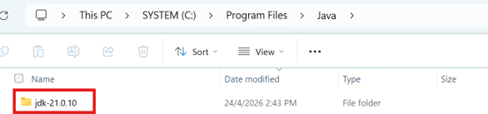
- JDK will be installed at:
C:\Program Files\Java - Default JDK version: jdk21.0.10
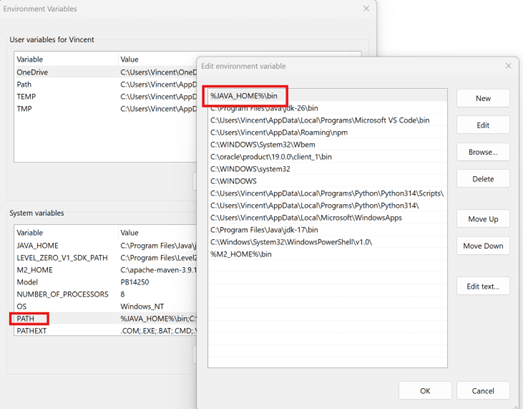
JAVA_HOMEwill be set to:C:\Program Files\Java\jdk21.0.10.PATHwill include:%JAVA_HOME%\bin.
Verifying JDK Distribution
- Navigate to
C:\Program Files\Java. - Verify that jdk21.0.10 is installed.
Verifying JAVA_HOME
- Located our Java installation directory.
- Press Windows logo key + R key to open the Run dialog.
- Type sysdm.cplin the input field and click OK.
- At the System Properties dialog, go to Advanced tab.
- Click the Environment Variables button.
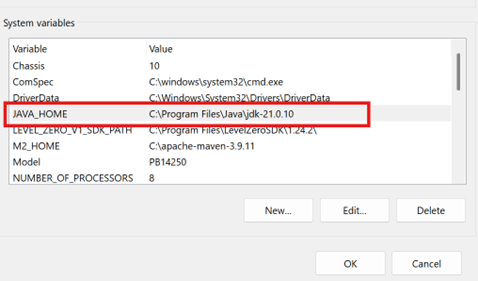
- Under System Variables section, look for JAVA_HOME variable.
- Verify that JAVA_HOME is set to
C:\Program
                            Files\Java\jdk21.0.10.
Verifying PATH
- Click the Environment Variables button, then select Edit to edit the system environment variable.
- Under System Variables, located the ‘Path’.
- Verify that
%JAVA_HOME%\binis added on top of the list.