Crew POS Employee ID
All crew members eligible for service charge distribution must have a POS employee ID assigned to enable the Crew Purser to generate the Bar Service Charge (BSC). Each posting from the Food and Beverage (F&B) outlet is linked to the crew POS employee ID and the Point-of-Sale (POS) system is responsible in providing the employee ID.
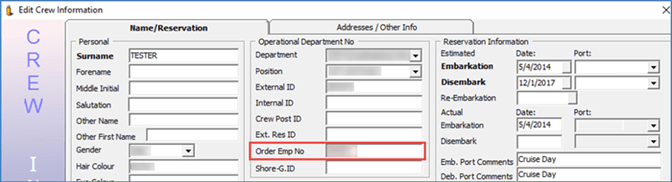
Figure 25-2 POS Employee ID
-
Log in to the Crew module, Crewmembers.
-
Search for the Beverage Staff or Room Service Stewards crew member.
-
Select the crew member and click Edit Information.
-
In the Name/Reservation tab, Operational Department No, enter the crew member employee ID in the Order Emp No field.
-
Click OK to save and repeat the above steps for all Beverage Staff or Room Service Stewards. The same steps apply to the new joiner that has a new employee ID card assigned.