Paying an Invoice by City Ledger
-
Retrieve the crew account from the Search panel, then click Pay Invoice.
-
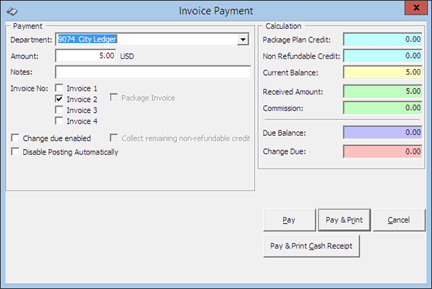
In the Payment Department field, select a City Ledger code.
-
Select an invoice to settle, and the system calculates the total amount due by guest.
-
Insert the amount to settle. If the exact amount is paid, the system sets the value as payment receipted and Due Balance is 0.00.
Figure 7-64 Invoice Payment by City Ledger
-
Select Pay or Pay & Print to complete the transaction. If Pay is selected, print a copy of the invoice for crew reference.