8 Add or Change a Function Space for an Existing Event
Business Context
Sales managers might create events and later assign the function space based on the property availability or the client's preferences and requests. Another instance might be a change in the guaranteed number of attendees that requires an update to either a larger or smaller space. Whatever the case, you need the ability to assign and/or change a function space using the REST APIs.
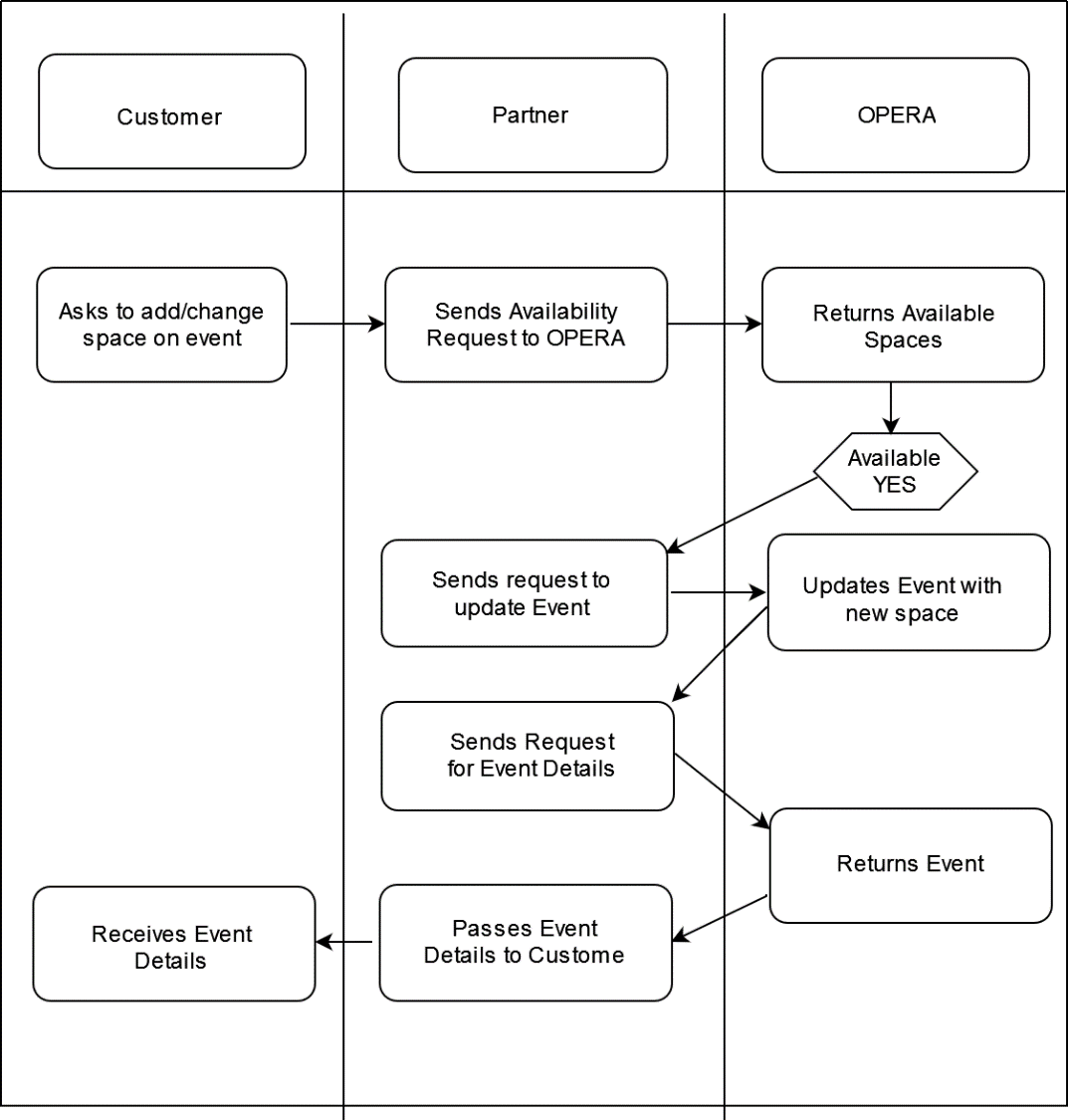
This below workflow diagram explains typical use cases for adding or changing a function space on an event.
Customer — The customer has chosen to have a larger space for his meeting based on the final number of attendees for his events.
Partner — The partner must check availability based on the response to book the larger space.
OPERA Cloud — The application checks for availability, returns the response, and possibly books the new space for the partner so the customer receives the new booking information.
Figure 8-1 Workflow Diagram
Prerequisites
Table 8-1 Required Software Tools
| Tool | Description | Links |
|---|---|---|
|
Postman |
Postman is an API Platform that allows you to design, create and test API's. Use Postman to send API requests or to use the Postman collections provided. |
Table 8-2 Current Versions Required
| OPERA Cloud Platform Module | Description | Minimum Version |
|---|---|---|
|
OPERA Cloud Services |
The customer must have a subscription to OPERA Cloud Foundation |
|
|
Oracle Hospitality Integration Platform (OHIP) |
For customers, OHIP is included in the subscription to OPERA Cloud Foundation. Partners need a subscription to the Oracle Hospitality Integration Cloud Service. |
Configuration of OPERA Controls
To activate the Create Block functionality, you must ensure the following OPERA Controls are active in the target property. You can use the following API operations to validate the settings:
Ensure that application function EVENTS - CATERING EVENTS is active
RQ: ent/config/v1/settings?hotelId={{HotelId}}¶meterNameWildCard=CATERING EVENTS
Mandatory Fields - Available Values:
Function Space Configuration
Note:
This returns the codes available for Rental Code and Setup Styles, which are required fields when creating an event with function space.
RQ: evm/config/v1/hotels/{{HotelId}}/functionSpaces/{{FunctionSpaceCode}}/configurations
Workflow
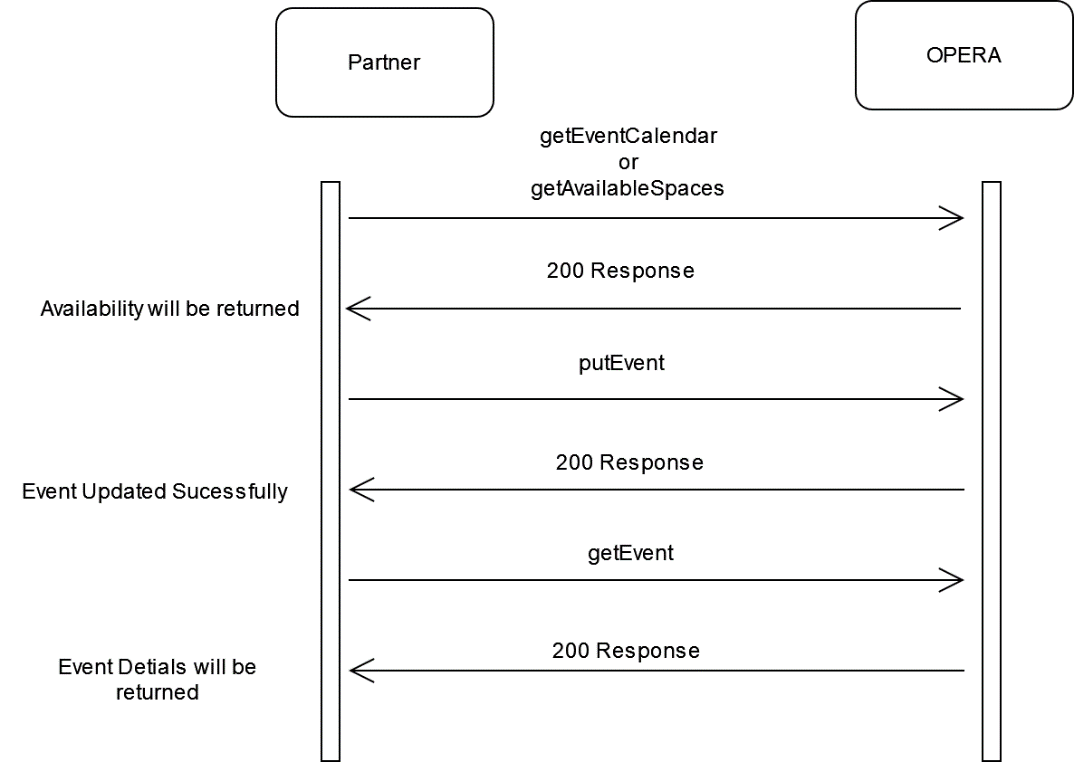
Step by step solution including:
Figure 8-2 The sequence of API calls (in any direction)
Description of Steps
A typical process to add or change function space on an existing event is as follows:
- Search for function space availability for the event date(s) using getEventCalendar or getAvailableSpaces.
- Search for the event by block Id. If you know the internal event ID, then omit this step.
- Add or Update the function space assigned to the event using putEvent.
- Ensure the mandatory fields Event Type, Event Status Code, Start Time, End Time, and Expected Attendees are sent with valid values.
- If you are intending to assign a function space, ensure that the elements for Rental Code and Setup Styles are present and contain valid values.
Sample calls: Sample API calls for the steps described in the diagram.
Sample for getEventCalendar
Check Function Space Availability
getEventCalendar
GET {{HostName}}/evm/v1/hotels/{{HotelId}}/eventcalendar?eventEndDate=2025-04-20&isSortDescending=false&showAvailableRooms=true&display=ALL&eventLabel=Booking&sortingBy=Name&eventStartDate=2025-04-20
200 response:
{
    "eventCalendarDetails": {
        "eventSpace": [
            {
                "description": "Chesapeake A",
                "eventSpaceAttributes": {
                    "spaceArea": {
                        "area": 744,
                        "unit": "SqFeet"
                    },
                    "shareable": false,
                    "comboSpace": false,
                    "alternate": false,
                    "maximumOccupancy": 95,
                    "comboElement": true,
                    "comboRoom": "CHER"
                },
                "hotelId": "BHOTEL",
                "roomId": "CHEA",
                "name": "CHEA",
                "building": "MAIN",
                "roomOrder": 1
            }
        ],
        "eventCodes": [],
        "sellMessages": {},
        "totalRooms": 1
    },
    "links": [],
    "warnings": []
}
Sample for getAvailableSpaces
Check Function Space Availability
getAvailableSpaces
GET {{HostName}}/lov/v1/listOfValues/AvailableSpaces?parameterName=Event_Start¶meterName=Event_End¶meterName=HotelCode&includeInactiveFlag=false¶meterValue=2025-04-20+18:00:00.0¶meterValue=2025-04-20+19:00:00.0¶meterValue={{HotelId}}
200 response:
{
    "listOfValues": {
        "items": [
            {
                "flexfields": [
                    {


            {
                "flexfields": [
                    {
                        "parameterName": "AvailableYn",
                        "parameterValue": "Y"
                    },
                    {
                        "parameterName": "SetupCode"
                    },
                    {
                        "parameterName": "OccMin"
                    },
                    {
                        "parameterName": "OccMax"
                    },
                    {
                        "parameterName": "SetupTime"
                    },
                    {
                        "parameterName": "SetdownTime"
                    },
                    {
                        "parameterName": "RateCode"
                    },
                    {
                        "parameterName": "Rate"
                    },
                    {
                        "parameterName": "ShareableYn",
                        "parameterValue": "N"
                    },
                    {
                        "parameterName": "ForceAlternateYn",
                        "parameterValue": "N"
                    }
                ],
                "code": "CHEA",
                "name": "Chesapeake A",
                "description": "Chesapeake A",
                "active": true

 }
Sample for putEvent
Create Event with Space
PUT{{HostName}}/evm/v1/events
Body:
{
    "eventDetails": [
        {
            "eventPrimaryInfo": {
                "eventId": {
                    "type": "EventId",
                    "idContext": "OPERA",
                    "id": "641634"
                },
                "hotelId": "BHOTEL"
            },
            "eventDetail": {
                "eventName": {
                    "defaultText": "Welcome Reception"
                },
                "eventType": "REC",
                "eventTimeSpan": {
                    "startDateTime": "2025-04-20 18:00:00.0",
                    "endDateTime": "2025-04-20 19:00:00.0"
                },
                "eventStatus": {
                    "status": {
                        "code": "INQ"
                    }
                },
                "attendees": {
                    "expected": "30"
                },
                "doorcard": "Do Not Update KD API Block",
                "notMoveable": false,
                "loudEvent": false,
                "displayDoorcard": true,
                "includeSpaceInPackage": false
            },
            "processInstructions": {
                "overrideCapacity": false,
                "overbook": false,
                "overrideMaxgroups": false,
                "warnFunctionSpace": true
            },
            "eventBlockInfo": {
                "blockIdList": [
                    {
                        "type": "Block",
                        "id": "919698"
                    }
                ],
                "hotelId": "BHOTEL",
                "markAsRecentlyAccessed": false
            },
            "functionSpaceInformation": {
                "functionSpaceCode": "CHEA",
                "functionSpaceDescription": "Chesapeake A",
                "setupCode": "BQ10",
                "setupTime": "30",
                "setdownTime": "30",
                "rentalCode": "CUSTOM",
                "rentalAmount": {
                    "amount": "500"
                }
            }
            }
        }
    ]
}
200 Response: Created
Sample for getEvent
Fetch Event
GET{{HostName}}/evm/v1/events?hotelId={{HotelId}}&eventId={{EventId}}
{
    "eventSummaries": {
        "eventSummary": [
            {
                "eventId": {
                    "type": "EventId",
                    "idContext": "OPERA",
                    "id": "641634"
                },
                "blockIdList": [
                    {
                        "id": "919698",
                        "type": "Block"
                    }
                ],
                "blockName": "Do Not Update KD API Block",
                "attendees": 30,
                "functionSpaceDetails": {
                    "code": "CHEA",
                    "description": "Chesapeake A"
                },
                "rentalAmount": 500,
                "functionSpaceSetup": {
                    "code": "BQ10",
                    "description": "Banquets 10 Chairs"
                },
                "eventStatus": {
                    "status": {
                        "code": "INQ",
                        "description": "Inquiry Non Deduct"
                    },
                    "color": "Blue"
                },
                "cateringStatusDeductInventory": false,
                "cateringStatusReturnToInventory": false,
                "setupTime": 30,
                "tearDownTime": 30,
                "masterEvent": false,
                "subEvent": false,
                "packageEvent": false,
                "alternateEvent": false,
                "displayDoorCard": true,
                "doorCard": "Do Not Update KD API Block",
                "excludeFromForecast": false,
                "useForecastRevenue": true,
                "minimumOccupancy": 1,
                "maximumOccupancy": 60,
                "loudEvent": false,
                "rentalCode": "CUSTOM",
                "eventShared": false,
                "shareable": false,
                "includeSpaceInPackage": false,
                "hotelId": "BHOTEL",
                "blockHotelCode": "BHOTEL",
                "hasPostings": false,
                "blockHasPostings": false,
                "hasPartialPostings": false,
                "allPosted": false,
                "nothingPosted": false,
                "eventStartDate": "2025-04-20 18:00:00.0",
                "eventEndDate": "2025-04-20 19:00:00.0",
                "type": "REC",
                "eventName": "Welcome Reception",
                "cateringCurrency": "USD",
                "cateringQuotedCurrency": "USD"
            }
        ],
        "totalPages": 1,
        "offset": 200,
        "limit": 200,
        "hasMore": false,
        "totalResults": 1
    },
    "links": []
}
200 Response: OK
References
-
For more information, review the Anti-Patterns chapter in the OHIP user guide to learn more about functional and technical anti-patterns.