2 Create a Block with or without Room Grid
Business Context
- Blocks with rooms only (that is, wedding room blocks where the bride and groom reserve rooms for their attendees to book at the discounted group rate).
- Blocks with rooms and events (that is, conventions where the group has rooms and meetings at the same property).
- Blocks with events only (that is, local companies that decide to meet off premises to have their meetings at a hotel facility).
In examples 1 and 2, you need a room grid; therefore, you must create a block with room allocation since you have rooms allocated for your group. If you are in the scenario of example 3, then you do not need a room allocation as all you need to create is an event space.
-
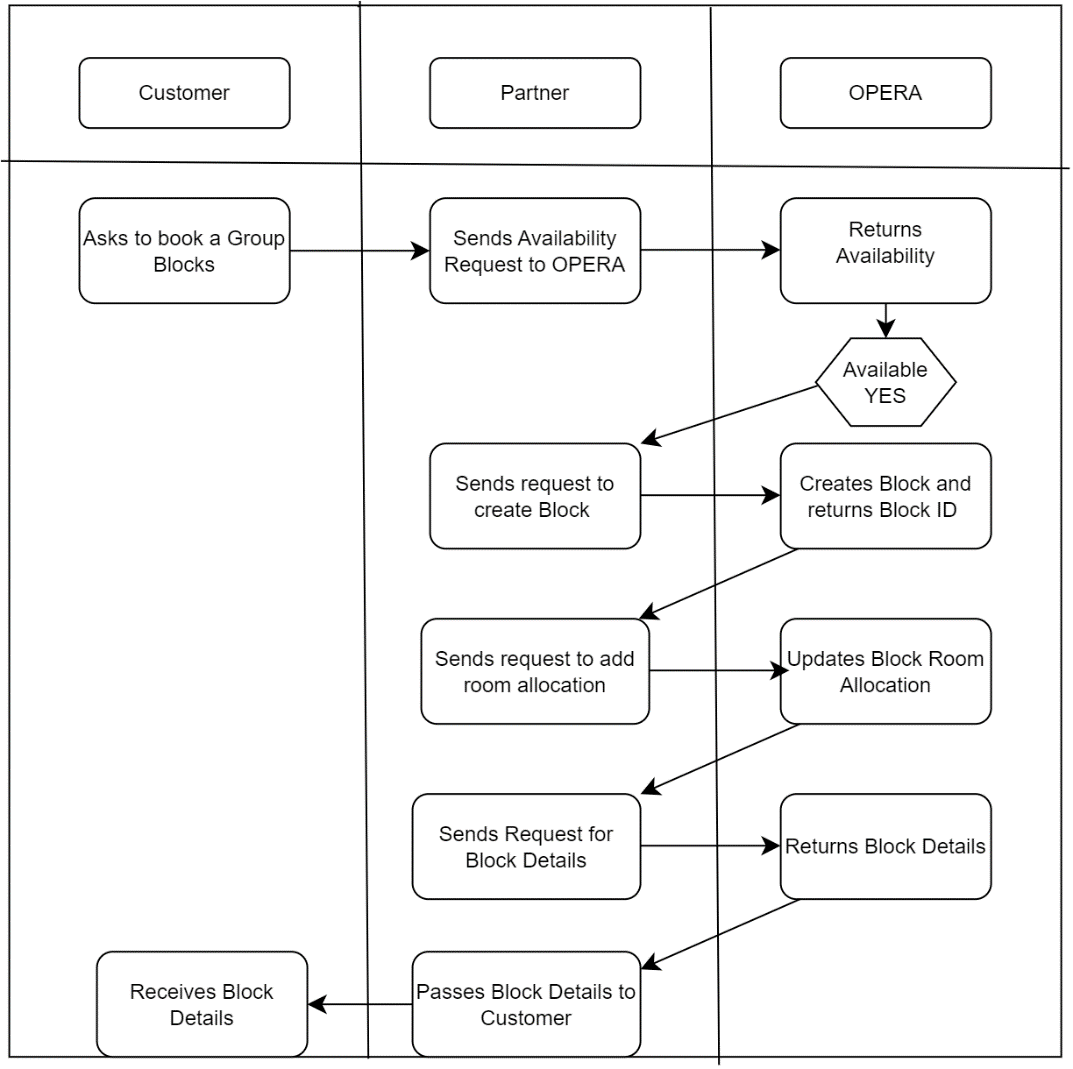
Customer — The groom wants to reserve a block with 10 rooms for 2 nights for the wedding weekend at the property nearby the wedding venue. The rooms must be set aside at a group rate for the guests attending the wedding.
-
Partner — The partner sends the requests to the property to check availability. The response determines the availability at the property. In the case of availability, the next step is the block creation and the room allocation.
-
OPERA Cloud — The application checks for availability, returns availability (if any), creates the block, and returns the final block with details and rooms allocated.
Figure 2-1 Workflow Diagram
Prerequisites
Table 2-1 Required Software Tools
| Tool | Description | Links |
|---|---|---|
|
Postman |
Postman is an API Platform that allows you to design, create and test API's. Use Postman to send API requests or to use the Postman collections provided. |
Table 2-2 Current Versions Required
| OPERA Cloud Platform Module | Description | Minimum Version |
|---|---|---|
|
OPERA Cloud Services |
The customer must have a subscription to OPERA Cloud Foundation |
|
|
Oracle Hospitality Integration Platform (OHIP) |
For customers, OHIP is included in the subscription to OPERA Cloud Foundation. Partners need a subscription to the Oracle Hospitality Integration Cloud Service. |
Configuration of OPERA Controls
The below software tools are required to follow the steps listed:
To activate the Create Block functionality, you must ensure the following OPERA Controls are active in the target property. You can use the following API operations to validate the settings:
Ensure that application function BLOCKS - BUSINESS BLOCK is active
RQ: ent/config/v1/settings?hotelId={{HotelId}}¶meterNameWildCard=BUSINESS BLOCK
Check if the site is using OCCUPANCY SPLIT BY ROOM TYPE
RQ: ent/config/v1/settings?hotelId={{HotelId}}¶meterNameWildCard=OCCUPANCY SPLIT PER ROOM TYPE
Check if the site is using RATE CODE MANDATORY BLOCK HEADER
RQ: ent/config/v1/settings?hotelId={{HotelId}}¶meterNameWildCard=RATE CODE MANDATORY BLOCK HEADER
Check if the site is using USE SINGLE BLOCK STATUS
RQ: ent/config/v1/settings?hotelId={{HotelId}}¶meterNameWildCard=USE SINGLE BLOCK STATUS
Mandatory Fields
The creation of a block requires to pass certain mandatory fields. Use the API operations below to retrieve the available, valid values:
Market Segment
RQ: rsv/config/v1/marketCodes?includeInactive=false&hotelIds={{hotelId}}
Source Code
RQ: rsv/config/v1/hotels/{{hotelId}}/sourceCodes?includeInactive=false&hotelIds={{hotelId}}
Block Status
RQ: blk/config/v1/blockStatusCodes
Reservation Type
RQ: rsv/config/v1/guaranteeCodes?pageNumber=1&hotelIds={{hotelId}}
Rate Code (if mandatory)
RQ: rtp/v1/ratePlans?includeRateInformation=false&includeInactive=true&offset=1&limit=200&sellDate=2024-02-08&hotelId={{hotelId}}
Room Types
RQ: rm/config/v1/hotels/{{hotelId}}/roomTypes?accessible=false&includeInactive=false&offset=1&hotelIds={{hoteldId}}&summaryInfo=true&limit=25&physical=true&pseudo=false
Workflow
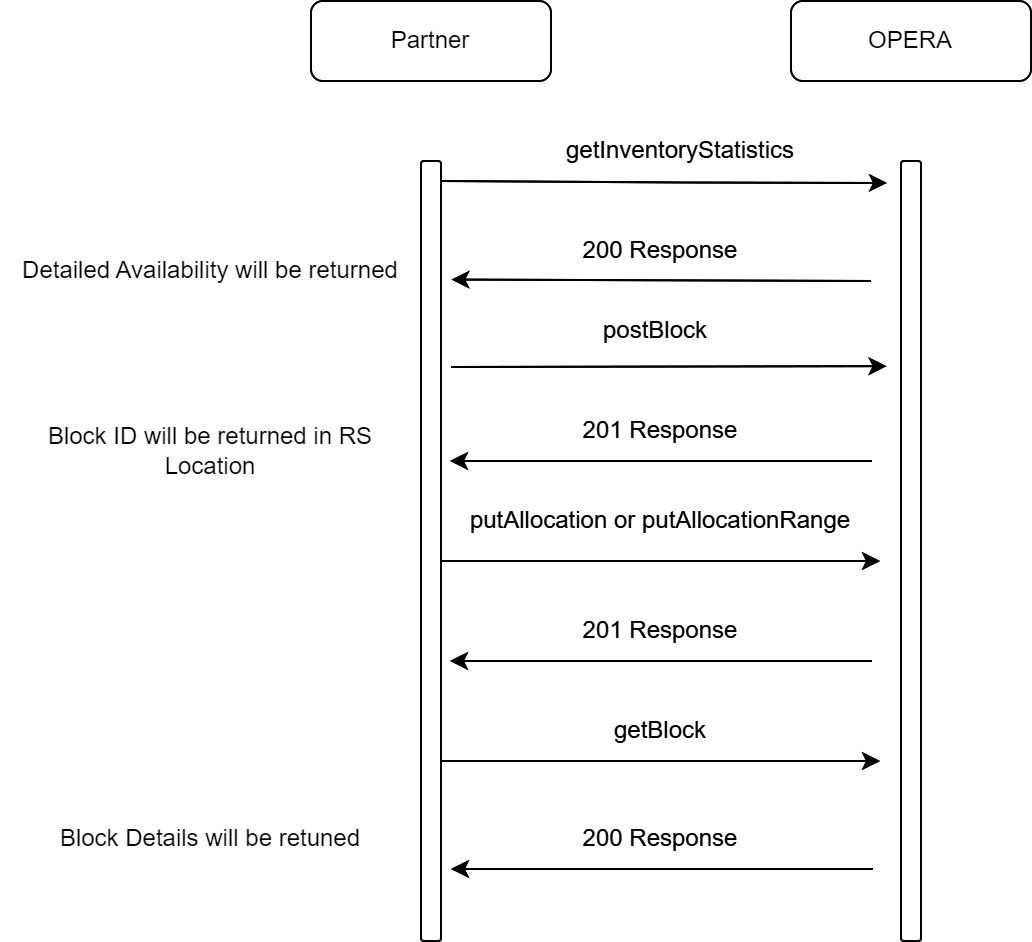
Figure 2-2 The sequence of API calls (in any direction)
Description of Steps
A typical process to create a new block header with room grid is as follows:
- Search for guest room availability for the block date(s) using getInventoryStatistics.
- Create the block header using postBlock.
- Ensure that mandatory fields Market Code, Source Code, Status, and Reservation Type are sent with valid values. Note that other fields may be mandatory depending on the application settings.
- Ensure that the block status code is a Starting Status.
- The blk/config/v1/blockStatusCodes returns that information.
- Ensure that the reservation type sent is correct based on the
block status code. Blocks on INQUIRY or NON DEDUCT status require
a non-deduct reservation type. Blocks on DEDUCT or ACTUAL status require
a DEDUCT reservation type.
- rsv/config/v1/guaranteeCodes returns the status information.
- If you want to add events to this block, ensure that the elements for cateringStatus and eventAttendees are present and contain valid values. If the block does not have any events attached, these elements can be left blank.
- If the parameter 'BLOCKS - USE SINGLE BLOCK STATUS' is active, ensure that the element for cateringStatus always carries the same value as the element bookingStatus. The element eventAttendees cannot be null in this scenario (but it can be zero).
- Once the block ID of the newly created Block is returned in the
location header, add the room block using putBlockAllocation or
putBlockAllocationRange
- Note that putBlockAllocation and putBlockAllocationRange are also available as async operations. A separate topic explains how to use these calls. This is recommended for blocks longer than 30 days.
- When the OCCUPANCY PER ROOM TYPE parameter is not active, only submit inventory updates for the onePerson element. When the parameter is active, inventory updates can be done for onePerson, twoPerson, threePerson and FourPerson. Rates can be submitted for all occupancy levels, regardless of the parameter setting.
- When the block is not in an open-for-pickup status, the allocation element must carry the value INITIAL. When the block is open for pickup, any inventory updates must be done for allocation = ACTUAL.
- If a valid rate code has been submitted as part of the block creation process, rate amounts should not be sent during the grid update process. Rate amounts in OPERA Cloud are populated automatically from the rate code on the block header.
- Retrieve the newly created block using getBlock with fetchInstructions for the room grid to ensure that the block was created with the correct attributes (optional).
Sample calls: Sample API calls for steps described in the diagram.
Sample for getInventoryStatistics
Check House Availability
200 response:
[
{
"statistics": [
{
"statisticDate": [
{
"inventory": [
{
"value": 160,
"code": "RoomsSold"
},
{
"value": 0,
"code": "OverBookingRooms"
},
{
"value": 448,
"code": "SellLimitRooms"
},
{
"value": 288,
"code": "AvailableRooms"
},
{
"value": 0,
"code": "Cancelled"
},
{
"value": 288,
"code": "MinAvailableRooms"
},
{
"value": 288,
"code": "AvailableRoomsExcludingOverbooking"
}
],
"statisticDate": "2025-01-01",
"weekendDate": false
},
{
"inventory": [
{
"value": 160,
"code": "RoomsSold"
},
{
"value": 0,
"code": "OverBookingRooms"
},
{
"value": 448,
"code": "SellLimitRooms"
},
{
"value": 288,
"code": "AvailableRooms"
},
{
"value": 0,
"code": "Cancelled"
},
{
"value": 288,
"code": "MinAvailableRooms"
},
{
"value": 288,
"code": "AvailableRoomsExcludingOverbooking"
}
],
"statisticDate": "2025-01-02",
"weekendDate": false
}
],
"statCode": "BHOTEL",
"statCategoryCode": "HotelCode"
},
{
"statisticDate": [
{
"inventory": [
{
"value": 2,
"code": "AvailableRooms"
},
{
"value": 1,
"code": "SequenceId"
}
],
"statisticDate": "2025-01-01",
"weekendDate": false
},
{
"inventory": [
{
"value": 2,
"code": "AvailableRooms"
},
{
"value": 1,
"code": "SequenceId"
}
],
"statisticDate": "2025-01-02",
"weekendDate": false
}
],
"statCode": "A1K",
"statCategoryCode": "HotelRoomCode",
"statCodeClass": "STANDARD",
"description": "A1K to test meetingroom_yn flag (Meeting CB & Events CB)"
},
{
"statisticDate": [
{
"inventory": [
{
"value": 18,
"code": "AvailableRooms"
},
{
"value": 1,
"code": "SequenceId"
}
],
"statisticDate": "2025-01-01",
"weekendDate": false
},
{
"inventory": [
{
"value": 18,
"code": "AvailableRooms"
},
{
"value": 1,
"code": "SequenceId"
}
],
"statisticDate": "2025-01-02",
"weekendDate": false
}
],
"statCode": "DLXK",
"statCategoryCode": "HotelRoomCode",
"statCodeClass": "DELX",
"description": "Deluxe King Guestroom"
},
{
"statisticDate": [
{
"inventory": [
{
"value": 5,
"code": "AvailableRooms"
},
{
"value": 1,
"code": "SequenceId"
}
],
"statisticDate": "2025-01-01",
"weekendDate": false
},
{
"inventory": [
{
"value": 5,
"code": "AvailableRooms"
},
{
"value": 1,
"code": "SequenceId"
}
],
"statisticDate": "2025-01-02",
"weekendDate": false
}
],
"statCode": "DLXQ",
"statCategoryCode": "HotelRoomCode",
"statCodeClass": "DELX",
"description": "Deluxe Queen Bedded Guestroom"
},
{
"statisticDate": [
{
"inventory": [
{
"value": 21,
"code": "AvailableRooms"
},
{
"value": 1,
"code": "SequenceId"
}
],
"statisticDate": "2025-01-01",
"weekendDate": false
},
{
"inventory": [
{
"value": 21,
"code": "AvailableRooms"
},
{
"value": 1,
"code": "SequenceId"
}
],
"statisticDate": "2025-01-02",
"weekendDate": false
}
],
"statCode": "EXEC",
"statCategoryCode": "HotelRoomCode",
"statCodeClass": "SUPERIOR",
"description": "Executive Suite"
},
{
"statisticDate": [
{
"inventory": [
{
"value": 5,
"code": "AvailableRooms"
},
{
"value": 2,
"code": "SequenceId"
}
],
"statisticDate": "2025-01-01",
"weekendDate": false
},
{
"inventory": [
{
"value": 5,
"code": "AvailableRooms"
},
{
"value": 2,
"code": "SequenceId"
}
],
"statisticDate": "2025-01-02",
"weekendDate": false
}
],
"statCode": "PRES",
"statCategoryCode": "HotelRoomCode",
"statCodeClass": "ALL",
"description": "Presidential Suite"
},
{
"statisticDate": [
{
"inventory": [
{
"value": 3,
"code": "AvailableRooms"
},
{
"value": 50,
"code": "SequenceId"
}
],
"statisticDate": "2025-01-01",
"weekendDate": false
},
{
"inventory": [
{
"value": 3,
"code": "AvailableRooms"
},
{
"value": 50,
"code": "SequenceId"
}
],
"statisticDate": "2025-01-02",
"weekendDate": false
}
],
"statCode": "CCOTHER",
"statCategoryCode": "HotelRoomCode",
"statCodeClass": "ALL",
"description": "Castle Club Other"
},
{
"statisticDate": [
{
"inventory": [
{
"value": 1,
"code": "AvailableRooms"
}
],
"statisticDate": "2025-01-01",
"weekendDate": false
},
{
"inventory": [
{
"value": 1,
"code": "AvailableRooms"
}
],
"statisticDate": "2025-01-02",
"weekendDate": false
}
],
"statCode": "2965",
"statCategoryCode": "HotelRoomCode",
"statCodeClass": "DELX",
"description": "Cottage Test"
},
{
"statisticDate": [
{
"inventory": [
{
"value": 4,
"code": "AvailableRooms"
}
],
"statisticDate": "2025-01-01",
"weekendDate": false
},
{
"inventory": [
{
"value": 4,
"code": "AvailableRooms"
}
],
"statisticDate": "2025-01-02",
"weekendDate": false
}
],
"statCode": "CLK",
"statCategoryCode": "HotelRoomCode",
"statCodeClass": "ALL",
"description": "Club King Room"
},
{
"statisticDate": [
{
"inventory": [
{
"value": 1,
"code": "AvailableRooms"
}
],
"statisticDate": "2025-01-01",
"weekendDate": false
},
{
"inventory": [
{
"value": 1,
"code": "AvailableRooms"
}
],
"statisticDate": "2025-01-02",
"weekendDate": false
}
],
"statCode": "JS1",
"statCategoryCode": "HotelRoomCode",
"statCodeClass": "ALL",
"description": "Junior Suite"
},
{
"statisticDate": [
{
"inventory": [
{
"value": 1,
"code": "AvailableRooms"
}
],
"statisticDate": "2025-01-01",
"weekendDate": false
},
{
"inventory": [
{
"value": 1,
"code": "AvailableRooms"
}
],
"statisticDate": "2025-01-02",
"weekendDate": false
}
],
"statCode": "SK1009",
"statCategoryCode": "HotelRoomCode",
"statCodeClass": "STANDARD",
"description": "SK Room type -1009"
},
{
"statisticDate": [
{
"inventory": [
{
"value": 114,
"code": "AvailableRooms"
}
],
"statisticDate": "2025-01-01",
"weekendDate": false
},
{
"inventory": [
{
"value": 114,
"code": "AvailableRooms"
}
],
"statisticDate": "2025-01-02",
"weekendDate": false
}
],
"statCode": "STDK",
"statCategoryCode": "HotelRoomCode",
"statCodeClass": "ALL",
"description": "Standard King Guestroom"
},
{
"statisticDate": [
{
"inventory": [
{
"value": 118,
"code": "AvailableRooms"
}
],
"statisticDate": "2025-01-01",
"weekendDate": false
},
{
"inventory": [
{
"value": 118,
"code": "AvailableRooms"
}
],
"statisticDate": "2025-01-02",
"weekendDate": false
}
],
"statCode": "STDQ",
"statCategoryCode": "HotelRoomCode",
"statCodeClass": "ALL",
"description": "Standard Double Queen Bedded Room"
}
],
"hotelName": "BHOTEL",
"reportCode": "RoomsAvailabilitySummary"
}
]Sample for postBlock
Create Block Header
POST{{HostName}}/blk/v1/hotels/{{HotelId}}/block
Body:

{
    "blocks": {
        "blockInfo": [
            {
                "block": {
                       "blockDetails": {
                        "blockCode": "REDS1224",
                        "blockName": "Red Ski  Conference XXXX",
                        "blockAliases": [],
                        "timeSpan": {
                            "startDate": "2023-12-01",
                            "endDate": "2023-12-03"
                        },
                        "shoulderDates": {},
                        "blockStatus": {
                            "bookingStatus": {
                                "status": {
                                    "code": "INQ"
                                }
                            }
                        },
                        "reservationType": {
                            "reservationType": "GNON"
                        },
                        "marketCode": {
                            "marketCode": "CORI"
                        },
                        "sourceOfSale": {
                            "sourceCode": {
                                "sourceCode": "GSALES"
                            }
                        },
                        "reservationMethod": {},
                        "bookingType": {},
                        "rateProtectionDetails": {
                            "criteria": "None"
                        },
                        "nonCompeteDetails": {
                            "criteria": "None"
                        },
                        "currencyCode": "USD",
                        "blockClassification": "RegularBooking",
                        "cateringOnlyBlock": false,
                        "allowRateOverride": false,
                        "manualCutOff": false,
                        "wholesaleBlock": false,
                        "controlBlockLocally": false
                    },
                    "externalReferences": [
                        {
                            "id": "12345",
                            "idExtension": "12345",
                            "idContext": "XXXXXXX"
                        },
                         {
                            "id": "53455",
                            "idExtension": "45345",
                            "idContext": "YYYYYYY"
                        },
                         {
                            "id": "123645",
                            "idExtension": "456666",
                            "idContext": "ZZZZZZZ"
                        }
                    ],
                    "blockOwners": {
                        "owner": [
                            {
                                "ownership": "Block",
                                "ownerCode": "ALL",
                                "primary": true
                            },
                            {
                                "ownership": "Catering",
                                "ownerCode": "ALL",
                                "primary": true
                            },
                            {
                                "ownership": "Rooms",
                                "ownerCode": "ALL",
                                "primary": true
                            }
                        ],
                        "lockBlockOwners": false,
                        "lockRoomsOwners": false,
                        "lockCateringOwners": false
                    },
                    "reservationDetails": {
                        "ratePlanCode": [
                            {
                                "primary": true,
                                "ratePlanCode": "BAR"
                            }
                        ],
                        "traceCode": {},
                        "breakfast": {
                            "breakfastIncluded": false,
                            "price": {
                                "currencyCode": "USD"
                            }
                        },
                        "porterage": {
                            "porterageIncluded": false,
                            "price": {
                                "currencyCode": "USD"
                            }
                        },
                        "elastic": "1",
                        "suppressRate": false,
                        "housing": true
                    },
                    "catering": {
                        "cateringStatus": {
                            "bookingStatus": {
                                "status": {}
                            }
                        },
                        "eventAttendees": {},
                        "overrideEventsProcessingWarnings": true
                    },
                    "blockProfiles": {
                        "fullOverlay": false
                    },
                    "blockPackages": [],
                    "externalAttributes": {
                        "eventType": "Convention",
                        "rollEndDate": false
                    },
                    "hotelId": "{{HotelId}}",
                    "markAsRecentlyAccessed": true
                }
            }
        ]
    }
}
201 Response: Created
Sample for putBlockAllocation
Note:
Although there is a start and end date for each grid cell, in this call, the start and end date in each collection must be the same (and the collection must be repeated for any additional dates).
This call is for a block that is not open for pickup. Please note the element: "allocation": "INITIAL". When running this RQ for an open-for-pickup call, the element must be :"allocation": "ACTUAL."
Create / Update Room Grid (Cell by Cell)
PUT{{HostName}}/blk/v0/hotels/{{HotelId}}/blocks/{{BlockId}}/allocation
Body:

{
    "criteria": {
        "hotelId": "{{HotelId}}",
        "blockId": {
            "type": "Block",
            "idContext": "OPERA",
            "id": "{{BlockId}}"
        },
        "allocationRoomTypes": [
            {
                "allocationGridDates": [
                    {
                        "roomAllocationInfo": [
                            {
                                "inventory": {
                                    "forceOverbook": false
                                },
                                "rate": {
                                    "onePerson": "240",
                                    "twoPerson": "240",
                                    "threePerson": "260"
                                },
                                "start": "2023-12-01",
                                "end": "2023-12-01"
                            },
                            {
                                "inventory": {
                                    "forceOverbook": false
                                },
                                "rate": {
                                    "onePerson": "200",
                                    "twoPerson": "220"
                                },
                                "start": "2023-12-02",
                                "end": "2023-12-02"
                            }
                        ],
                        "allocation": "RATES"
                    },
                    {
                        "roomAllocationInfo": [
                            {
                                "inventory": {
                                    "forceOverbook": false,
                                    "onePerson": "4",
                                    "twoPerson": "4"
                                },
                                "rate": {},
                                "start": "2023-12-01",
                                "end": "2023-12-01"
                            },
                            {
                                "inventory": {
                                    "forceOverbook": false,
                                    "onePerson": "3",
                                    "twoPerson": "3"
                                },
                                "rate": {},
                                "start": "2023-12-02",
                                "end": "2023-12-02"
                            }
                        ],
                        "allocation": "INITIAL"
                    }
                ],
                "roomType": "EXEC"
            }
        ],
        "genericRoomType": false
    }
}
200 Response: OK
Sample for putBlockAllocationRange
Note:
The start and end date in the collection define the date range for which the given values should be populated. Only one range can be defined per call.
This call is for a block that is open for pickup. Please note the element: "allocation": "Actual". When running this RQ for a not open-for-pickup call, the elements must be :"allocation": "Initial."
Create / Update Room Grid (Range)
PUT{{HostName}}/blk/v1/hotels/{{HotelId}}/blocks/{{BlockId}}/allocationRange
Body:

{
    "blockAllocationRange": {
        "blockId": {
            "type": "Block",
            "idContext": "OPERA",
            "id": "{{BlockId}}"
        },
        "hotelId": "{{HotelId}} ",
        "roomTypes": [
            "DLXQ"
        ],
        "beginDate": "2023-12-01",
        "endDate": "2023-12-02",
        "allocationType": "Actual",
        "incrementFlag": false,
        "blockInventory": {
            "onePerson": "8",
            "twoPerson": "3"
        },
        "blockRates": {
            "onePerson": "240",
            "twoPerson": "280"
        },
        "includedDays": "1111111",
        "rangeMode": "Core",
        "genericRoomType": false
    }
}
200 Response: OK
Sample for getBlock
Fetch Block with Grid Details
GET{{HostName}}/blk/v1/hotels/{{HotelId}}/blocks/{{BlockId}}?fetchAllocatedRoomTypes=true&markAsRecentlyAccessed=false&roomTypes=DLXQ&roomTypes=STDK&roomTypes=STDQ&roomAllocationCriteria=Initial&fetchInstructions=RateGrid&numberOfDays=2&startDate=2024-09-06&roomAllocationCriteria=CutoffDate
200 Response: OK
{
"blocks": {
"blockInfo": [
{
"block": {
"blockIdList": [
{
"id": "{{BLockId}}",
"type": "Block",
"idContext": "OPERA"
}
],
"roomAllocations": {
"roomAllocationType": [
{
"roomAllocationInfo": [
{
"roomGridInvSummary": [
{}
],
"availableRoomGridInvSummary": [
{}
],
"stayDate": "2024-09-06",
"extendedStay": false
},
{
"roomGridInvSummary": [
{}
],
"availableRoomGridInvSummary": [
{}
],
"stayDate": "2022-05-19",
"extendedStay": false
},
{
"roomGridInvSummary": [
{}
],
"availableRoomGridInvSummary": [
{}
],
"stayDate": "2022-05-20",
"extendedStay": false
},
{
"roomGridInvSummary": [
{}
],
"availableRoomGridInvSummary": [
{}
],
"stayDate": "2022-05-21",
"extendedStay": false
},
{
"roomGridInvSummary": [
{}
],
"availableRoomGridInvSummary": [
{}
],
"stayDate": "2022-05-22",
"extendedStay": false
},
{
"roomGridInvSummary": [
{}
],
"availableRoomGridInvSummary": [
{}
],
"stayDate": "2022-05-23",
"extendedStay": false
},
{
"roomGridInvSummary": [
{}
],
"availableRoomGridInvSummary": [
{}
],
"stayDate": "2022-05-24",
"extendedStay": false
}
],
"allocation": "Initial"
},
{
"roomAllocationInfo": [
{
"roomGridInvSummary": [
{
"onePerson": 0,
"twoPerson": 0,
"threePerson": 0,
"fourPerson": 0
}
],
"availableRoomGridInvSummary": [
{}
],
"stayDate": "2022-05-18",
"extendedStay": false
},
{
"roomGridInvSummary": [
{
"onePerson": 0,
"twoPerson": 0,
"threePerson": 0,
"fourPerson": 0
}
],
"availableRoomGridInvSummary": [
{}
],
"stayDate": "2022-05-19",
"extendedStay": false
},
{
"roomGridInvSummary": [
{
"onePerson": 0,
"twoPerson": 0,
"threePerson": 0,
"fourPerson": 0
}
],
"availableRoomGridInvSummary": [
{}
],
"stayDate": "2022-05-20",
"extendedStay": false
},
{
"roomGridInvSummary": [
{
"onePerson": 0,
"twoPerson": 0,
"threePerson": 0,
"fourPerson": 0
}
],
"availableRoomGridInvSummary": [
{}
],
"stayDate": "2022-05-21",
"extendedStay": false
},
{
"roomGridInvSummary": [
{
"onePerson": 0,
"twoPerson": 0,
"threePerson": 0,
"fourPerson": 0
}
],
"availableRoomGridInvSummary": [
{}
],
"stayDate": "2022-05-22",
"extendedStay": false
},
{
"roomGridInvSummary": [
{
"onePerson": 0,
"twoPerson": 0,
"threePerson": 0,
"fourPerson": 0
}
],
"availableRoomGridInvSummary": [
{}
],
"stayDate": "2022-05-23",
"extendedStay": false
},
{
"roomGridInvSummary": [
{
"onePerson": 0,
"twoPerson": 0,
"threePerson": 0,
"fourPerson": 0
}
],
"availableRoomGridInvSummary": [
{}
],
"stayDate": "2022-05-24",
"extendedStay": false
}
],
"allocation": "CutoffDate"
}
],
"masterInfo": {
"roomTypes": []
},
"startDate": "2022-05-18",
"numberOfDays": 7
},
"hotelId": "BHOTEL",
"markAsRecentlyAccessed": false
}
}
]
},
"links": []
}References
-
For more information, review the Anti-Patterns chapter in the OHIP user guide to learn more about functional and technical anti-patterns.
-
Fore more information, refer to the Blocks introduction topic in the OPERA Cloud Services user guide.